

What Is Pagination and Creating SEO-Friendly Paginated Pages


Last updated:
7 July 2025
|
24 minutes readKey Takeaways
- Pagination refers to breaking up content across pages (e.g., category or blog pages) to enhance navigation and scalability.
- Self-referencing canonical tags on paginated pages maintain SEO originality.
- Numbered pagination is preferable to infinite scroll for flexible crawler access.
- Excluding paginated pages from XML sitemaps helps preserve crawl budget.
- Internal links from pagination aid link equity flow; use relevant anchor text and limit outlinks.
What Is Pagination and Guide On How To Create SEO Friendly Paginated Pages
To paginate, or not to paginate? That is the question — particularly if you’re a marketer that’s trying to deliver a better user experience on your website. Pagination gives more structure and hierarchy to your content, whether you’re running an eCommerce online store with thousands of products or developing in-depth blog posts. But despite everyone’s best intentions, if it’s implemented poorly, paginated pages can also open up a host of issues for Search Engine Optimisation / SEO.
Don’t worry. That’s precisely what we’re here to help you avoid.
In this Pagination guide, we’ll take you through:
- what pagination is
- how to use paginated pages
- answers to your burning questions, like whether infinite scroll or paginated pages is better, and whether pagination can hurt your web page optimisation efforts.
- best practices for SEO pagination
What Is Pagination (Definition & Etymology)
What Is The Definition Of Pagination?
Pagination is the process of dividing content into discrete pages, commonly seen in books, documents, and printed materials. It includes assigning page numbers, arranging text and images across multiple pages, and ensuring proper flow from one page to the next. In publishing, proper pagination ensures readability and logical progression, whether in novels, magazines, or academic papers.
Beyond print, pagination is also used in digital formats such as PDFs, eBooks, and even legal or financial documents to maintain structured layouts.
What is the Etymology of the word “Pagination”?
The word pagination comes from the Latin root pagina, meaning “page” or “sheet.” The verb paginare means “to mark with pages” or “to arrange pages.” The suffix -ation in English indicates an action or process, so pagination literally means “the process of structuring or numbering pages.”
The concept dates back to early manuscripts, where scribes manually numbered pages to maintain order. With the invention of the printing press, pagination became a crucial part of book production, evolving further with modern digital publishing and online content management.
What is Pagination in SEO?
Pagination is the process of dividing a website into separate sections or web pages to make it easier for users to navigate and browse the content. This is critical for eCommerce sites that want to separate categories and products into individual pages. However, paginated pages can also be used for segmenting pages on blogs and media publications, and dividing forum threads.
Even if you’re not familiar with the term, everyone who browses the web will recognise paginated pages thanks to Google itself:
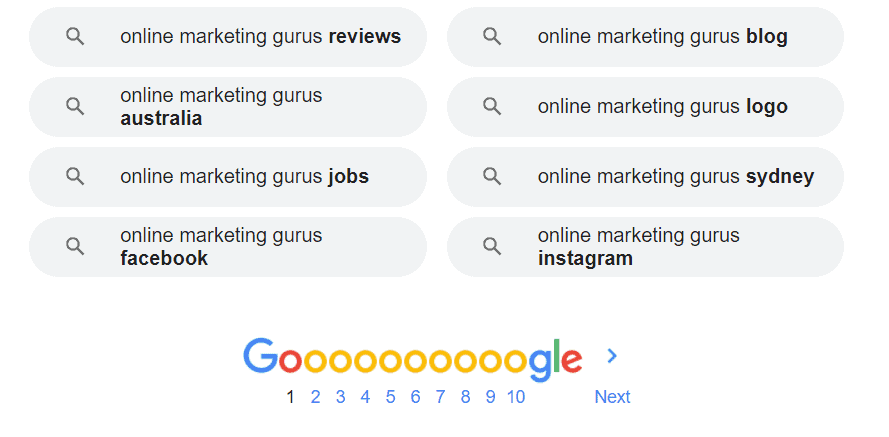
What are the different ways that websites can use paginated pages?
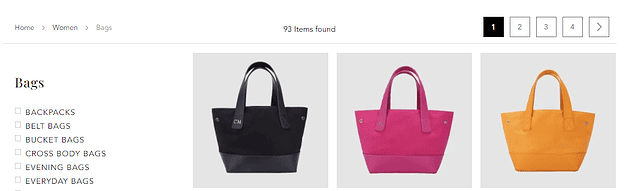
The first is like what Google does, with a list of numbers that link to different pages.
You’ll also see this commonly used on eCommerce websites like The Daily Edited:
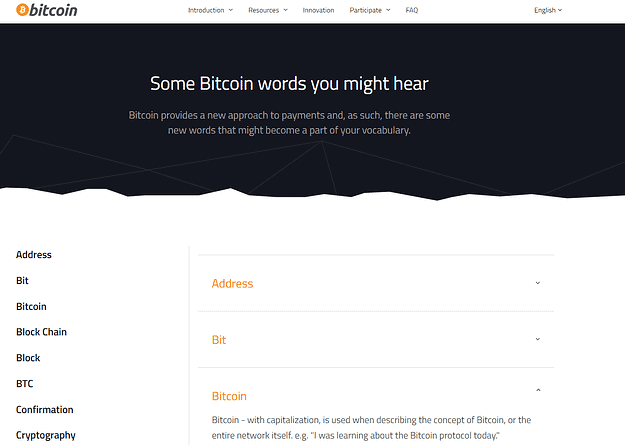
Websites can also break down content alphabetically, like in a glossary:
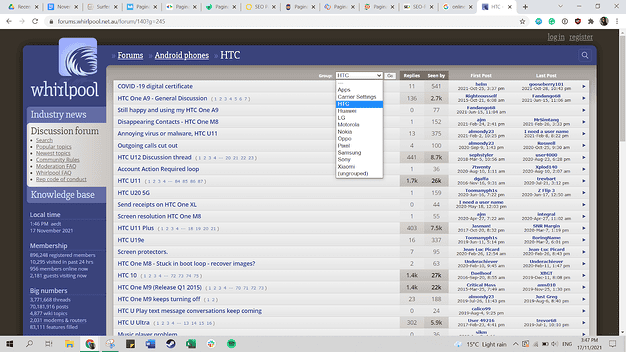
Or break down content by digital ranges, where users click on a group and get redirected to another page:
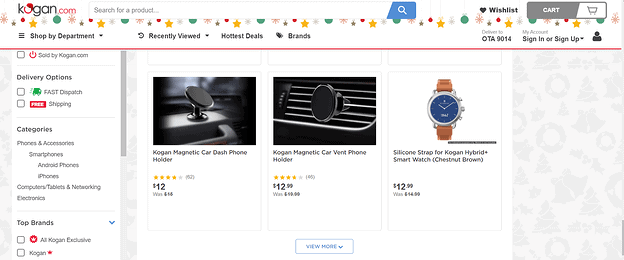
Last but not least, websites can have only a single page scrolling down, like Kogan:
How to use pagination attributes rel=”next” and rel=”prev”
In 2011, Google announced the rel=”next” and rel=”prev” pagination tags. These HTML link elements were designed to help website owners indicate the sequence of URLs in a paginated series, and how a subsequent page relates to a prior one so the search engine could prioritise the most important page of the content.
According to Google’s guidelines at the time:
If you choose to include rel=”next” and rel=”prev” markup on the component pages within a series, you’re giving Google a strong hint that you’d like us to:
- Consolidate indexing properties, such as links, from the component pages/URLs to the series as a whole (i.e., links should not remain dispersed between page-1.html, page-2.html, etc., but be grouped with the sequence).
- Send users to the most relevant page/URL—typically the first page of the series.
What does this mean?
Let’s say you’re running an eCommerce site selling tech accessories in Adelaide. If a user searches up “wireless chargers Adelaide” and your site appears in search results, you want them to end up on the first page in your wireless chargers category page — not the second or 10th page. In this case, the rel=”prev”/”next” markup tags helped Google understand the hierarchy and relationships between different pages, so it could display the most valuable page to searchers.
The same goes for an article that spans multiple pages of linked relevant content. If you had a second or third page to your article, the rel=”next” and rel=”prev” tags would help Google present the correct page in search results and direct users to the beginning of the article, rather than page 2, 3 or even the last page:
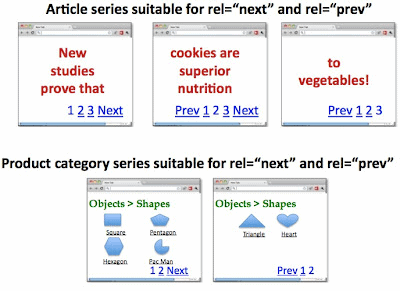
Image source: Google
These attributes are placed in the <head> section of your HTML pages.
The code looks like this:
Previous page: <link rel=”prev” href=”Your paginated URL here” />
Next page: <link rel=”next” href=”Your paginated URL here” />
For users, it would show up like this on your website:

But there’s a catch to these pagination parameters.
In 2019, Google officially announced that the rel=”next” and rel=”prev” link attributes were no longer used as an indexing signal.
According to a tweet by John Mueller, Search Advocate at Google:
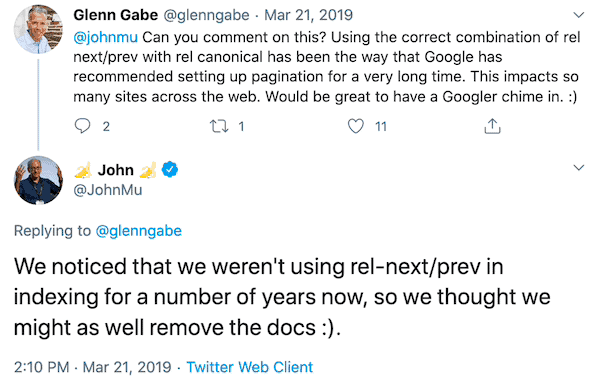
This means that paginated pages are now treated just like normal pages on your website in Google’s index. If you have three paginated pages, Google now sees it as three individual pages — not one page with three different sections. Each page needs to stand on its own, which means businesses need to utilise other on-page SEO techniques to manage paginated pages.
Can paginated pages hurt SEO?
Yes and no, depending on how it’s implemented.
Pagination can dramatically improve your website’s usability. This is especially true if you have long product pages with tons of inventory, or if you house lengthy amounts of information on your website. It gives structure to your visitors, while also showing search engines how your content is connected. In addition, pagination spreads PageRank and offers improved loading speeds — both of which are crucial ranking factors for search engines.
However, paginated pages also present two key risks to SEO:
Paginated pages can affect crawl depth
To explain this one, we have to first look at how search engines work. Search engines like Google send out crawlers to access content across the web, which is then added to a central index that’s used every time a person runs a search. If your website can’t be crawled, then its content can’t be indexed. In other words, it can’t, and won’t, show up in search results.
Here’s the thing. Google’s bots crawl MILLIONS of websites every day. Because of this, technical SEO best practices state that well written content-rich site pages should be reached in as few clicks as possible from the homepage. Pagination, however, does the opposite. It adds more clicks, as Google’s crawlers need to navigate from the first page to the second, and so on. By having more pages internally linked, you run the risk that Google’s spiders won’t reach every page on your website, which can negatively affect your SEO and SERP rankings.
Paginated pages may cause duplicate content
Another thing search engines don’t like? Duplicate content!
Pagination can create problems with duplicate content if it’s not implemented properly. If you don’t use the right canonical tags, Google might see each one of your paginated pages and the root page as completely independent of one another — and Google may penalise you for having multiple pages with duplicate content.
Thankfully, you can avoid both of these issues as long as you follow best practices for Search Engine Optimisation SEO pagination.
Paginated pages or infinite scroll: which is better?
Regardless of whether you’re running an online store, blog or forum, you’ll have to choose between pagination or infinite scroll when building your site.
Infinite scroll is a method for tackling lengthy content on a site. Unlike paginated pages, which break the content down into multiple pages, infinite scroll loads content continuously as users move down the page.
You’ve undoubtedly seen this web design technique before on your favourite social media advertising platforms, such as Facebook, or on Google Image Search. Every time you reach what appears to be the bottom of the page, the website loads additional content — inviting users to keep browsing content.
Websites usually choose to implement pagination or infinite scroll. And, like with anything in SEO, each technique comes with its pros and cons.
Pros of infinite scroll
- It’s more usable on mobile. One of the biggest advantages of infinite scrolling is that it’s incredibly usable on mobile devices. Simply scrolling down to view more content is far easier than asking users to click on a tiny “next” button or number every time they want to go to the next page.
- Infinite scroll is better for user engagement. There’s a reason why Aussies spend hours on end scrolling through social media platforms. Having content continuously load means that users can browse and engage with your site without being interrupted. This can be beneficial for content marketing and SEO, particularly given that Google is now using user behaviour as a ranking signal.
Cons of infinite scroll
- Difficulties with crawling. Like pagination, the infinite scroll can also create problems when it comes to having your site crawled by Google (or other search engines). Search bots only have a limited time to crawl a page. If your content is too lengthy or takes too long to load, it loses the opportunity to be crawled — meaning entire chunks of your content might go unindexed.
- It can be hard to find information. Depending on the length of your page, an infinite scroll can make it difficult for users to go back and revisit previous sections or products that they’re interested in. You might end up losing valuable leads or conversions simply because users found it too difficult to find what they were looking for, and chose to look elsewhere.
- Limited access to the footer. Website footers contain valuable information for site visitors, such as social media network buttons, shipping policies, FAQs and contact information. However, with infinite scroll, it’s tough for users to access this section on your site.
At the end of the day, while users might appreciate infinite scrolling, this option isn’t as beneficial for SEO as website pagination. Pagination is the ideal option for search engines, provided you handle paginated pages in line with the SEO best practices.
Best practices to consider for SEO pagination
1. Include canonical tags on paginated pages
Duplicate content is likely to be one of the biggest challenges you’ll come across when implementing pagination on your website.
To overcome these issues, you’ll need to use a self-referencing rel = “canonical” attribute on all of your paginated pages that directs back to the “View All” version of your page. This tag tells Google to crawl and index the “View All” version only and ignore any duplicated content in your paginated pages.
In the HTML, it looks like this:

Image source: SEO Clarity
Last but not least, make sure you use internal linking to different paginated URLs using the rel=”next” and rel=”prev” tags along with your canonical tag. These can be incorporated into your HTML like so:
<link rel=”next” href=”https://www.example.com/category?page=2&order=newest” />
<link rel=”canonical” href=”https://www.example.com/category?page=2″ />
Even though these aren’t a ranking factor, they still help Google (and Bing) understand the order of paginated content on your website.
2. Make sure to use crawlable anchor links
The first step to getting Google to crawl and index pages that are paginated? Make sure that the search engine can access them. Throughout your website, you should link to your paginated category pages using crawlable anchor site links with href attributes.
Let’s say you’re linking to page 3 of your product catalogue. Crawlable paginated links would look like this:
<a href=”https://www.mystorehere.com/catalog/products?page=4>
On the flipside, any link without the “a href” attribute won’t be crawlable by Google, such as this link:
<span href=”https://www.mystorehere.com/catalog/products?page=4>
3. Don’t include paginated pages in your sitemap
Even though your paginated pages are indexable, paginated URLs shouldn’t be included on your XML sitemap. Adding them in will only use up your ‘crawl budget’ with Google and could even lead to Google picking a random page to rank (such as page 3 in your product catalogue).
The only exception to this is when you choose to have important pages consolidated into a “View All” page, which absolutely needs to be included in your XML sitemap.
A final word on this one: don’t noindex paginated pages. While the no-index tag tells Google not to index paginated pages, it could lead to Google eventually no-following internal links from that page. In turn, this might cause other pages that are linked from your paginated pages to be removed from Google’s index.
4. Ensure you optimise your on-page SEO
Even if your paginated pages use self-referencing canonical URL tags, feature crawlable anchor links and are excluded from your XML sitemap, you should still follow best practices for on-page SEO.
As we touched on earlier, paginated pages are treated as unique pages in Google’s search index. This means that each page needs to follow on-page SEO guidelines if you want to rank in search results.
In case you needed more proof, here are John Mueller’s recommendations on this topic:
“I’d also recommend making sure the pagination pages can kind of stand on their own. So similar to two category pages where if users were to go to those pages directly, there would be something useful for the user to see there. So it’s not just like a list of text items that go from zero to 100 and links to different products. It’s actually something useful kind of like a category page where someone is looking for a specific type of a product they can go there, and they get that information.” – John Mueller, Google Webmaster English Hangouts
This means that every paginated page should:
- Have unique meta tags, including title tags and meta descriptions
- Feature mobile-friendly design that’s optimised for smaller screens
- Load quickly on desktop and mobile devices
- Include filters to help narrow down products (if you’re running an online store)
- Deliver value for visitors
Tip: If you’re running an online store with eCommerce category pages, Google’s UX Playbook for Retail contains all the best practices you need to know to turn clicks into customers.
5. Track how your pagination strategy is impacting SEO
Wondering if your pagination strategy is helping or hurting SEO? There are a few data points you can use to measure the impact on your position and visibility in search engine results:
- Check your server log files for the number of paginated page crawls.
- Run a search to see how many paginated pages Google has indexed using “site:URL.com inurl:page number” (like this: site:onlinemarketinggurus.com.au inurl:4).
- Log on to Google Search Console and filter your Search Analytics Report by pages containing pagination.
- Filter your Google Analytics landing pages report by paginated URLs.
Gather these numbers before making any changes to your pagination strategy. This will give you a benchmark that you can use when tracking the impact of pagination on your SEO.
If you notice issues with search engines crawling paginated URLs / slugs and indexing them or you see significant changes in user behaviour, it may be a signal that you need to update your pagination links.
Rundown To Optimal Way Of Setting Up Website Pagination
Pagination is crucial for improving user experience and SEO on websites that have large amounts of content spread across multiple pages, such as e-commerce sites, blogs, or news outlets. Proper pagination helps users easily navigate through content, while also ensuring search engines index your pages correctly.
Here’s the optimal way to set up website pagination:
Use Clear, Simple Pagination Structure
- Traditional Pagination: The most common method is the use of numbered pages at the bottom or top of the content. For example, “Page 1,” “Page 2,” and so on. It’s essential that the page numbers are easily visible and simple for users to follow.
- Next/Previous Navigation: In addition to numbered pages, you can include Next and Previous buttons for seamless browsing through the pages, especially for users who don’t want to click through many individual pages.
Implement rel=”next” and rel=”prev” Tags
- Why It Matters: These HTML link tags tell search engines like Google that the pages in the series are part of a paginated sequence. When you use these attributes, search engines understand that your content is split across several pages and treat it as a single piece of content rather than multiple separate pages.
- How to Implement: For each page in the sequence (except for the last page), you need to add the rel=”next” tag in the header of your HTML, pointing to the next page, and rel=”prev” in the header of the next page, pointing to the current page.<link rel=”next” href=”http://example.com/page/2/” />
<link rel=”prev” href=”http://example.com/page/1/” />
Create SEO-Friendly URL Structure
- Ensure that your paginated pages have clean, descriptive URLs. Instead of using complicated query strings, use a URL structure that is easy to read and index.
- Example: http://example.com/category/page/2/ or http://example.com/blog/page/3/.
Ensure Content is Unique Across Pages
- Avoid duplicate content across paginated pages by making sure that the content on each page is unique. Each page should have enough value on its own while keeping the overall content connected.
- Canonical Tags: If you have very similar content across paginated pages, you may want to use the canonical tag to specify the preferred version of the page. For example, the first page of a paginated series could have a canonical tag pointing to itself, signalling that this is the main page.
Load More vs. Traditional Pagination
- Traditional Pagination: This approach is preferred for SEO because search engines can easily crawl and index all pages in the series.
- Infinite Scroll or “Load More” Buttons: This can be more user-friendly, but it’s not always the best for SEO unless implemented carefully. Infinite scroll often requires a special setup with rel=”next” and rel=”prev” tags, along with a method for search engines to crawl the additional content as users scroll.
- Best Practice: If using “Load More” functionality, ensure that each item is still accessible by search engines and indexed properly.
Optimise User Experience (UX)
- Limit the Number of Pages: Avoid having too many pages in a single pagination set. If possible, limit it to about 10 pages per series, as going beyond this can overwhelm users and hurt engagement. Offering a “View All” option could also help.
- Mobile-Friendly Design: Make sure your pagination works well on all devices, particularly mobile. Responsive design is a must for ensuring that users can navigate through pages easily on smaller screens.
Handle Broken Links and Errors Gracefully
- Set up proper 404 pages for missing pages and ensure that there are no broken links in your pagination sequence.
- Use 301 redirects for any pages that have been removed or changed.
Test Your Pagination Setup
- Regularly test your pagination setup for usability and SEO. Use Google Search Console to check if Googlebot is crawling and indexing your paginated pages correctly.
- Ensure that internal linking works well between pages in the sequence and that there are no issues with linking or redirect loops.
Breadcrumbs for Enhanced Navigation
- Implementing breadcrumb navigation alongside pagination can improve user experience and also provide search engines with better context of the site structure. This helps both users and search engines understand where they are within the site.
Setting up pagination correctly is essential for maintaining a seamless user experience and optimising SEO performance. Using clear navigation, proper HTML tags, clean URLs, and ensuring that content is unique across pages can help ensure that search engines index and rank your paginated content effectively. By following these best practices, you’ll enhance the discoverability of your content and improve engagement across your site.
Do Approaches to Pagination Differ Based on Industry or Type of Website?
Yes, the approach to pagination can vary depending on the industry or type of website. Different website types have unique user behaviours, content strategies, and SEO needs, which can influence how pagination is set up.
Here’s how pagination practices might differ based on the type of site:
E-Commerce Websites
- Product Pages: E-commerce sites often feature extensive product listings, making pagination a crucial part of navigating through products. For these sites, it’s important to use traditional pagination (page numbers) to allow users to browse through multiple product categories or filter options. It’s also common to use infinite scroll for a more seamless user experience on product category pages, as it encourages users to keep browsing without interruption.
- SEO Considerations: For SEO purposes, e-commerce websites and online stores should make sure that product pages are indexed correctly, ensuring that internal linking is optimised to distribute link equity effectively. It’s also essential to use canonical tags if duplicate product listings exist.
- Recommendation: Depending on the product volume, a mix of pagination and infinite scroll could work well, ensuring both SEO and UX are optimised.
Content-Rich Websites (Blogs, News Sites, Magazines)
- Blog Pages: Content-driven websites such as blogs or news sites typically have large amounts of articles divided into multiple pages, often organised by categories or topics. These sites may use traditional pagination to break down long lists of posts or “Load More” buttons to show additional content without having to leave the page.
- SEO Considerations: With a large volume of articles, it’s essential to set up proper internal linking so that related articles are recommended and easy to access. Search engines will reward this structure. Furthermore, pagination and canonical tags help avoid content duplication or fragmentation.
- Recommendation: A combination of standard pagination for older content and infinite scroll for newer or trending posts could work, ensuring the site remains accessible and SEO-friendly.
E-Learning and Online Course Websites
- Course Listings: Websites offering courses or learning materials may have multiple pages dedicated to various courses, lessons, or resources. Pagination is necessary to guide users through course options. These websites often use filters and category-based pagination to help users find specific topics.
- SEO Considerations: Similar to e-commerce sites, course-based websites need to ensure that the pagination does not hinder indexing by search engines. Every lesson, course description, and individual resource page should be accessible for SEO purposes. Rel=”next” and rel=”prev” tags are useful in these cases to signal to search engines that pages are part of a sequence.
- Recommendation: Implement filter-based pagination along with traditional pagination to ensure users can easily navigate course listings while ensuring SEO-friendly page structure.
Job Boards and Recruitment Websites
- Job Listings: For job boards, where job posts are typically listed by category, location, or posting date, pagination is necessary to help candidates browse available positions. Many recruitment websites implement pagination to allow users to filter job listings by multiple factors.
- SEO Considerations: It’s important to ensure that individual job listings are indexed by search engines. Pagination should be designed so that job pages are crawled and not left buried within an infinite scroll. Additionally, schema markup for job posts can help improve visibility in search results.
- Recommendation: Use filter-based pagination for listing pages, ensuring that job listings are accessible and optimised for both search engines and job seekers.
Service-Based Websites (Local Businesses, Agencies)
- Service Listings: Service-based websites often present a range of services or case studies. Pagination in this case helps users navigate different offerings or success stories. Categorised pagination is commonly used, where services are grouped by industry or service type.
- SEO Considerations: Service pages need to be properly interlinked so that search engines understand their relationship to other content on the site. For local SEO approaches, pagination is also very important, especially if services are listed by location, requiring proper local and near me centric search optimisation for geographical queries.
- Recommendation: Use category-based pagination for services and localised pagination when showcasing multiple locations or areas served. Ensure each service page is well-linked and easy to navigate.
Media or Video Streaming Websites
- Media Content: Websites hosting a large library of media content such as videos, podcasts, or music use pagination to help users find and browse content. Many media streaming sites use infinite scroll to keep users engaged with minimal interruptions.
- SEO Considerations: For SEO, it’s important to optimise video and media pages with rich metadata, appropriate tags, and descriptions. Additionally, pagination helps search engines crawl and index content across multiple pages.
- Recommendation: For SEO, use standard pagination to index all media content, with infinite scroll or “Load More” buttons to improve user engagement. Make sure the content is well-optimised for search engines to appear in relevant video or media search results.
Pagination is not a one-size-fits-all approach, and it should be customised based on the type of website or industry you’re in. E-commerce, content-rich sites, service pages, and media-based websites all require different strategies to balance user experience and SEO. By understanding the unique needs of your website, you can implement pagination strategies that enhance user navigation while also optimising for search engine visibility.
Optimising Your Site with SEO-Friendly Pagination
For a successful SEO campaign, having friendly pagination is crucial for managing large amounts of content on your site without harming its search engine rankings. By dividing content across multiple pages, you can ensure that users and search engines can navigate your website easily without overwhelming them with excessive information on a single page.
One of the key benefits of pagination is the ability to organise and present large data sets in a more manageable way. Whether you’re showcasing product listings, blog posts, or other large amounts of data, pagination allows you to break down these data sets into smaller, more digestible sections. This not only improves user experience but also helps search engines crawl and index your site more effectively, as they won’t miss important content spread across multiple pages.
By using rel=”next” and rel=”prev” tags, you can further signal to search engines that your paginated pages are part of a larger content set, helping to preserve page authority and ensuring that all your content is indexed properly.
Over to you
Done well, paginated pages will help you improve your visibility in search engines AND deliver a better user experience for visitors. But you need to treat pagination differently from other pages and make sure it’s implemented correctly if you want it to support your SEO efforts.
And these website pagination tips are just the tip of the iceberg when it comes to rising through the ranks and maximising your revenue in Google’s search engine results. You need to be on top of the latest algorithm updates, develop and design an SEO-friendly website, develop content, build high-quality backlinks, and more.
Feel overwhelmed? Don’t be. At OMG, Australia’s Leading Digital Marketing Agency, we’re here to help you grow your business online using evidence-based SEO — and it’s completely free to get started. Claim your free digital marketing audit (worth $2,000) and you’ll get all the support you need to rake in the sales online. That includes a 30-minute call with one of the Top Australian SEO Services Agency Growth Gurus, a 50+ page analysis of your existing channels AND a 6-month multichannel game plan.
Are you an Australian Business? Need Help With Paid Ads and / or SEO? Then simply reach Out:
PPC Sydney | PPC Melbourne | PPC Brisbane | PPC Gold Coast | PPC Perth | PPC Adelaide | PPC Hobart | PPC Canberra
SEO Sydney | SEO Melbourne | SEO Brisbane | SEO Hobart | SEO Perth | SEO Adelaide | SEO Gold Coast | SEO Canberra | SEO Darwin

About the author
Read More Blogs
-


Last updated on:
-
Last updated on:
-
Last updated on:



Stop Guessing What Your Marketing Should Do Next.
Your free $4,000 strategy session shows where your digital marketing is leaking performance across search, paid media, content and conversion. You leave knowing what to fix first and what a stronger strategy could produce.