

Facebook Pixel: High-ROI Secrets Revealed


Last updated:
1 May 2025
|
13 minutes readEverything You Need To Know About Facebook Pixel
Facebook Pixel – When you’re looking to get your business in the minds of prospective customers, there are two places you need to create a profitable presence: Google and Facebook.
Facebook is the place to be because it gives you the most finely tuned audience.
It’s where BILLIONS are people are spending their time – Facebook boasts 2 billion users every month at an average of four hours a day.
It makes great business sense to get in front of them with Facebook ads.
The challenge? Facebook users are usually in browsing mode, or as the industry calls it “Discovery Mode”, NOT buying mode.
So how do you effectively convert new leads and customers?
That’s where Facebook Pixel comes in. It’s your secret weapon for getting a better return on investment and capturing truckloads more customers.
In this guide, you’ll learn what the Facebook Pixel is and how you can use it to turbocharge your Facebook advertising campaigns for maximum ROI.
What is Facebook Pixel?
The Facebook Pixel, also known as the Facebook retargeting pixel, is a snippet of code you can insert into your website which allows you to track visitors and retarget them with Facebook ads, and then track their behaviour again when they return to your site.
So, you can find out which ads are most effective and target your audiences with more relevance. EVERY TIME.
In a nutshell, here’s what you can do with Facebook Pixel:
- Gain more insights about your audience
- Optimise ads to send targeted messaging
- Build targeted audiences for future ads
- Monitor conversions from Facebook ads
- Track how effective your paid social advertising efforts are
In short, the Facebook Pixel helps you work out and improve the ROI from advertising on the world’s biggest social network.
How does Facebook Pixel work?
Facebook Pixel works by dropping a cookie that tracks visitors on your website so you can reach out to them later, in what’s known as “retargeting”.
Imagine someone clicks on your Facebook ad, ends up on your site and starts browsing product pages. They find something they like and add it to their shopping cart.
Adding a product to the cart triggers the Facebook Pixel to report the action that has just taken place.
You know the customer took action after seeing your Facebook ad. So, you can now optimise your campaigns to deliver incredible ads to people who are more likely to take that specific action.
Here’s the critical part.
The Facebook Pixel doesn’t actually do any targeting – that’s down to you.
Instead, the pixel is the foundation for targeting. It collects the data you need to create incredibly targeted, high-converting Facebook ad campaigns.
How to create a Facebook Pixel
First, you need to understand that the code is made up of two main parts:
- Pixel base code– tracks all the traffic to your site.
- Event code– additional pieces of code you can add under the default pixel code to specific pages to track certain actions on those pages (e.g. downloading an eBook or buying a product).
The event code is where you can tap into the pixel’s true powers.
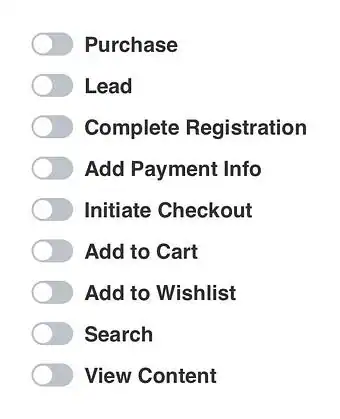
You can use the Facebook Pixel to collect data on your custom events or a set of 17 predefined “standard” events:
- Purchase: Visitor completes a purchase on your site.
- Lead: Visitor takes an action that defines them as a lead, e.g. signs up for a free trial.
- Complete registration: Visitor submits a form on your site, e.g. subscription form, webinar registration.
- Add payment info: Visitor enters payment information in the purchase process.
- Add to cart: Visitor adds product to their shopping cart.
- Add to Wishlist: Visitor adds a product to their Wishlist in your online store.
- Initiate checkout: Visitor begins the checkout process to buy something from your online store.
- Search: Visitor uses the search function to look for something on your site.
- View content: Visitor lands on a specific page on your site, e.g. article or product page.
- Contact: Visitor contacts your business.
- Customise product: Visitor selects a specific version of the product, e.g. picks a size.
- Donate: Visitor donates to your cause.
- Find location: Visitor searches for your organisation’s physical location.
- Schedule: Visitor books an appointment.
- Start trial: Visitor signs up for a trial of your product/service.
- Submit application: Visitor applies for your product, service, or program, e.g. credit card.
- Subscribe: Visitor subscribes to your paid product or service.
With these 17 standard events, you can simply copy and paste the standard Facebook event code.
Then, you can add more details to these events using extra bits of code called PARAMETERS.
Say you want to track purchases over a set dollar value or want to track views of a particular category. This is where you can add parameters.
You can also customise it to meet specific business goals. These are called CUSTOM EVENTS.
There are too many scenarios to include in this article.
So we’ll just cover the basic guide to installing the Facebook Pixel:
1. Go to Facebook Ads Manager
2. Go to the Pixel section
3. Click ‘Create a Pixel’
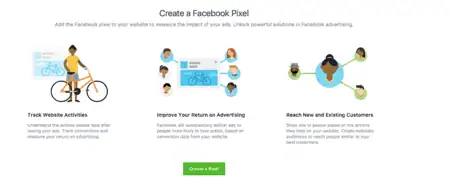
4. Create a name for your Pixel
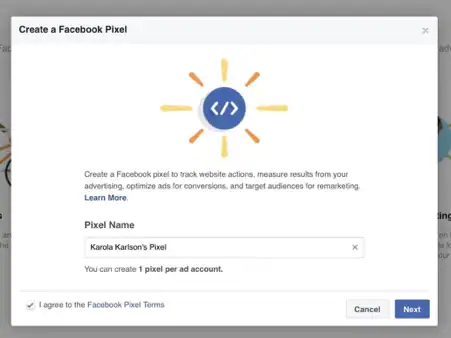
Image credit: Adespresso
5. Click ‘Install Pixel Now’.
You have three options:
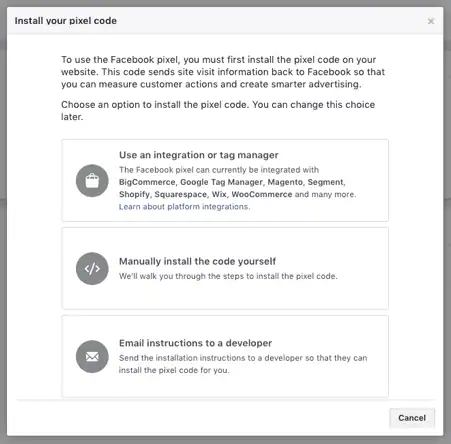
If you manage changes to your website, you can copy the base code of the Pixel and paste it between the <head> <head> tags in each web page, or in your website template to apply it to your entire site.
6. Next, you need to “Install Events”.
Choose the event you want to track by hitting the toggle next to it.
7. Add parameters, like conversion value or currency.
This means the Facebook Pixel will let you know how much you’re generating with a campaign, ad, or post-click landing page in live reports.
This is just a basic guide to implementing the Facebook Pixel.
The best approach is to go through the full step-by-step instructions on the Facebook pixel setup guide or ask your social media advertising team for help.
Here’s how to install the Facebook Pixel in Google Tag Manager by Julian Founder of Measure School :
How to use Facebook Pixel for your business
Now you know what the Facebook Pixel is and how it works. Let’s look at all the ways you can use it to turbocharge your social media advertising campaigns:
Use the pixel for remarketing
Facebook retargeting is where the pixel can add MASSIVE value to your marketing efforts.
Remarketing is where you can show targeted ads to people who have already visited your site AND are already interested in what you have to offer.
You can get really precise here. In fact, the more targeted you get, the better your results will be.
For example, you can show people an ad promoting the exact product that they abandoned in a shopping cart or added to their wishlist in your store.

Even add a special discount code that’s valid for 24 hours only to lure them back to the site with urgency.

Use the pixel to build Custom Audiences
This is arguably Facebook’s most powerful targeting capability. Sure, you could build your ad audience using the self-service ad tool.
OR you can let the Facebook Pixel do it for you.
This not only makes the process quicker and easier, but it also improves the effectiveness of your ad campaigns.
The Facebook pixel doesn’t create audiences using demographic or interests. It creates custom audiences based on HOW people have engaged with the page your pixel is on.
For example, the pixel knows all the Facebook users who have browsed blue shirts on your website, and when they did it.
So, you can create a Custom Audience in Ads Manager of all the people who have visited “blue shirts” pages on your website in the last 30 days. Then deliver an ad to them with an irresistible offer for blue shirts.
You can also use the Facebook Pixel in combination with the bidding option: “Bid for website conversions”.
Do this and Facebook will automatically show your ads to people who are most likely to convert.
Genius.
Use the pixel to track conversions
See how people interact with your website after viewing your Facebook ad. This data can help you fine-tune your Facebook ad strategy and work out your ROI.
The Facebook Pixel also lets you perform cross-device tracking – that is tracking customers as they move across devices.
So, you might see if people tend to first see your ads on mobile but then switch to desktop to actually make a purchase. Or vice versa.
Then, optimise your ads to hit them with the right message on the right device.
Use the pixel to create lookalike audiences
The Facebook pixel enables you to expand your reach beyond those people already visiting your website.
Using the data gathered through the pixel, Facebook will automatically build Lookalike Audiences of people who have similar likes, interests, and demographics to those who are already interacting with your site.
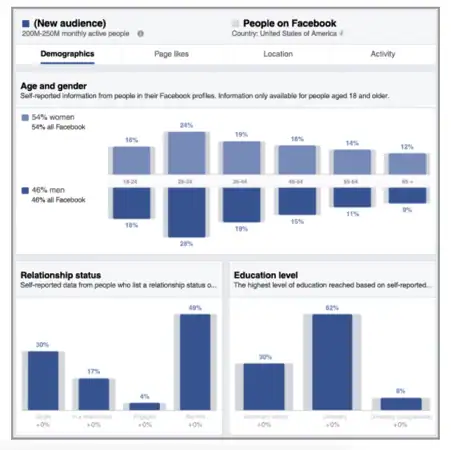
Image credit: Facebook
This means you are actually increasing your reach without having to look for new leads proactively.
Use the pixel to optimise Facebook ads for conversions.
The goal of the Facebook Pixel? To help you get to know more about the people interacting with your site and content so that you can convert them into customers.
Here’s the thing – without the Facebook Pixel, the only conversion you can optimise for is link clicks. That doesn’t tell you a great deal about your potential customers.
With the pixel, you can optimise your Facebook ads for specific conversion events on your website.
Remember those 17 conversion events we covered earlier?
Every single one of them tells you where visitors are in your funnel and helps you craft specific ads to take them even closer to the ultimate conversion: a sale.
Use the pixel to generate leads
The Facebook advertising platform is a brilliant digital tool for generating leads. STATS
Decide on a strategy for how you want to create new leads, then use the pixel to track your goals.
For example, Thank You uses Facebook ads to promote free samples of its toilet paper.
The pixel would track everyone who clicks through to and lands on the offer page. If people opt into the free sample, they get directed to a thank-you page.

But what about those people who click through but don’t opt into the offer?
Inside Ads Manager, you can create a custom audience for people who land on the main landing page bud didn’t land on the thank-you page. Then use a retargeting ad for that audience.
What you are doing here is segmenting and building audiences based on the interactions they have with your Facebook ads and website. So, you can target the most engaged people who are most likely to convert.
Use the pixel to track conversions and ROI
What’s the ROI of your Facebook advertising campaigns?
It’s never easy for digital marketers to track the real return on their ad campaigns. Yet that’s what you need to do if you’re going to see results from future campaigns, let alone get any recognition from business leaders!
Facebook pixel can help.
Install the code on the page where purchases happen, so you can track the number of eCommerce purchases from your Facebook ads. Then, use the data to analyse the ad ROI for specific campaigns.
This means you have the data needed to inform your future campaigns and create a benchmark for A/B testing.
Optimise your ad audience based on value
The Facebook Pixel helps you collect data on WHO is buying from your site and HOW MUCH they spend.
Why should you care?
Because it can help optimise your ad audience based on value. You can actually create Custom Audiences based on the amount of money people spent in your online store.
You’ll know who the biggest spenders are thanks to the Facebook Pixel, and can show your ads to those users.
The result? A higher ROI from your ad campaigns.
Target Facebook ads to people who have already converted
Want to build a base of loyal, repeat customers? Use the Facebook pixel to track users who have purchased from you.
Then reward them with a discount code for their next purchase.
Simply set up a URL rule for a post-conversion page, like a Thank You page.
Unlock even more Facebook ad tools and metrics
There’s a whole world of Facebook tools a metrics that you can ONLY access if you have installed the Facebook pixel.
We’re talking about:
- Web conversion campaigns
- Custom audiences from your website
- Dynamic ads
- Tracking cost per lead
- Tracking cost per conversion
Summary
If you want to get the most out of your Facebook ads and propel your conversion, you need to use the Facebook Pixel.
The Facebook Pixel is insanely versatile as a digital marketing tool. It can help you:
- Improve relevance by serving more targeted ads to custom audiences.
- Boost ad reach by creating lookalike audiences.
- Generate leads.
- Improve conversions.
- Track conversions and other metrics that matter to your business.
- Collect tons of insights for future campaigns.
- Boost the ROI of your Facebook ads.
- And so much more!
Even if you don’t have plans to advertise on Facebook right away, installing the Facebook pixel will help you find out how people are engaging with your website, helping you get the best from your ad campaigns when you do start.
You might want to review:
Facebook Ads: Budgeting, Best Examples & Common FB Advertising Mistake The Facebook Funnel You Need To Build | What is Brand Marketing and Why Is It Crucial in Your Facebook Strategy?
The Facebook Pixel is not a silver bullet to help you smash your goals. You’ll also need a rock-solid online digital marketing strategy, tailored to your customers and made to convert.
OMG is the top Australian SEO agency and we are here to help you get the search results you deserve. Get our latest and free eBook to access proven insights, templates, techniques and examples on how to propel revenue shifting results with digital marketing.
It’s all yours, right here, for free. Click below to grab your copy!

About the author
Read More Blogs
-
 10 minutes read
Are Your Search Campaigns Ready for the Google Ads Migration?

Last updated on:
-
10 minutes read
More AI In Search, More Ads In AI & More Choice For Social Users: This Week’s Updates
Last updated on:
-
Last updated on:



Stop Guessing What Your Marketing Should Do Next.
Your free $4,000 strategy session shows where your digital marketing is leaking performance across search, paid media, content and conversion. You leave knowing what to fix first and what a stronger strategy could produce.