

Google Ads Dashboards: Reporting, Metrics and Target KPIs


Last updated:
31 December 2025
|
9 minutes readKey Takeaways
- Google Ads reporting involves custom dashboards and metrics to monitor campaign health and ROI.
- Integrating Google Analytics helps trace user behavior across channels and measure full conversion paths.
- Visualisation tools like Data Studio enable multi-source dashboards to simplify reporting.
- Regular KPI review such as CTR, CPC, and conversion rate helps identify opportunities and optimise spend.
Your Guide To Google Ads Reporting And Dashboard
Test, monitor, analyse, and improve. If you need a recipe for success in Google Ads, this is it. Setting the right KPIs and observing the right metrics is a HUGE part of what helps you pinpoint what’s working, and where you’re wasting your time (and your budget). There’s more to Google ads reporting than just tracking conversions. In this short guide, we deep dive into how to track the metrics that matter — and use that data to maximise your revenue.
Use custom columns to view more key stats for your campaigns
At OMG, we love diving into the numbers — and custom columns are one of our favourite ways to do just that.
Custom columns are great because they allow you to see the full view of how your campaigns are performing from impressions to conversions. See, when it comes to paid performance, there’s a lot more in the process from initial click to purchase. Your ads could be faltering due to your ad position, CPC, copy, or anything in between. When you have more data, such as your Avg. CPC, Avg. CPM, CTR, Avg. Pos, Clicks, impressions, invalid clicks and invalid click rate, it’s easier to make required optimisations fast.
Follow these steps to set up custom columns for your campaigns:
- Sign in to your Google Ads account.
- Click Campaigns > Ad groups > Ads & extensions or Keywords in the page menu. Make sure you’ve selected “Ads” at the top of the page if you’re navigating into Ads & Extensions.
- Select the Columns icon in the upper right hand corner of the table, then click Modify Columns.
- Click on Custom Columns > New Column.
- From here, you can begin setting up your very own custom column. First things first, give your column an appropriate name and description, so it’s easy for anyone to understand what that metric is tracking.
- Click +Metric, and select the metric you want to track. Tip: for some metrics, you can segment your data further by segment, such as devices.
- Create your column conditions, and choose your preferred format (Number, Percent or Currency). Be sure to keep this consistent with other data points in your reporting.
- Hit Save, and Apply.
Lastly, tailor your dashboard to your business. If you’re gunning for mobile clicks, set a column up. The same goes if you’re interested in tracking performance for a specific target audience, or interested in seeing which position your ads appear at on different devices.
Keeping an eye on more than purely CPC and conversions will help you make optimisations faster. Use custom columns to help you set up a holistic view of all the metrics of campaigns in one easy dashboard.
Bring in another dashboard
What are you using to track your campaigns?
If your answer is “just Google Ads”, it’s time to bring in reinforcements.
Google Ads’ reporting dashboard is pretty comprehensive, but there are some things missing. Dashboards allow you to set up key views for paid campaigns to conversions, while also getting an understanding of user behaviour. They’re a great way to understand things like:
- How Google Ads (or any other source/medium) contributes to conversions/leads
- How users interact with your site
- The page(s) they visited
- The path to conversion
Here are five of our favourite KPI dashboards to track campaign performance down to the last click, view, and conversion.
Google Data Studio
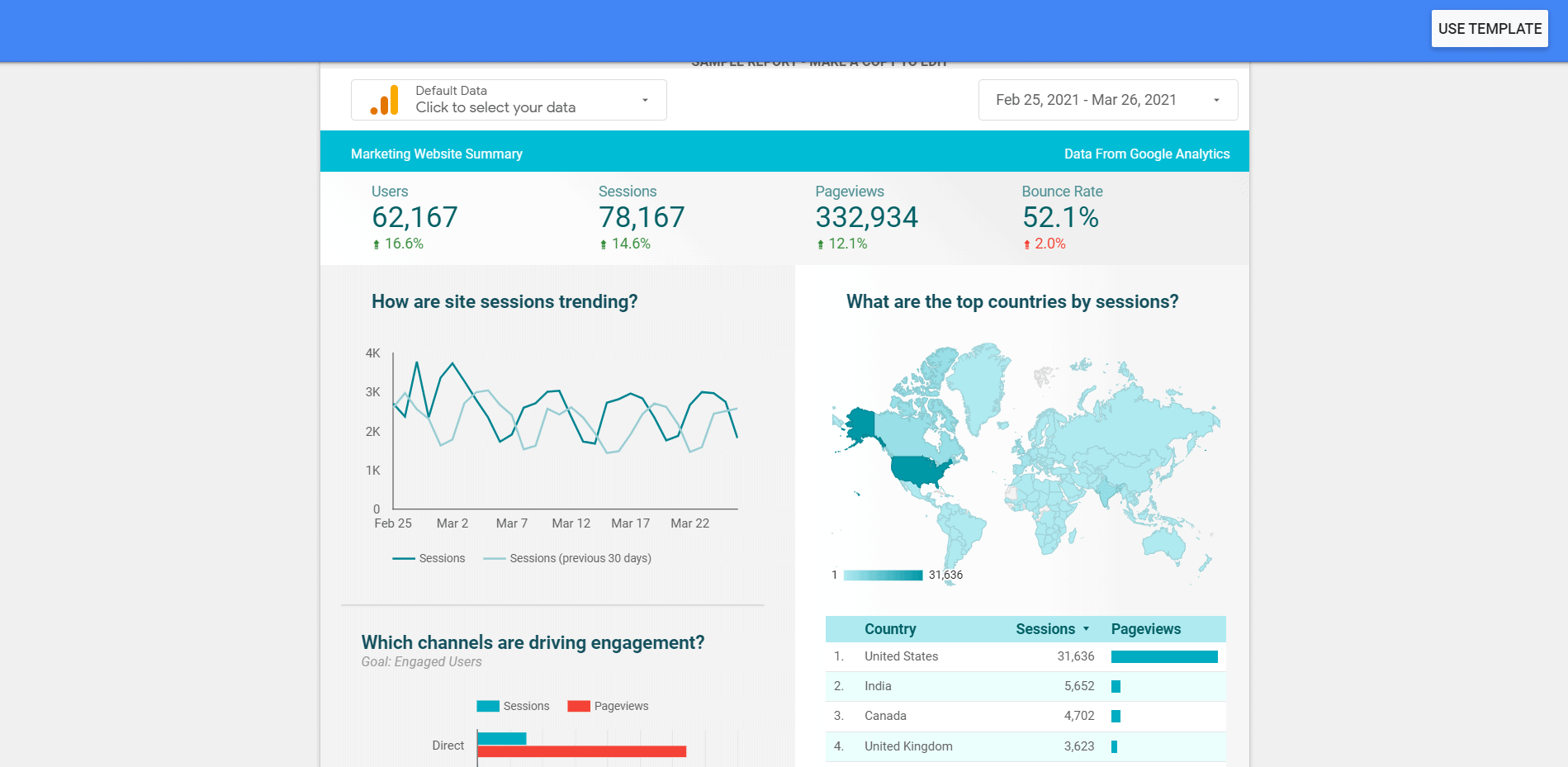
Google Data Studio is a free tool that allows you to turn data into fully customisable dashboards and reports. You can pull in data sets from a ton of different sources, including Google Ads, Google Analytics and Google Search Console, as well as social media platforms like Reddit, YouTube or Facebook.
We love Google Data Studio because of its simple-to-use interface, drag and drop functionality, and the fact that it allows you to get an overview of all your digital marketing campaigns within the Google ecosystem.
Databox
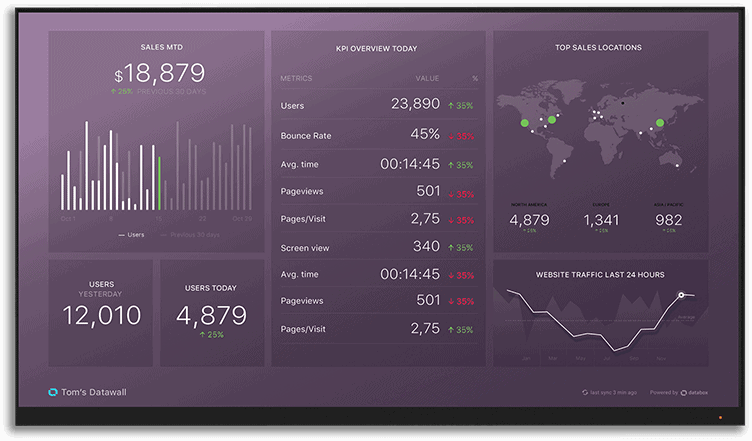
Image source: Scoro
Databox allows you to create beautiful reports and dashboards on its desktop platform and its mobile app. The platform allows you to set time-bound or numeric goals, then automatically track your performance and discover insights in real-time. Databox is free forever for up to 3 users, then goes up for the basic version.
Datapine
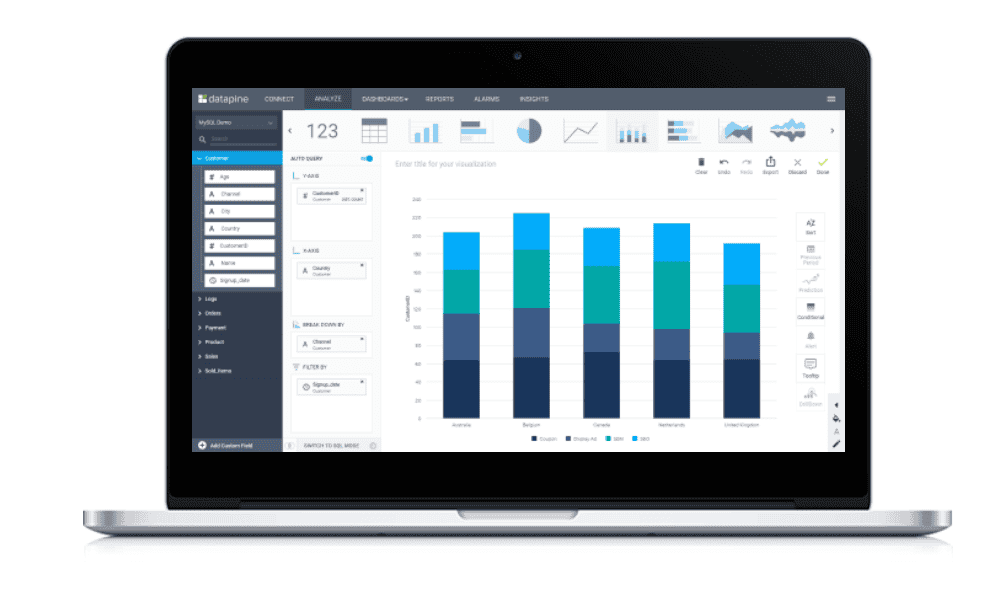
Image source: Datapine
Datapine is an interactive business intelligence dashboard that gives you a single source of truth for all of your digital marketing efforts. This robust tool pulls in information from 50+ data connectors, ranging from databases to CRM platforms, marketing solutions like Google Ads, social media, and more. Datapine is available as a free trial for 14 days.
Tableau
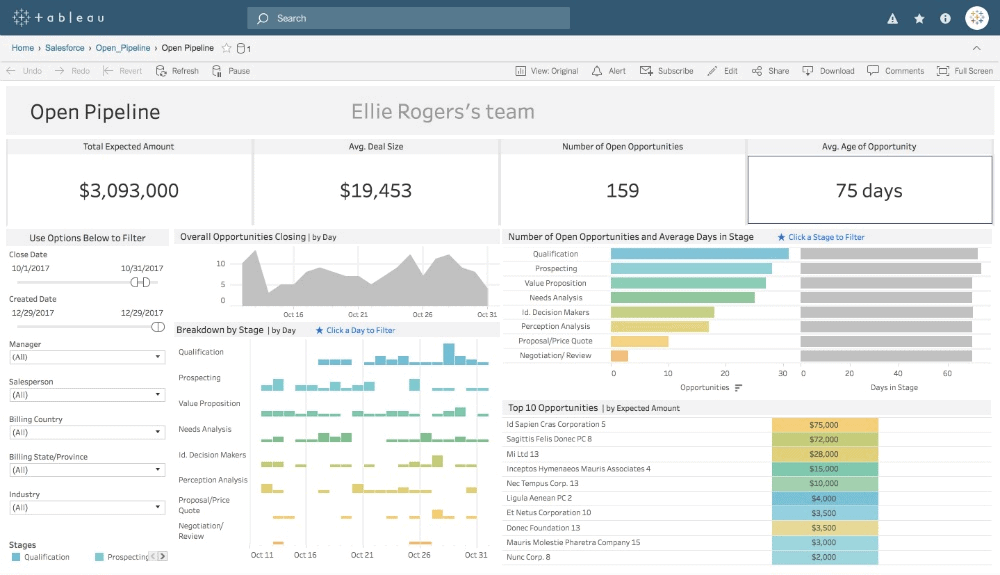
Image source: Tableau
A visual analytics platform, Tableau is one of the most intuitive dashboard tools out there today. It’s easy to get up and running in minutes, and pull in data from key sources such as Google Analytics, Google Ads, and Salesforce. This dashboard is also perfect for larger organisations: you can easily give external teams, partners, and clients secure access to analytics, without worrying about compromising your data. Like Datapine, Tableau offers a free 14-day trial.
Honourable mention: Google Analytics
While Google Analytics isn’t necessarily a KPI dashboard, it’s a great source of information when it comes to your campaigns. Use Google Analytics behaviour flow to see key pages from campaigns and understand who’s coming to your site, how different users are interacting with your landing page, which content resonates most, and when they convert.
Make the most of Google Analytics’ multi-channel funnels
There’s no way around it: marketing is fragmented.
A user could see your Google Ad, then hop on to your Facebook page and convert from an email newsletter. Or they could see your brand offline, visit your website first, follow you on Instagram, and then convert from a Google Ad. Multi-channel funnels are a great way to visualise how all of your different marketing channels work together to create conversions.
There are five multi-channel reports in Google Analytics:
- The Overview report provides a summary and comparison of your conversions and assisted conversions over a selected time period.
- Assisted Conversions report, which allows you to see how many conversions each channel initiated, assisted, and completed.
- Top Conversion Paths report that gives you an idea of the different channels that users go through before converting.
- Time Lag report, where you can see how long your sales cycle is within a 0 – 12+ day time range.
- Path Length report that shows how many interactions a user had with your site before they finally converted.
All of these reports are useful, but the two you DEFINITELY want to keep your eye on are the Assisted Conversions and Top Conversion Paths reports.
Assisted Conversions
With “Assisted Conversions”, you can see which channels helped contribute or interacted with to make conversion happen, other than the last click. Understanding assisted conversions and what was involved in helping contribute to conversion is great for marketers and startups. It helps make better decisions and conversations around resources for other channels.
There are two options for this report: Assist Interaction Analysis and First Interaction Analysis. The Assist Interaction Analysis shows you how many conversions your Google Ads assisted in, and the number of conversions for which Google Ads was the last interaction point.
For example, in this report we can see that Paid Search assisted in 215 conversions and was the last click for 218 of them:
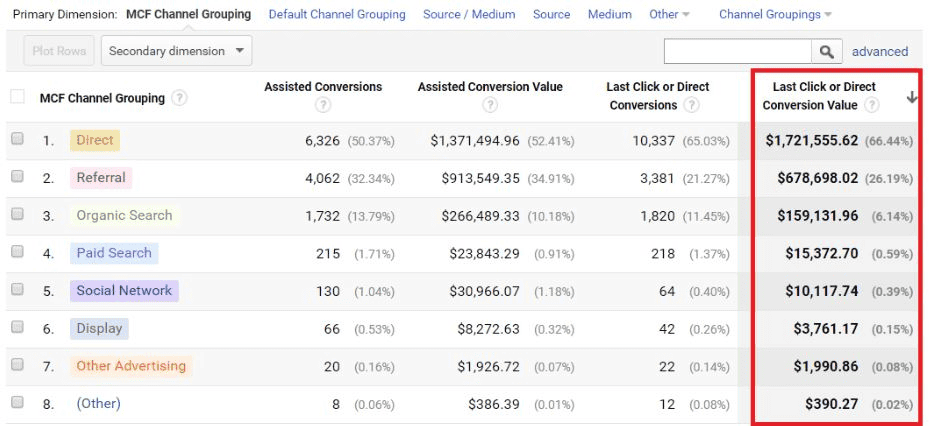
Image source: Optimize Smart
Top Conversion Paths
As marketers, we know that running campaigns such as Google Ads or any other marketing initiative isn’t a clear-cut linear path. There are multiple factors that contribute to conversions, especially channels. The Top Conversion Paths report helps dissect which channel user’s visited and how they interacted with your channels and website before converting.
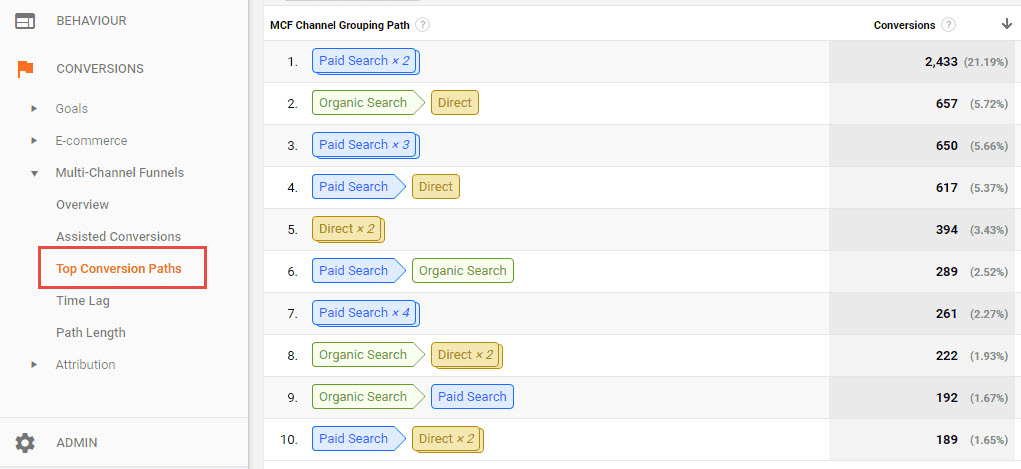
Here’s an example: a user may have found your article/blog post through an organic search. Four days later, they come back to your website through a display campaign and decide to make a purchase. With the Top Conversion Paths report, you can understand the different journeys that users go through before converting.
Once you have this information, it becomes much easier to know where to invest and understand how different channels fit together as part of your customer journey.
You may also want to review:
Google Ads vs Facebook Ads: Which Is Better For Your Business? | The Ultimate Guide To Google Ads Ad Extensions | Ultimate Guide to Google Display Network in 2022 | Complete Guide to Google Ads Keyword Match Types and Analysis | Advertiser’s Guide to Google’s Responsive Search Ads & Best Practices | How Long To See Results With Google Ads? | How to Properly Set Up Your Google Analytics Tracking for Google Ads | Google Ads: How to Lower CPA to Better Scale Your Campaigns | Guide to Google Ads Bidding Types, Strategies and Bid Adjustments | How to Set Up a Simple Google Ads Testing Framework for Campaign Optimisation | Bing Ads vs Google Ads: Where Should You Invest Your Time And Money? | Google Ads: What You Need to Know About CTR and Other Benchmarks | Should I Inhouse Or Outsource Adwords Management? | The Ultimate Guide To Google Ads | Proven Ways To Stop Google Ads Click Fraud | Guide to looker studio / Google data studio
Need help with Google Ads Reporting? We are the #1 PPC Agency in Australia and our Australian SEO agency experts are standing by to assist with any online digital marketing needs you may have.

About the author
Read More Blogs
-
 10 minutes read
Are Your Search Campaigns Ready for the Google Ads Migration?

Last updated on:
-
10 minutes read
More AI In Search, More Ads In AI & More Choice For Social Users: This Week’s Updates
Last updated on:
-
Last updated on:




Stop Guessing What Your Marketing Should Do Next.
Your free $4,000 strategy session shows where your digital marketing is leaking performance across search, paid media, content and conversion. You leave knowing what to fix first and what a stronger strategy could produce.