
What Is a Google Knowledge Panel and How To Get One?


Last updated:
7 July 2025
|
17 minutes readKey Takeaways
- Google Knowledge Panel refers to a right‑hand info box in search results showcasing factual data about people, brands, or places, pulled from Google’s Knowledge Graph.
- Presence in the panel increases trust, visibility, and occupies prime SERP real estate.
- Knowledge Panels surface only when Google has strong confidence in your entity's factual data.
- Building and maintaining your entity profile through GMB, website, schema markup, and external sources increases your chances.
- Regularly updating entity details and adding supporting sources helps prevent Panels from disappearing.
Guide to Understanding and Getting a Google Knowledge Panel
The Google Knowledge Panel is one of the most beneficial SEO components that you (probably) didn’t know you needed.
Having a Google Knowledge Panel can boost clickthrough rates from organic search results and help you maximise your search engine real estate.
It’s also a powerful tool to educate your target audience on what your business does and point them in the right direction to learn more about your brand.
If you’ve heard about the Google Knowledge Panel, you’re one step ahead of the pack. But knowing about it is just the first step. You need to obtain your own Knowledge Panel and optimise it if you truly want to use it to improve your page 1 visibility AND user experience.
That’s exactly what we’re going to cover in this post. You’ll get an in-depth view of Knowledge Panels, why they matter for Search Engine Optimisation (SEO), and a step=by-step guide on how to get one.
What is a Google Knowledge Panel?
A Google Knowledge Panel is a rich result that appears on the right-hand side (a.k.a. the right rail) of Google’s search results, and contains information that Google considers to be factual. This information is pulled from Google’s Knowledge Graph, a database of billions of facts about entities — in other words, about people, places, and things.
Even if you’re not sure what it is, you’ve definitely seen one when running a Google search:
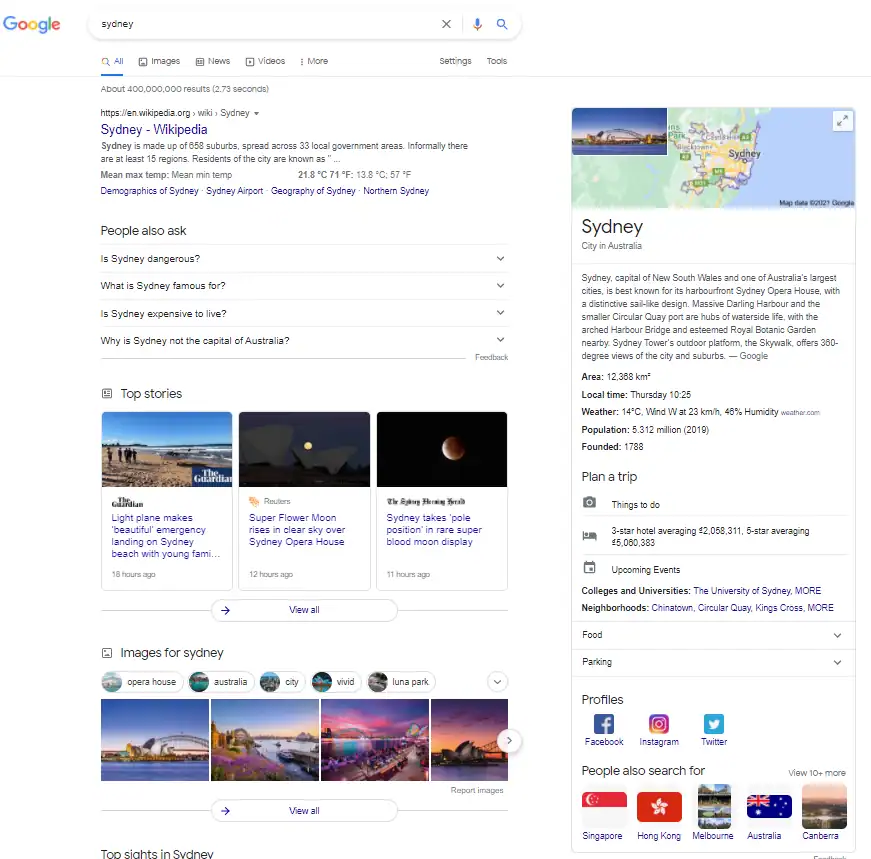
Knowledge Panels are designed to serve four purposes, according to Google:
- Supply a user with basic factual information about entities.
- Help a user navigate to different web pages that have related content, such as a company’s subsidiaries or related characters in a movie.
- Provide content that would have otherwise required users to conduct multiple searches and visit multiple pages.
- Help a user obtain information faster without needing to visit multiple pages.
Here’s an example that demonstrates this perfectly:
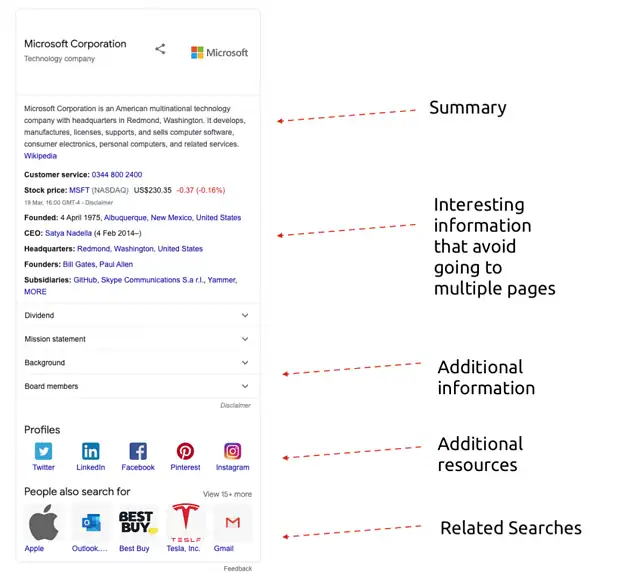
Image source: SEMrush
Keep in mind: Knowledge Panels aren’t the same as other rich results, such as a Google My Business listing or a featured snippet. Google will ONLY show Knowledge Panels when it is confident it is factual, and when it believes it will be helpful for a user’s search.
What Is the History of the Google Knowledge Panel?
The Google Knowledge Panel is an information box that appears on Google’s search engine results pages (SERPs), providing quick, structured details about a topic, entity, or brand. It is part of Google’s broader efforts to enhance search results with factual, authoritative information.
Timeline & Evolution of the Google Knowledge Panel
- 2012 – Introduction of the Knowledge Graph: Google launched the Knowledge Graph in May 2012, marking a shift from keyword-based search to an entity-based model. This allowed Google to understand relationships between people, places, and things, improving search accuracy. The Knowledge Graph became the foundation for the Knowledge Panel.
- 2013 – Hummingbird Algorithm & Semantic Search: Google’s Hummingbird update refined how the search engine interpreted natural language queries, further strengthening the Knowledge Graph’s role in search results.
- 2014 – Expanded Knowledge Panels: Google began enhancing Knowledge Panels with richer information, including images, direct answers, and structured data sourced from Wikipedia, government databases, and authoritative websites. Businesses also started seeing branded Knowledge Panels.
- 2017 – Knowledge Panel Claiming for Businesses & Public Figures: Google introduced a feature allowing businesses, celebrities, and organisations to claim and manage their Knowledge Panels via Google Search Console, enabling them to update displayed information.
- 2020 – More Structured & Interactive Elements: Google continued refining the Knowledge Panel, adding interactive elements such as dynamic updates, enhanced visuals, and deeper integration with Google’s AI models to pull relevant, real-time data.
- Present & Future Developments: Today, Knowledge Panels are AI-driven, pulling data from trusted sources like Google My Business, Wikidata, government sites, and authoritative publishers. Google continues to enhance them with machine learning, user contributions, and real-time data updates to ensure accuracy.
Why Is the Knowledge Panel Important?
- Improves Brand Authority: A verified Knowledge Panel boosts credibility.
- Enhances Search Visibility: Displays key information directly in SERPs.
- Drives User Engagement: Provides quick access to relevant details like website links, social profiles, and company reviews.
As Google’s AI and search algorithms evolve, the Knowledge Panel is expected to become more interactive, real-time, and personalised, further enhancing how users access and trust information.
Why is the Knowledge Panel is critical for your SEO strategy
One of the most tried-and-tested ways to improve your performance from organic search is to take up as much real estate as possible.
Google’s Knowledge Panel is incredibly effective at helping you do this.
It allows you to take up the entire right-hand side of the search engine results — which is more search real estate than the top result, ads, featured snippets, and images COMBINED.
But it’s not just the Knowledge Panel.
Google uses the Knowledge Graph to create a Knowledge Card for relevant searches:
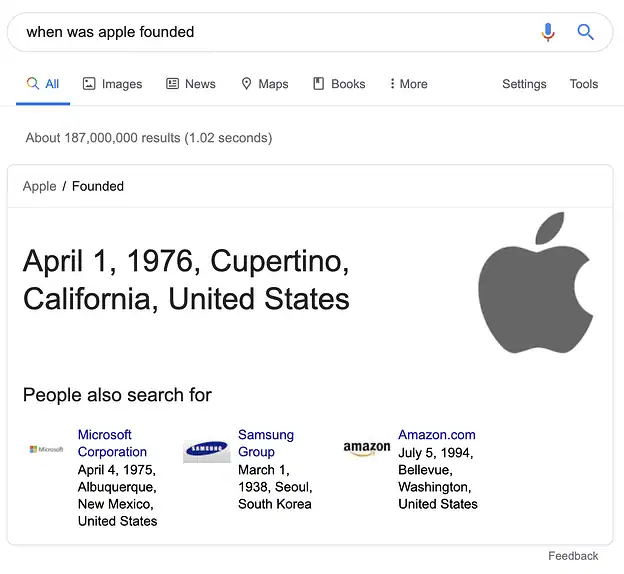
By having a Google Knowledge Panel, you can maximise your visibility and better reach your audience when they’re searching for your product or service. Your target audience can quickly and easily learn more about what your brand is and what you offer, then click through to your website’s Instagram page, Facebook, website, or learn more about your founders.
Google and, in turn, users, also consider this information as a fact. If you’re appearing in the Knowledge Panel, there’s the added benefit of a boost in trust and authority amongst users.
However, this visibility does come at a trade-off.
A study by Sistrix found that search engine results pages with Knowledge Panels have a lower clickthrough rate. The data showed that the average first position in search results only received a CTR of 16.8%, as opposed to 28% without a panel.
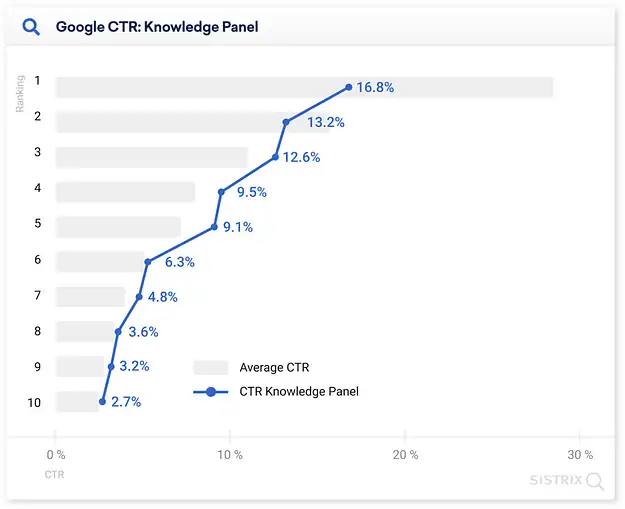
This isn’t necessarily a bad thing, however. Think of it like the Zero-Click Searches where users simply find the information they’re looking for in the SERPs with out having to click through to your website. In this case, they find the information straight in the panel itself, without needing to navigate to different pages for the result. This is part of Google’s push to make search engine results more relevant for a user with semantic search.
When do Knowledge Panels appear?
As we touched on earlier, Google will create Knowledge Panels ONLY when its algorithm is confident it has ‘understood‘ a fact, and believes the information will be relevant to the searcher. This information is gathered from multiple sources, including Wikipedia, Crunchbase, LinkedIn, Facebook, and Wordlift.
Where do Knowledge Graph facts come from?
In the words of Google itself:
Facts in the Knowledge Graph come from a variety of sources that compile factual information. In addition to public sources, we license data to provide information such as sports scores, stock prices, and weather forecasts. We also receive factual information directly from content owners in various ways, including from those who suggest changes to knowledge panels they’ve claimed.
Once your data is in the Knowledge Graph, a Google Knowledge Panel can appear for any search related to that known entity.
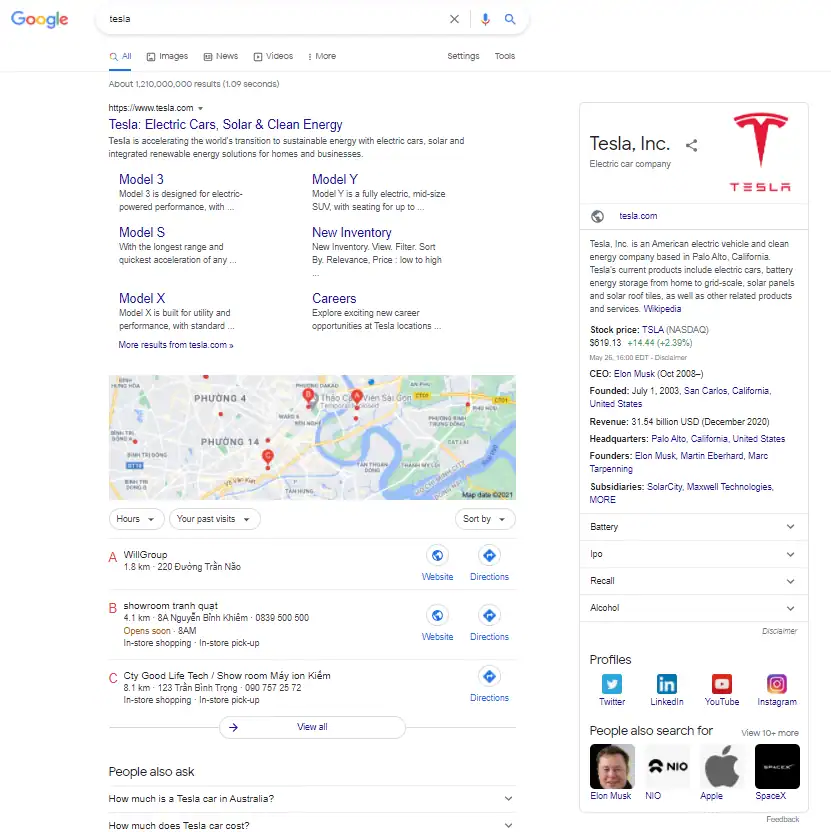
For example, if you’re Tesla, you might have a panel that appears when someone searches for your brand name.
This includes details on your company history, social profiles, and a ‘People also search’ section:
But that’s not all.
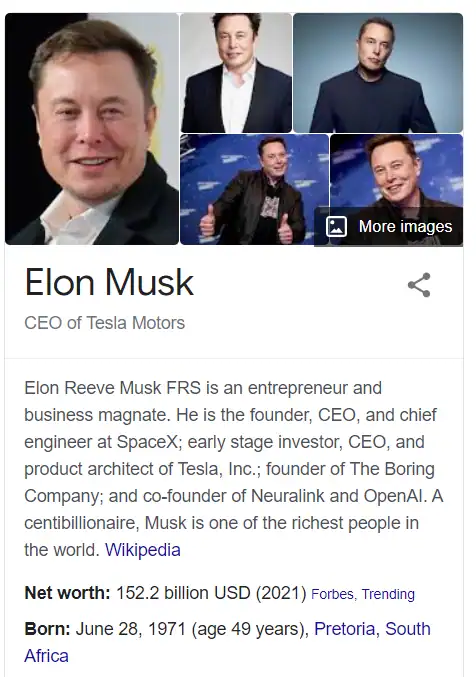
The brand appears when someone searches for Elon Musk:
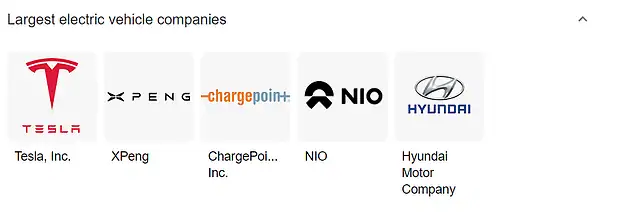
Tesla’s brand name might also come up for searches related to electric vehicle companies…
…and in relevant search queries about the company:
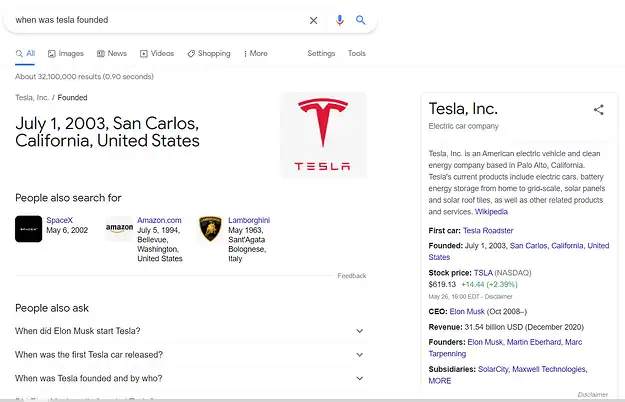
How do you get a Knowledge Panel for your business?
There isn’t a clear-cut path to getting a Google Knowledge Panel for your brand name. Like anything with Google, the algorithm ultimately decides whether or not to create a panel in search results. However, there are some steps you can take to put your brand in the best position possible to acquire a Knowledge Panel.
Verify your business on Google
Creating your local Google My Business listing with your Google account is the first, and most important step in getting your brand seen as an entity in Google’s Knowledge Graph.
This allows you to verify that your business actually exists, and gives Google a clear source to pull data on your opening hours, street address, photos, contact information and more.
If you have an updated and verified GMB listing, you dramatically increase your chances of having your Google Knowledge Panel appear in local and “near me” search engine results.
Create a ‘home’ for your business information
On top of creating a local Google My Business listing with your Google account, you should have a ‘home’ for your entity (a.k.a. your brand). This is the go-to place for Google to source data about your brand, and where your entity lives in the Google Knowledge Graph.
Your entity ‘home’ should be a page on your website, such as your About Us profile page. Populate this with information about your brand and business, such as your company history, founder, core products and services, and more.
Using Wikipedia to get into the Knowledge Graph
Wikipedia is often seen by brands as a shortcut to getting into Google’s Knowledge Graph. Having a Wikipedia page will almost certainly trigger a Google Knowledge Panel for your brand, but this shouldn’t be your silver bullet.
There are a number of risks involved in using Wikipedia as your sole strategy. The process to submit information can be time-consuming, and your Wikipedia page can be edited by any person — putting your company information completely out of your control. On top of that, if your listing is deleted, chances are your Knowledge Panel will disappear along with it.
We suggest keeping your entity ‘home’ in a place you can control, rather than on a third-party website. You can use Wikipedia to corroborate information about your business (more on this next), but we’d recommend against using it as your main strategy.
Use schema mark-up to set out the facts
Once you have a home for your entity, it’s time to start populating this with the ‘facts’ you want Google to understand.
Create different sections for different aspects of your business, such as your:
- brand and company history
- founder and CEO
- locations
- subsidiaries
- products and services
Keep it simple so it’s easy for Google to understand, and stick to the facts. Add the Organisation Schema.org markup as well to the page, in order to reiterate the information in a Google-friendly way.
Corroborate your facts with other sources
Like any good research, you need to corroborate your brand and company facts from sources that Google trusts. The more external sources you have with the same information that you do on your entity ‘home’, the more likely Google is to take that information as a fact and list it in a Knowledge Panel.
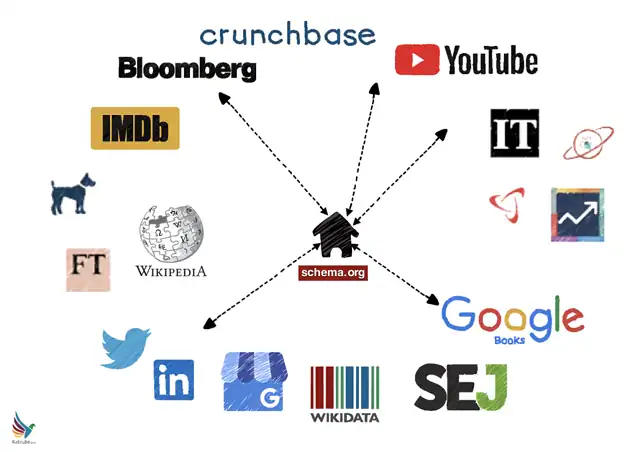
After you’ve identified a relevant source (such as a business listing or article), it’s important to make sure that all of the information aligns with what you’ve listed on your entity ‘home’. This is the one instance where having duplicate content is a good thing, as it confirms the ‘facts’ to Google and gives the algorithm more confidence that the information is accurate.
Once you’re comfortable with these sources, you can add in the links to your Organisation schema markup.
Improve your domain authority
Having a good Domain Authority (DA) is crucial if you want your brand to rank on the first page of Google — and it’s also important if you want to appear in the Knowledge Panel.
Why?
Your DA is Google’s trust signal for your site. If you have a high domain authority, Google automatically believes your site is a credible and trustworthy source of knowledge.
There are a number of steps you can take to improve your DA, including:
- Optimising your on-page elements, including meta descriptions, heading tags, and alt text
- Ensuring all elements of your technical SEO are on point, such as mobile site speed, redirects, crawlability and indexability
- Creating and sharing valuable content related to your industry or niche
- Increasing the amount of links back to your site from quality sources. This could be done by writing an article as a guest post, building up your directory profile, sending press releases to get an article written about your business, and more.
Claim your Knowledge Panel
Once Google has recognised your entity home, it’s time to go about claiming your brand Knowledge Panel.
You’ll know when Google recognises it because you’ll get the little global icon in the Knowledge Panel when a search is run for your business:
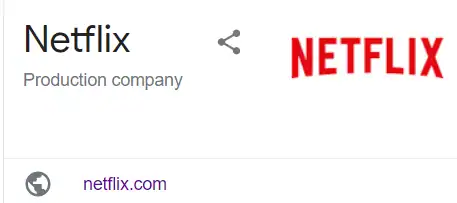
As long as you’re the recognised owner of that site and account in Google Search Console (GSC), you can claim the Knowledge Panel in a few easy steps:
- Log in to your Google account.
- Scroll to the bottom of the Knowledge Panel and click “Claim this knowledge panel”.
- Review the displayed information about features granted after verification.
- Sign in to your official site or one of the social profiles listed, such as Google Search Console. This also works with a YouTube account, Twitter account or Facebook account.
If you don’t have a globe icon or social icons next to your brand, you’ll need to manually apply to claim your Knowledge Panel through your account. During this process, you’ll be required to provide ID and prove your relationship to the entities through legal documentation, screenshots and more.
How long does it take to get a Knowledge Panel?
Unfortunately, there’s no clear-cut timeframe for getting a Knowledge Panel for your brand or website. The process could take a few days, weeks, or months depending on which route you take and how well-known your company is.
Why do Knowledge Panels disappear?
Just like Knowledge Panels can appear, they can also disappear. There are three main reasons why a Knowledge Panel might be removed:
- Google has updated its Knowledge Graph. Core updates may affect what Google sees as a ‘fact’ and in turn, lead to Knowledge Panels disappearing. If you have more sources corroborating your brand, you’ll be less prone to the impacts of Google algorithm updates in the future.
- Your entity ‘home’ has been deleted. This means the source of truth that Google was using to verify facts about an entity has been removed. For example, if a brand Knowledge Panel was based on a Wikipedia page and the Wikipedia page was removed, Google may, in turn, remove the Knowledge Panel.
- A person reports or gives feedback on the panel. This most likely happens if the information on a brand, person, place or entity is reported to be incorrect, misleading, non-representative, or in violation of Google’s search policies.
Checklist: How to Build a Solid Knowledge Panel
- Create a local Google My Business listing with your Google account
- Make sure you have verified your local Google My Business listing
- Ensure all of the information in your GMB listing is up to date
- Create an entity ‘home’ for your brand on the web (preferably that you own)
- List out the key facts about your business on your entity home, such as your company history, founders, subsidiaries and more
- Corroborate your business information across multiple sources, such as YouTube, Twitter, Facebook, Crunchbase, LinkedIn or Instagram
- Add these sources to your Organisation Scheme markup
- Improve your website Domain Authority with on-page and focusing on white hat SEO strategies and technical SEO
- Build backlinks to your website with article guest posting or press releases
- Submit a claim for your Knowledge Panel with your brand’s account or social media profiles
- Keep your entity home and sources up to date at all times
Google Knowledge Panel: How to Get Your Business Featured
The Google Knowledge Panel is a powerful feature that displays key business details in search results, giving users quick access to essential information. For local businesses, appearing in this panel can enhance visibility and credibility.
One of the first steps to achieving a Knowledge Panel is to create a Google Business Profile. This ensures that your business details—such as address, contact information, website, and operating hours—are accurately displayed. The more complete and consistent your profile is, the better chance you have of being featured.
Beyond business listings, Google also pulls information displayed in the Knowledge Panel from sources like Wikipedia, authoritative websites, and structured data on your site. Additionally, relevant images often appear in the panel, so optimising your visuals for Google Images results can further enhance your business’s online presence.
By actively managing your online presence and ensuring your business details are accurate across platforms, you increase your chances of achieving a Knowledge Panel, making it easier for customers to find and trust your brand.
How the Google Knowledge Graph Panel Enhances Search Results
The Google Knowledge Graph Panel is a feature designed to provide users with relevant information directly on the results page (SERP). Instead of clicking through multiple websites, users can instantly access key details about businesses, people, or topics at a glance.
This panel pulls data from authoritative sources, such as Wikipedia, Google Business Profiles, and structured data on websites, to ensure accuracy. For businesses, appearing in the Knowledge Graph Panel increases visibility and credibility, as it highlights essential details like contact information, website links, and even social profiles.
By optimising your website and online presence, you improve the chances of having your brand featured in this valuable section of the results page (SERP), making it easier for users to find and trust your business.
What Is a Personal Knowledge Panel and How Can You Get One?
A personal knowledge panel is a prominent information box that appears on the right-hand side of Google search results when someone searches for a public figure, expert, or notable individual. It displays verified details such as name, profession, social profiles, and images—all pulled from trusted sources across the web.
For professionals and business leaders, securing a personal knowledge panel helps build credibility, enhance online presence, and control how you’re represented in search. Claiming and managing one often involves optimising your digital footprint, having a Wikipedia or Wikidata entry, and using structured data so Google can confidently recognise and showcase your identity.
Maximise your visibility in organic search results
Having a Google Knowledge Panel can help you dominate the first page of Google search results amongst your target audience.
With time and patience, you’ll increase your real estate on page 1 and get a one-up over the competitors.
But that’s just the first step to skyrocketing your revenue with SEO.
To truly reap the rewards of SEO, you need to have a solid and comprehensive digital marketing strategy that touches all bases — from keyword research to on-page optimisation, local SEO listings, technical SEO, and link building. What’s more, you need to keep up with Google’s algorithm changes if you want to rank on top both now and in the future.
Our expert Australian SEO services agency Gurus are here to help you get ahead and stay ahead in organic search results. Best of all, it’s completely FREE to get started. Request your full website audit and 6-month game plan below.
Are you an Australian Business? Need Help With Paid Ads and / or SEO? Then simply reach Out:
PPC Sydney | PPC Melbourne | PPC Brisbane | PPC Gold Coast | PPC Perth | PPC Adelaide | PPC Hobart | PPC Canberra
SEO Sydney | SEO Melbourne | SEO Brisbane | SEO Hobart | SEO Perth | SEO Adelaide | SEO Gold Coast | SEO Canberra | SEO Darwin

About the author
Read More Blogs
-
 10 minutes read
Are Your Search Campaigns Ready for the Google Ads Migration?

Last updated on:
-
10 minutes read
More AI In Search, More Ads In AI & More Choice For Social Users: This Week’s Updates
Last updated on:
-
Last updated on:


Stop Guessing What Your Marketing Should Do Next.
Your free $4,000 strategy session shows where your digital marketing is leaking performance across search, paid media, content and conversion. You leave knowing what to fix first and what a stronger strategy could produce.