

Orphan Pages: How to Find and Fix Them in 5 Steps


Last updated:
25 July 2025
|
17 minutes readKey Takeaways
- Orphan pages are web pages that exist on your site but have no internal links pointing to them, making them difficult for users and search engines to discover.
- Since search bots rely on internal links to crawl, orphan pages may not be indexed or rank, resulting in lost organic opportunities.
- Crawling orphan pages drains crawl budget, reducing attention to valuable content elsewhere on your site.
- Fixing orphan pages involves integrating them into navigation, sitemaps, or related content to improve visibility and indexing.
Your Guide To Orphan Pages And How To Handle Them
Orphan pages are like holes in the bottom of a bucket. Left unchecked, these pages drain your resources — and having them on your website means you’ll never get the most out of your SEO efforts.
Every orphan page on your website represents a missed opportunity to reach new customers with your content. What’s more, orphan pages might even hold your website back from reaching the top of search engine results.
Fortunately, finding orphan pages is a simple and straightforward process. In this post, we’ll take you through everything you need to know to fix orphan pages and maximise your website performance.
You’ll learn:
- What orphan pages are
- Why are orphan pages bad for SEO?
- Common reasons why you might have orphaned pages
- 5 steps to pinpoint and fix orphan pages
- Essential audit tools to help you identify orphan pages
Orphan Pages: What They Are and Why They Matter for SEO
Orphan pages are web pages that exist on a site but are not linked to from any other page, making them difficult for both users and search engines to find. Since these pages lack internal links, they often go unnoticed, leading to indexing issues and wasted crawl budget.
One way to identify orphan pages is by checking their status code in server logs or using SEO audit tools. If a page returns a 200 status code but has no inbound links, it may be an orphan page. Alternatively, if it returns a 404 or 410 status code, it means the page is broken or deleted, requiring further action.
To fix orphan pages, ensure they are linked from relevant sections of your website, such as navigation menus, sitemaps, or related content. Proper internal linking improves discoverability, enhances SEO, and ensures that important pages contribute to your site’s overall performance.
What is an orphan page?
Orphan pages are pages on your website that aren’t linked from other pages on your site. The only way that orphan pages can be accessed is if a user knows the direct URL of the page, or if you (or another website) link directly to it.
These pages live outside of your site structure, like so:
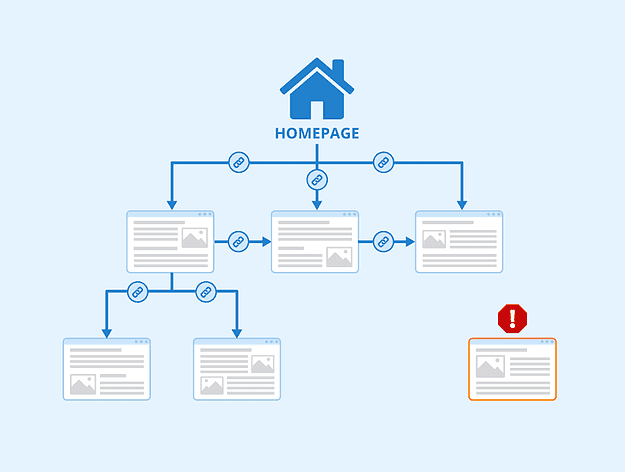
Image source: SEObility
Without any incoming links, it’s FAR more difficult for users to discover and access your content once they’re on your website.
But there’s another more pressing issue.
Orphan pages also don’t get discovered and indexed by search engines. Given that Google accounts for a whopping 94% of the total organic search traffic coming to your website, these orphan pages can compromise your ability to get discovered by customers who are searching for your products and services.
In other words, orphan pages = lost opportunities and lost $$$.
Why are orphan pages an SEO issue?
As we just touched on, orphan pages aren’t just problematic for users. These pages can’t be accessed by search engine crawlers, which leads to a host of issues for your SEO.
Let’s start by recapping how search engines like Google find and index content on the web.
Google uses spiders to ‘crawl’ the web for new content. These search engine bots follow internal links on your site like threads on the web:
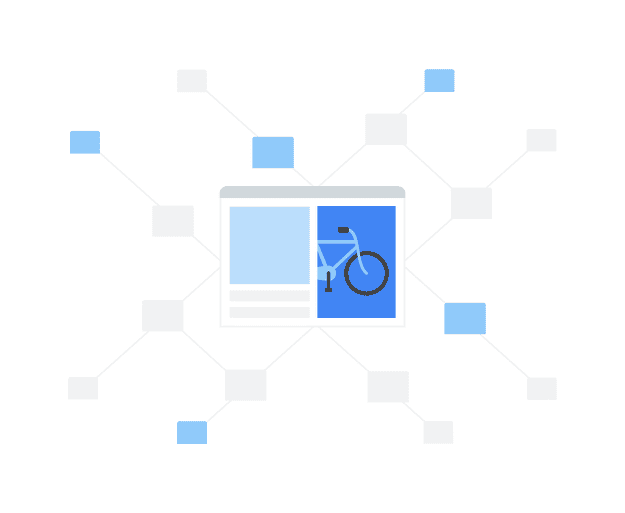
Once a spider has crawled your site, it adds these pages to a central search index — a huge database with all of the websites it has crawled and the words that are contained within them.
When someone types a search term into Google, the search engine then scans its index and matches up a user’s queries with the most relevant and valuable results, based on its search algorithm.
Because orphan pages aren’t linked internally, it makes it much harder for Google’s crawlers to discover that page. And if Google can’t discover it, it can’t get indexed, which means it won’t show up in search results.
In turn, this means…
Orphan pages have low rankings and traffic
You might have an incredibly content-rich page that’s well-researched, optimised for all of your target keywords, and has strong backlinks from high-quality external websites. However, if this content doesn’t have any internal links pointing back to it, you’ll be jeopardising your own efforts.
Even if your page gets indexed through external links or XML sitemaps, orphan pages don’t get any internal link juice. This means they don’t rank well in search engines — and if they’re not ranking in SERPs, they’re not bringing in much organic traffic from search (if any at all).
Orphan pages waste your crawl ‘budget’
Orphan pages also take away from a search engine’s ability to crawl your website.
Search engines have a ‘crawl budget’, which is the number of pages that they will crawl on a website within a given timeframe. If you’re using up this precious budget on low-value orphan pages, it means other more important pages might not be getting crawled and indexed.
Common reasons why you might have orphan pages
Nobody deliberately sets out to have orphan pages on their website. However, as time goes by, you might find that a few pages slip through the cracks. The key here is to be aware of when it might occur, so you can try to prevent any orphan pages from cropping up in the future.
Here are some of the most common reasons why you might wind up with orphan pages:
- They’re old pages. Previous time-sensitive sales campaigns, events, or even discontinued products are all likely suspects for orphan pages unless you move these to an archive or deliberately take them down from your website.
- Difficulty tracking new pages or page updates. If you’ve recently done a site migration or your team is regularly updating your content, you might end up overlooking some of your website’s active pages or accidentally removing an internal link.
- Testing or experimenting. This happens if you create new landing pages or URLs as a test, then either forget to take them down or forget to add internal links pointing to the page.
Orphan pages: How to find and fix them in 5 steps
We’ve covered what orphan pages are and why they exist. Now it’s time to identify any orphan pages that might be affecting your Search Engine Optimisation (SEO) performance. With these five steps, you’ll be able to quickly find and fix any orphan pages that are currently on your site, as well as catch any unlinked pages that might appear in the future.
1. Get a full list of all the pages on your website
Before you go about locating orphan pages, you first need to pull together a list of all of the pages that are live on your site.
You can do this in one of two ways:
- Use your sitemap file. Your sitemap is a file that contains information about the pages, videos, and other files on your site, and the relationships between them. If you’re working with a content management system (CMS), your sitemap should update every time you add a new page or post.
- Download a list of unique URLs on your site. If you’re not sure that your sitemap contains the full list of pages on your site or if downloading your sitemap isn’t an option, you’ll need to generate a list of URLs directly in your CMS. This can either be done through a plugin or you can request CMS log files directly from your IT team. Once you get this list as a Google Sheet or spreadsheet, you’ll have to manually paste this into your website crawler.
2. Run a website crawl
Got your data sources? Great. It’s time to do your site crawl. Use your SEO tool to identify dead-end pages that don’t have at least one inbound internal link pointing to it (you’ll find our favourite digital marketing tools in the next section).
When you’re configuring your website audit, set up a recurring crawl. This way, you’ll catch any other URLs in the future BEFORE they start hurting your SEO.
3. Review your audit results
After your audit’s complete, take a look at the results and identify any of the orphan URLs discovered. Don’t delete them just yet. Instead, look to understand their objectives and how your visitors behave on the page.
Hop onto your web analytics tool to understand how much value these pages are delivering, and what type of traffic you’re getting to the page.
Here’s a checklist of questions to ask yourself or your team:
- Are the pages driving any traffic? If so, what are the traffic sources?
- Are they being used as a campaign page? For example, these unlinked pages might be featured as part of a Pay-Per-Click PPC ad or in a social media ad competition.
- How many visitors and page views does the orphan page get, and how does this stack up to your site average?
- Do site visitors access the page extensively in another way, such as through an on-site search?
- How do visitors behave on the page? Do they follow other page links or do they immediately bounce off the page?
4. Fix the orphan pages
When you’ve taken the time to understand the purpose that your unlinked pages serve, you’ll be in the best position to decide what to do next.
There are three possible routes to fix the issue, depending on the objectives of the page:
- Keep the page up and add internal linking from other pages. This is the ideal approach if the page is important and valuable, or if you want it to be discovered in organic search engine results.
- Add it to your archive page. If they’re old URLs that aren’t serving any purpose to your marketing campaigns and getting no traffic, pull the plug and move on.
- Leave it as it is. Sometimes orphan pages aren’t linked for a reason. It’s fine to leave these pages untouched and unlinked, as long as they’re still serving a business need.
5. Rinse and repeat
Even after you’ve audited your site for any orphan pages, it’s a good idea to schedule regular site audits in the future. Pages can become orphaned over time as you add more content to your website or when you make updates. By running your audit periodically, you’ll be able to catch these pages and resolve any issues as soon as they appear.
Audit tools to find pages that have been orphaned
Audit tools are a must-have if you want to find orphan pages on your site. In this section, we’ll take you through three of the most common platforms that SEOs use to find orphan pages, as well as step-by-step instructions on how to use these tools and your XML sitemap to crawl and find orphan pages.
SEMRush
SEMRush is one of the most popular SEO tools out there, so it’s no surprise that it comes with a tool to find orphan pages.
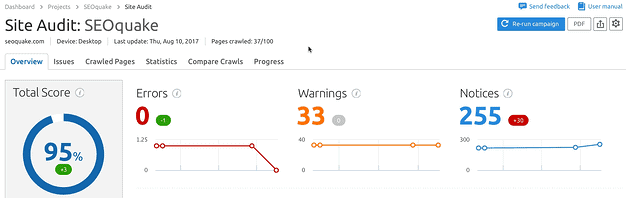
Simply set up a Site Audit project and wait until your website is crawled. If you have an existing Site Audit, just hit ‘Re-run campaign’ to get the most recent data possible:
When the audit is complete, hover on “Issues” and click Select an issue > Orphaned pages.
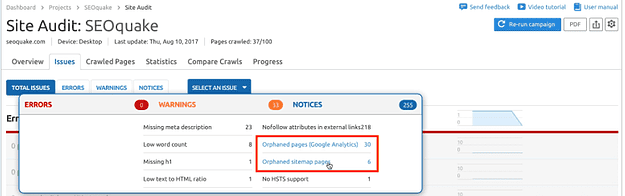
SEMRush will identify any orphan pages that are in your XML sitemap, as well as any pages that have been recorded in Google Analytics within a 30-day date range but don’t have inbound internal links.
Note: to check your GA data, you’ll first need to connect your SEMRush account with your Google Analytics account.
Screaming Frog
Screaming Frog is a technical SEO spider tool that crawls your website and identifies any technical issues that may be impacting your visibility in organic SERPs. Even though it’s technically free to download, you’ll need an SEO Spider license if you want to crawl and audit your site for orphan pages.
Start your crawl by navigating to Configuration > Spider > Crawl and selecting ‘Crawl Linked XML Sitemaps’. You can either crawl URLs using your website’s robots.txt file or provide Screaming Frog with the link for your sitemap.
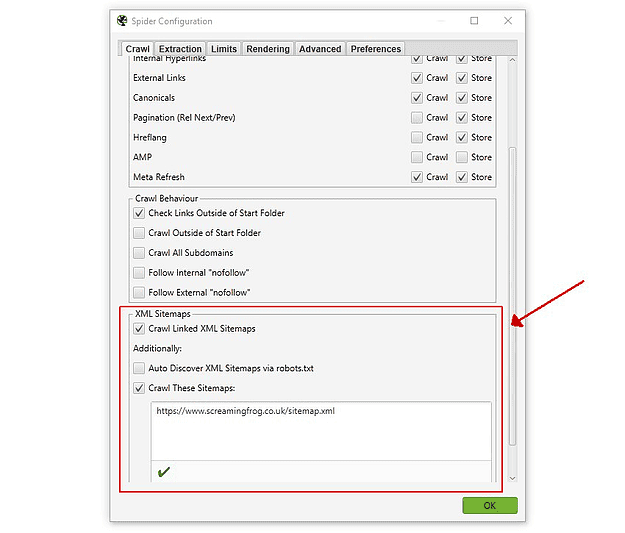
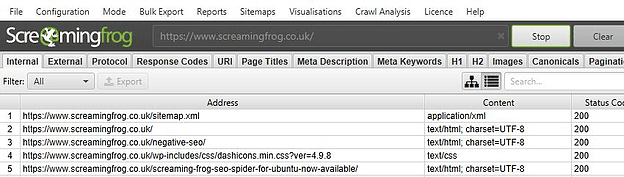
Once you’ve done this, open up SEO Spider and type or copy your website URL and press ‘Start’.
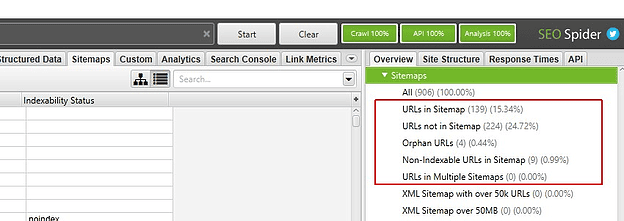
Once the crawl reaches 100%, begin a crawl analysis link on the top menu bar:

When this hits 100%, head to Overview > Sitemaps and filter Orphan URLs:

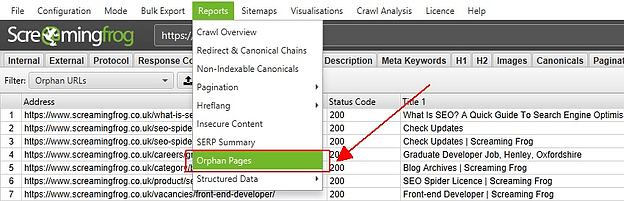
If you need it, you can also export your Orphan Pages report by clicking on Reports > Orphan Pages:
Screaming Frog also gives you the option to link your Google Analytics and/or Google Search Console to find orphan pages.
Sitebulb
Last but not least, there’s Sitebulb. This is another website auditing tool that you can use to find orphan pages (and there’s even a free trial up for grabs).
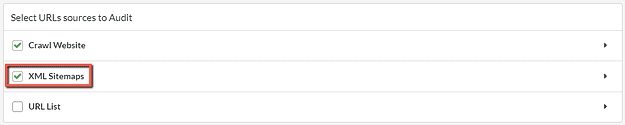
Log on to Sitebulb and start a new website audit or project. Scroll down to the ‘Select URL sources to audit’ and tick ‘XML sitemaps’:
You can also double check that Sitebulb is checking the right sitemaps by clicking into the “XML sitemaps” option. The tool will then display the XML sitemap URLs that it’s going to crawl:
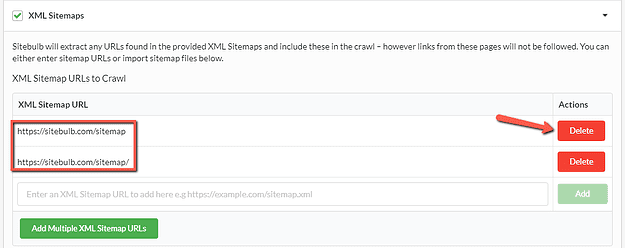
If there are any that are missing, you can manually add them in the entry box or drag and drop them into a panel at the bottom of the page. Similarly, if you don’t want any included, simply hit ‘Delete’. When you’ve got your sitemaps ready to go, hit ‘Start’ and Sitebulb will crawl your website.
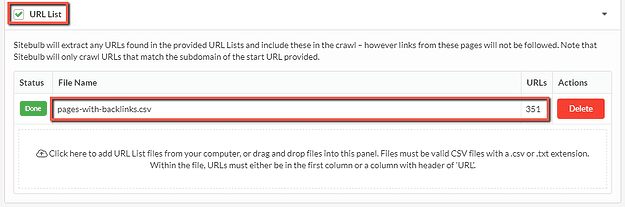
Like Screaming Frog, you can also link up your Google Analytics and Google Search Console account if you prefer to crawl your website using these platforms. There’s also the option to add a .CSV Google Sheets URL list, if you have it on hand:
Once you’ve put in all your sources and completed your crawl, head to the Audit Overview section and scroll down to HTML URL sources:
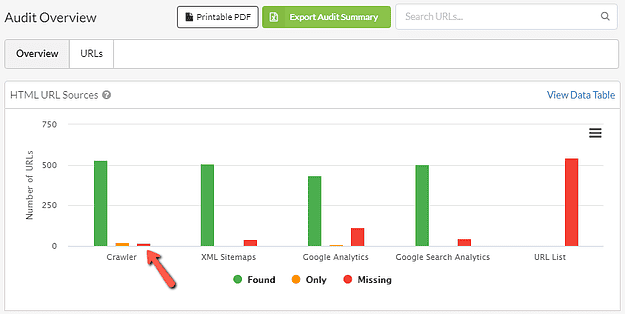
You can then narrow down orphan URLs by looking at Crawler – Missing. Clicking on this bar will open up a list of URLs that weren’t discovered by the crawler. These are your orphan pages:
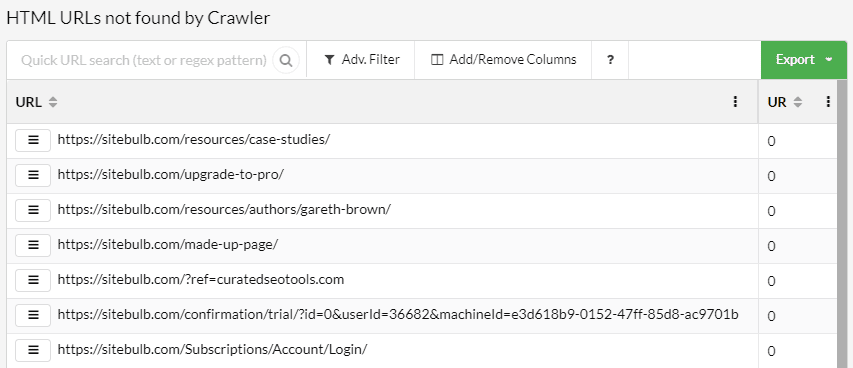
Another option is to head into the Links section and check out the Hints. Any orphaned URLs will be listed here like so:
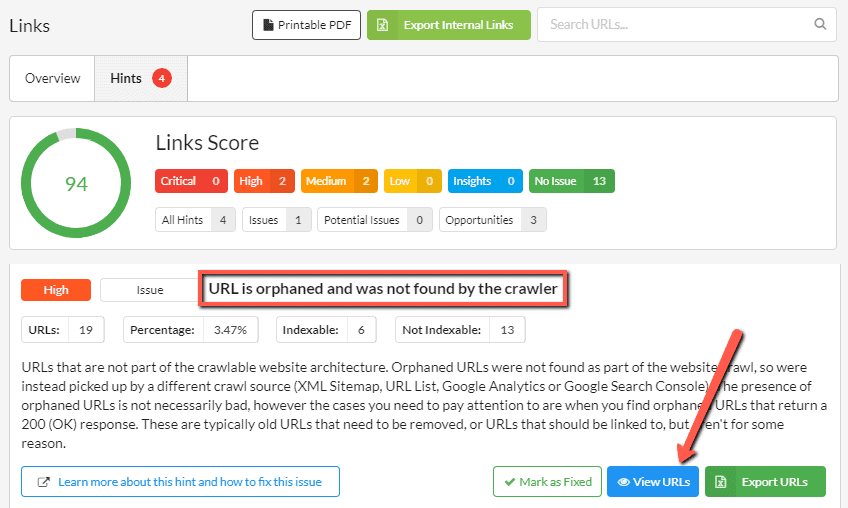
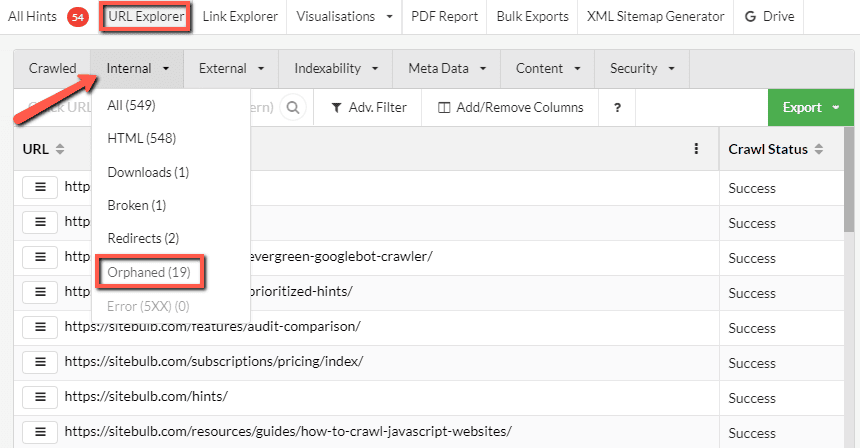
Last but not least, there’s the URL Explorer Filter. Navigate to URL Explorer > Internal and select Orphaned to bring up a list of pages:
In conclusion, while orphan pages can technically be indexed by search engines, it is less likely that they will perform well in search rankings. If they are discovered through external links or listed in your sitemap, search engines can still find and index these pages. However, because orphan pages lack internal links, which help search engines evaluate the page’s relevance and authority, they typically don’t rank as highly.
Internal links are essential for guiding search engines through your site and indicating which pages are important. When a page doesn’t have any internal links pointing to it, it can struggle to gain visibility. Search engines may crawl it less often, and as a result, it could be overlooked or given lower priority.
Think of internal links as a way of signalling importance: if a page were truly significant, it would likely be referenced across other pages on your site. By failing to link to a page, you’re essentially sending a message to search engines that the content is not valuable or worth promoting within the site’s structure. Therefore, orphan pages, by nature, have a reduced chance of ranking effectively and contributing to your site’s overall SEO success.
History of algorithms and orphans
The concept of orphan pages in SEO refers to pages on a website that are not linked to by any other pages within the same domain, making them difficult for search engines to discover and index. Over time, search engine algorithms have evolved to account for orphan pages in various ways, improving how they crawl, index, and rank content.
In the early days of search engines like Google, web crawlers primarily relied on links to navigate the internet and discover new content. If a page wasn’t linked to by any other page, it had a high chance of being overlooked or never indexed, regardless of its content quality. Orphan pages, therefore, were essentially invisible to search engines, making it difficult for website owners to get these pages ranked or discovered by users.
As Google’s algorithm developed, it began to prioritise the structure of a website, focusing on the internal linking structure as a crucial factor for SEO. This led to the introduction of concepts like PageRank (in the early 2000s), which tracked the flow of link equity through a website. If a page didn’t have any inbound links, it essentially lacked any link equity and had a lower chance of ranking in search results. While this algorithm didn’t directly account for orphan pages, it made it clear that a page without internal links was at a severe disadvantage in SEO.
By the time Google’s Panda (2011) and Penguin (2012) updates rolled out, search algorithms became more sophisticated, focusing not only on content quality and link-building but also on site architecture. These updates indirectly impacted orphan pages, as they highlighted the importance of having a solid, well-structured website with user-friendly navigation and proper linking. Orphan pages were more likely to be penalised by these updates because websites with poor internal linking were often seen as less optimised and harder for search engines to crawl.
The Mobile-First Indexing update in 2018 also affected orphan pages. With more users browsing the internet on mobile devices, Google’s algorithms prioritised mobile-friendly pages. Orphan pages, often overlooked in the site’s mobile navigation, could suffer if they weren’t linked properly or accessible on mobile-friendly designs. Google began focusing on overall site usability and user experience, which required ensuring every page was reachable, relevant, and linked in some way.
Today, Google’s core updates and continuous algorithm refinements make it clear that orphan pages, while not directly penalised, can significantly hinder a website’s SEO performance. These pages need to be appropriately linked through internal navigation, such as site menus, related content sections, and footer links. Modern SEO practices focus on creating an interconnected site structure where every page has a clear path for discovery, ensuring that even those less-visited pages have the opportunity to be indexed and contribute to the website’s overall authority.
Ultimately, the history of algorithm changes surrounding orphan pages reflects a growing understanding that site architecture and internal linking are essential for both user experience and SEO performance. Algorithms have shifted from a simple focus on individual page links to a more holistic approach, considering how each page fits into the overall site structure.
It’s time to get more out of your SEO
Orphan pages hurt your rankings and revenue, which is why it’s important to find and fix these pages as soon as possible. But these aren’t the only part of your SEO strategy that matter. Every element needs to be on point if you want to maximise your web performance and grow your business online. And that’s what we at OMG do best.
Our SEO Gurus will help you turn oversights into opportunities, from pinpointing the most profitable keywords for your business to increasing your rankings in SERPs. Plus, it’s absolutely FREE to get started. Claim your complimentary expert online digital marketing audit worth $2,000 and unlock explosive revenue growth, powered by evidence-based SEO from the Top Australian SEO Agency for Proven Search Results.

About the author
Read More Blogs
-
 10 minutes read
Are Your Search Campaigns Ready for the Google Ads Migration?

Last updated on:
-
10 minutes read
More AI In Search, More Ads In AI & More Choice For Social Users: This Week’s Updates
Last updated on:
-
Last updated on:




Stop Guessing What Your Marketing Should Do Next.
Your free $4,000 strategy session shows where your digital marketing is leaking performance across search, paid media, content and conversion. You leave knowing what to fix first and what a stronger strategy could produce.