

What Are Internal Links in SEO?


Last updated:
25 July 2025
|
13 minutes readKey Takeaways
- Internal links are in-site hyperlinks that help users and search engines navigate and discover related content.
- Contextual links guide users through relevant pages, spreading link equity and improving crawl depth.
- Maintaining 3-9 relevant internal links per page supports SEO value and page visibility.
- Fixing broken links with 301 redirects preserves traffic, link equity, and user experience.
- Including formerly orphan pages into your internal linking structure prevents them from being overlooked by crawlers.
Guide To Internal Links For Search Engine Optimisation / SEO
There’s a simple yet massive thing that most marketers overlook when it comes to SEO. It’s not external links or backlinks. It’s not content marketing. It’s not even the mountain of Google algorithm updates that are rolled out every year. It’s internal links!
Why are internal links important
Internal linking is often cast aside by marketers in favour of external links — despite the fact that building internal links helps Google index your website faster, improve positive user behaviour signals, and boost the ranking pages on your site.
So, what are internal links? Why is the right internal linking strategy important for SEO? And how can internal links help make your web pages more discoverable by Google and your site visitors?
Keep reading — we will answer all your questions and more.
What are internal links?
Internal links are hyperlinks that you use to link one page on a domain to another page on the same domain. These are different from external links, which are hyperlinks from one website to another website.
Code Sample

Image credit: Moz
For example, if we’re writing a blog post about keyword research, we might have our links point to other blog posts about white hat SEO. That’s an internal link:

In the same blog, we might link to a tool that our visitors can use to help with keyword research, like KWFinder. That’s an external link:
Optimal format for internal links
Try to use descriptive anchor text, or keywords, in anchor text that give a sense of the topic or the keywords the source page is trying to target.
How does internal linking help improve SEO?
Internal linking strategies are essential for two reasons:
- It helps set up your site architecture (also known as information architecture)
- It spreads your link juice (also known as link value or link equity)
First, let’s look at site architecture or IA.
It doesn’t matter what industry you’re in. Your end goal is to create a website that’s relevant and valuable to your users.
A massive part of that is making your site structure easy to navigate.
Your IA is how you structure information. Another way to think of it is like your sitemap or navigation bar.
If you’re running a shoe company, your IA might look like this:
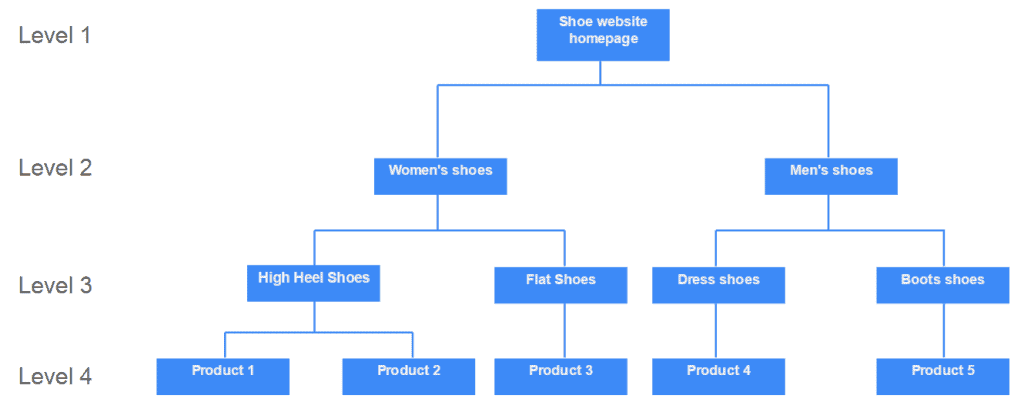
Image credit: Adobe
Internal links are critical here because they help search engines (and your users) navigate around the pages of your site and understand the hierarchy of information.
You see, a search engine doesn’t automatically know all the content that is on every website in the world. It uses its web crawlers to scour the internet for content to add to their index:
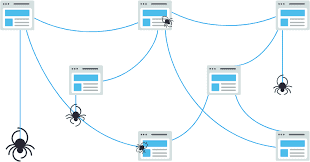
Image credit: Moz
Think of your internal links like the different lines on a spider web. Without them, the crawler can’t get from one webpage to the next — and if the crawler can’t get to the page, then it doesn’t exist in Google’s eyes.
Your information architecture also plays a huge role in delivering a good user experience for visitors. It decreases the bounce rate and improves engagement — all of which help you rank higher in search results.
The second thing internal linking does is spread link equity.
What is link equity?
To understand what link equity is we need to go back to the goal of every search engine: to provide the most useful and relevant results for users. One of the key ways that Google ranks sites for usefulness is based on how credible that domain is in the search engine’s eyes. Part of the way they measure that is through internal and external links.
External links Vs. Internal links
Think of every external link back to your site like a vote from another site. As more quality websites link back to your website, Google will perceive your site as a valuable resource and ranks you higher in search rankings.
They look a bit like this:
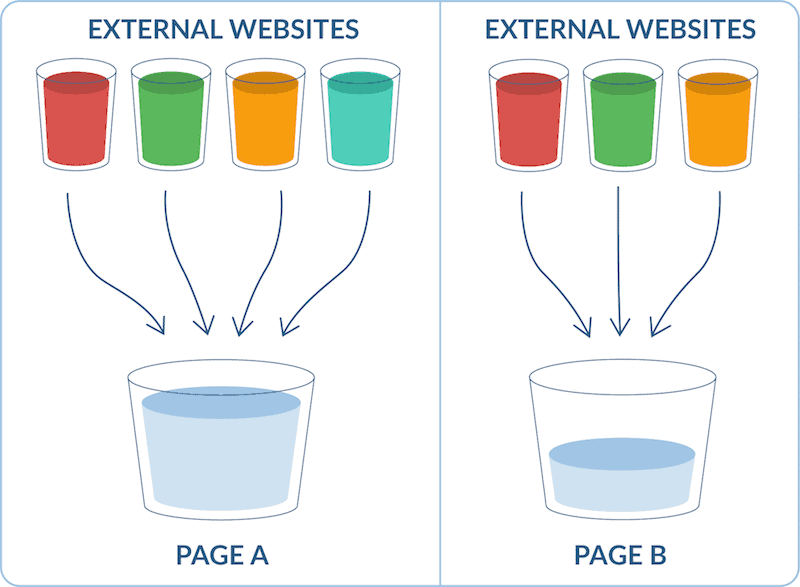
Image source: WooRank
Makes sense, right? But here’s the thing: link value can also be passed on via internal linking. This helps distribute the link equity throughout your website, so more pages benefit from this boost in link authority:
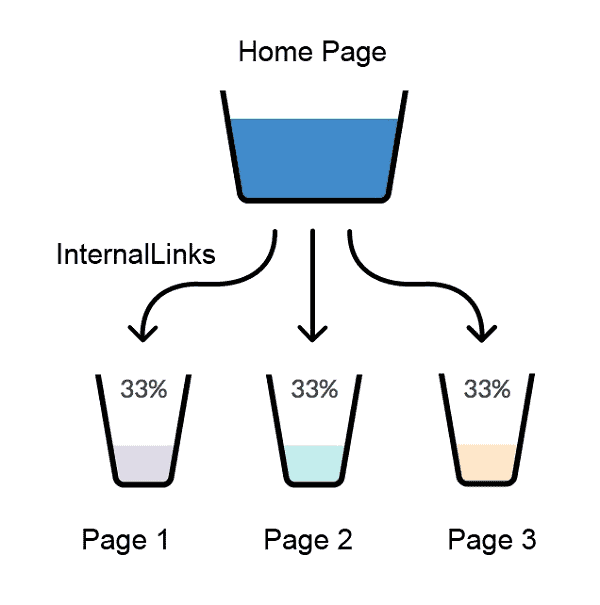
Image source: Neil Patel
Without internal links pointing to these pages on your site, all of the work you did to earn your hard-earned link value would stop at one page, like a dead end.
How to set up the ideal internal link structure
We’ve covered what internal linking is and why it matters. Now it’s time to dive into the meaty part: setting up the best internal link strategy to increase your site’s visibility on organic search results.
How to set up your internal linking structure
If your site is just your homepage and a bunch of other pages with no hierarchy of information, it makes it incredibly difficult for Google to understand your IA.
That’s why the number one best practice when it comes to your internal linking is to have a clear structure.
So how can you achieve this?
Easy: structure your content into pillars, like so:
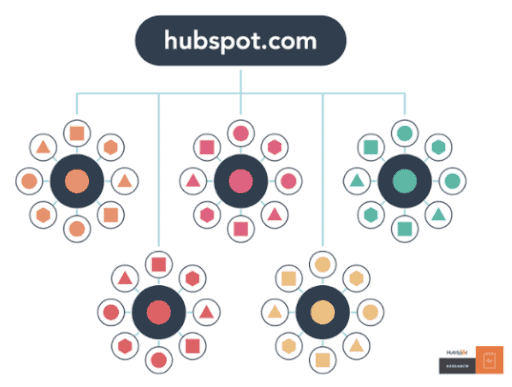
Once users land on your homepage, they can easily navigate to your most important pages (also known as your pillar pages). From there, they simply click on that link to find topic clusters of valuable pages and content related to that topic.
Internal links help search engines crawl your site
Another thing to keep in mind when building your website structure?
Try to have the minimum amount of links possible between your homepage and any other page, and don’t forget to link to secondary pages (such as your contact us or privacy policy) in your footer links. This makes it easier for Google to crawl your site, and better spreads link equity to all your internal pages.
A shallow website (i.e. one that requires three or fewer clicks to reach every page) is far more preferable than a deep website (which requires lengthy strings of clicks to see every page on your site). Search Engine Journal
Link to your most important pages
You can’t link to every word (aka anchor text) on your site to another page without being penalised by Google.
This means you have to be strategic about the target pages you add internal links from and which pages you link to.
As we touched on earlier, internal linking helps to spread link equity throughout your site, which in turn can help underperforming pages rank higher up the search engine results pages (SERPs) on Google.
So how do you ensure you are spreading link equity from high volume, high authority pages to lower pages?
Start by using a dedicated backlink tool, such as Ahrefs, to find the pages on your site that have the most backlinks:
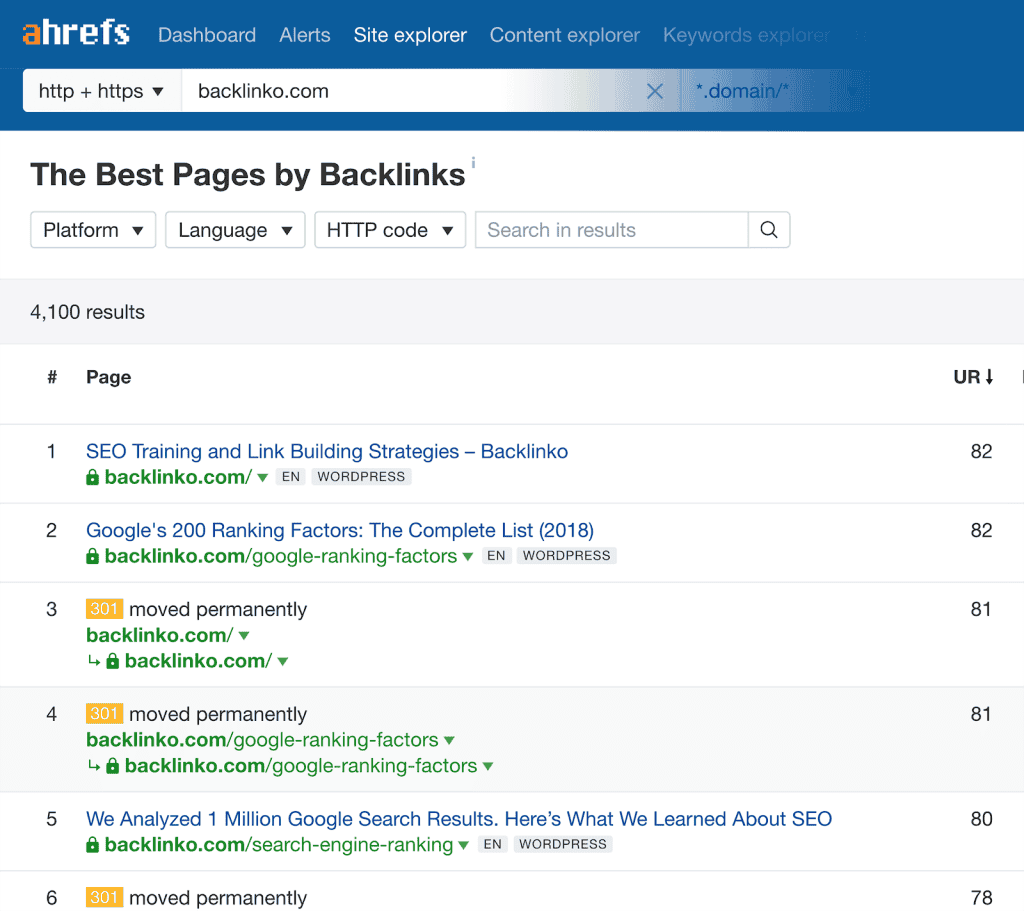
Image source: Backlinko
Once you’ve found these, focus on adding internal links from these pages to pages that have fewer or no links.
This little action requires little effort on your part, but when done consistently will help give these underperforming pages a little extra boost. It’s also a great way to help boost the page authority of a new page on your domain.
Don’t go overboard with the number of links on a page
Sure, internal linking is important. But, it’s also important not to go overboard with the number of internal links you have and link every second word to different pages on your site.
If you have too many internal links, this sends a red flag to Google that your site might be spammy or low quality — and you risk getting penalised as a result.
So how many links should you have per page? A general rule of thumb is three to four, but this could go upwards of 10 or 20 if you’re writing a lengthier blog post. Unfortunately, there is no magic number or ratio when it comes to internal linking.
At the end of the day, the key is to internally link strategically and always with your user in mind.
Make your links crawlable
Your web pages can only appear to users in search results if Google can crawl your website and follow your links. However, they can only do this if you have the right link formats in place.
In Google’s own words:
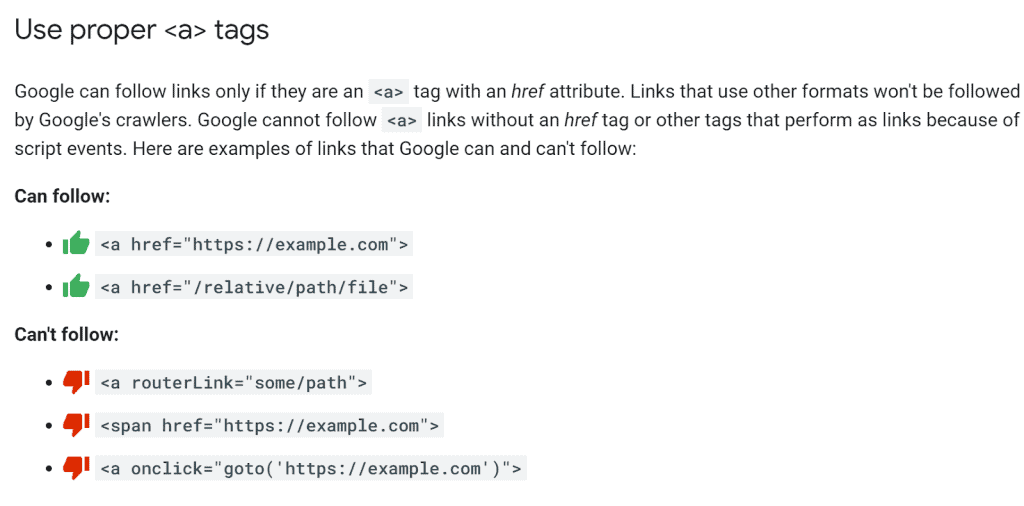
Not sure if you’re using the right format for your links? Speak to your developer or SEO services agency and ask them to check your link attributes, and update any that aren’t following the a href structure.
While we’re on the subject, this is also a good opportunity to make sure that all of your links aren’t a nofollow link with the “rel=nofollow” tag.
Optimise your anchor text
Anchor text refers to the words that you use when you want to link from one web page to another.
Let’s take an example. In this article about content marketing, we link the anchor text “why link building matters” to a page about backlinks:
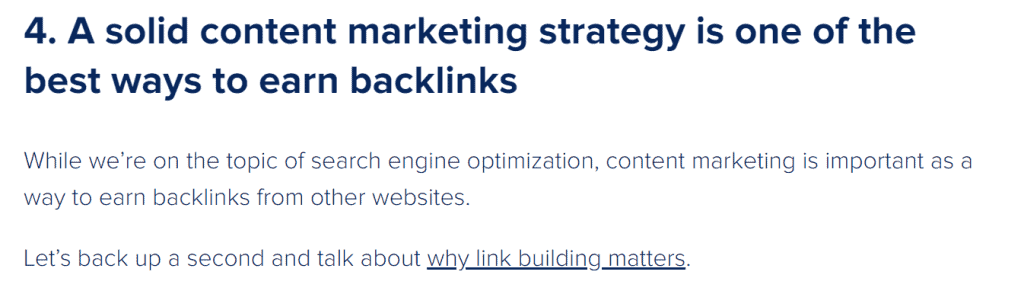
Your anchor text helps search engines (and your audience) understand what the page is that you’re linking to and provides key phrase ranking opportunities if you optimise your anchor text for relevant keyphrases.
According to Google:
The better your anchor text is, the easier it is for users to navigate and for Google to understand what the page you’re linking to is about. With appropriate anchor text, users and search engines can easily understand what the linked pages contain.
So, how do you write optimal link text for search engines and users?
Follow these best practices:
- Use descriptive anchor text that gives users an idea about what you’re linking to
- Keep your link text to a few words or a short phrase (i.e. “thanks for sharing” or “this article”)
- Use keywords that you want to rank for, without keyword stuffing
- Make sure you use contextual internal links, so they appear as natural links
- Avoid creating unnecessary text that doesn’t help users navigate around your site
How do you find internal linking opportunities?
One of the best ways to find internal linking opportunities is to find pages on your site that rank for specific topics and make sure they link to one another with descriptive anchor text.
Check how your internal links are set up using Google Search Console
Wondering how your site’s internal links are currently set up? Google has a handy feature to help you do just that:
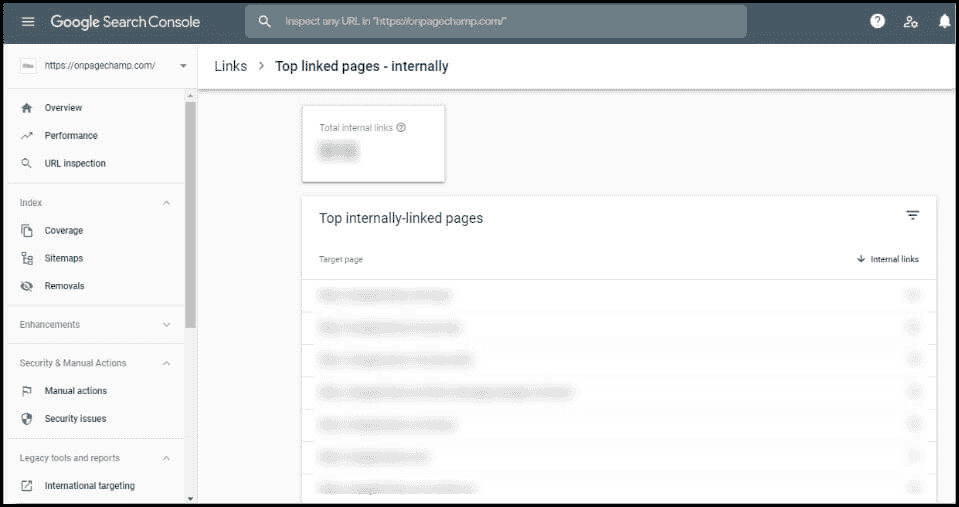
Image source: OnPage Champ
- Just hop into Google Search Console and click on the Links Report.
- Once you get here, you can see exactly how your internal links are set up, including your top linked pages.
- After doing this, you’ll quickly see which pages your internal links pointing to the most — and which need a little bit of TLC.
- Repeat this process once or twice a year. It’s a quick and simple way to evaluate your current internal linking strategy and structure and bump up link value to the important pages you want to rank.
How to fix broken internal links
Unlike external links, you have control over your internal links, which means that you can fix them if they are broken. A broken link refers to an internal link is simply a link on your website that is no longer working, because your website is experiencing one or more of the following issues:
- The destination page has been moved or no longer exists
- An invalid URL has been entered for the link by the web page owner
- The linked web page has been removed from the website
By monitoring your current internal linking structure regularly using tools such as Google Search Console or Ahrefs, you can prevent broken links on your own website or resolve them quickly before they affect your SEO and user experience – as broken links may cause higher bounce rates, reduce user trust and detrimentally affect conversion rates as they act as a “dead end” on your site.
However, we have compiled 4 ways to fix broken internal links so:
1. Check for typos
One common reason for broken internal links on websites is typos. Check to see if the 404 error is caused because of a misspelling and fix it. Easy.
2. Re-publish the page
This is another useful solution for fixing broken links in terms of Search Engine Optimisation / SEO, especially if the missing page has backlinks pointing to it. Rather than recreating the page, just re-publish the old one so you can maintain the authority of the page and prevent broken links on the website.
3. Redirects
Using 301 redirects is a method Google recommends for fixing broken internal links. Ideally, you redirect to a page with relevant content, such as a blog post or a category page. Redirecting broken internal links does take a bit of time, but it will keep the link juice flowing and earns you more page views, which is good for your SEO.
4. Delete the Broken Link
When you’ve exhausted all options, you can simply delete the broken internal link. The only downside is that you lose an opportunity to increase page views, time on site, and pass link value to relevant pages. We recommend that you only do this if you think that it the link is not valuable to your site.
Orphan Pages
Another internal linking issue is orphaned pages, which is a page that is not linked to at all from other relevant pages on your website. This means that the orphan page can’t be accessed by a search engine crawler and therefore, can’t be indexed – which is not optimal for SEO.
How to fix:
If an orphan page is valuable, then ensure that you include it in your internal linking strategies. If it should not exist, or you don’t want it to be ranked by search engines, then we always recommend either removing it from your site entirely, or adding a “noindex” tag to the link.
How to improve internal linking?
Improving internal linking on your website involves strategically connecting relevant pages to enhance navigation, distribute link equity, and improve SEO. Start by structuring your site with a clear hierarchy, ensuring important pages are easily accessible.
Use descriptive, keyword-rich anchor text that naturally fits within your content, helping both users and search engines understand the context of linked pages.
Regularly audit your internal links to fix broken links and remove outdated or excessive links that may dilute link value. Prioritise linking to high-value pages, such as service pages, blog posts, or conversion-focused content, to drive engagement and rankings.
Additionally, consider implementing breadcrumb navigation and a well-organised menu to improve user experience. By maintaining a balanced and logical internal linking strategy, you can strengthen your site’s SEO while making it easier for visitors to find relevant information.
The final word
Not sure if your internal linking strategy is up to scratch? Want to combine great on-site / on-page SEO with a smart link building strategy to win more organic traffic real revenue results? We’re here to help.
Claim your free online digital marketing audit today and learn how you can catapult your website to the top of search.

About the author
Read More Blogs
-
 10 minutes read
Are Your Search Campaigns Ready for the Google Ads Migration?

Last updated on:
-
10 minutes read
More AI In Search, More Ads In AI & More Choice For Social Users: This Week’s Updates
Last updated on:
-
Last updated on:



Stop Guessing What Your Marketing Should Do Next.
Your free $4,000 strategy session shows where your digital marketing is leaking performance across search, paid media, content and conversion. You leave knowing what to fix first and what a stronger strategy could produce.