

Complete Guide to Google Ads Keyword Strategy


Last updated:
31 December 2025
|
56 minutes readKey Takeaways
- A keyword strategy outlines how to select, match, and group keywords in Google Ads to attract the right audience effectively.
- Match types, such as broad, phrase, exact, help balance reach and precision in targeting.
- Negative keywords filter out irrelevant traffic, saving budget and improving relevance.
- Dynamic Keyword Insertion (DKI) boosts ad relevance but must be used carefully to avoid mismatched messaging.
- Split ad groups by match type and campaign funnel stages for clearer insights and optimisation.
- Responsive and Dynamic Search Ads enhance performance with automation and broad keyword coverage.
Keyword Strategy, Matching Types in Google Ads
Google Ads Keyword Strategy – Keywords are the backbone of any successful SEO or PPC campaign which is why doing your research is so vital. Every Google search has some sort of intent behind it — whether it’s commercial, navigational, transactional or informational. When you target the right keywords with the right ad creative, that’s when the magic happens.
But before you begin developing your creative, you need to define WHAT keywords you’re targeting and with which ads. In this keyword strategy guide, we cover the different keyword match strategies you can use, how to conduct better keyword research, and tips to ensure you’re spending your budget effectively on the right search terms.
Breaking down the difference between keyword match types
Your Google ads keyword strategy is one of the most important considerations when it comes to setting up your campaign. In a nutshell, the specific ones and the types of keywords you select will affect which search terms trigger your ads to appear, and can prevent your ads from showing up for unnecessary searches.
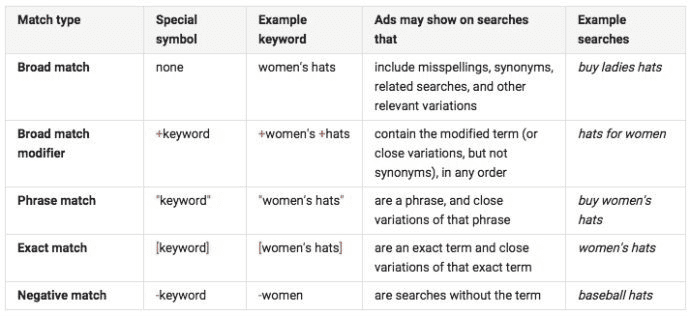
For your Google ads keyword strategy, there are five different keyword match types you should be across:
- Broad Match: Google will show your ads for misspellings, synonyms, and other related variations of your target keyword.
- Broad Match Modifier (BMM): Your ad will appear for modified versions of your specified search term, such as the words put in a different order.
- Phrase Match: Your ads will show up for phrases that include your keyword.
- Exact Match: Google will only show your ads for searches that match your target keyword exactly, or that are extremely close.
- Negative Match: These are keywords that you want to exclude from your ad campaign. This means that if someone runs a search for them, your ad won’t appear.
Here’s how it might look for an eCommerce online store that sells products like women’s hats:
Guru tip: Changes to Phrase Match and BMM
There’s a new update to Google Ads that should make it easier to match your ads to the right keywords in Google Search. From February 18 2021, Google’s phrase match and BMM feature is getting an upgrade. Here are the details:
Previously, Google’s broad match modifier–which let you target more relevant searches–wasn’t great at respecting the order of words in a search. For example, it would treat “Boston to NYC moving services” the same as “NYC to Boston moving searches.”
With the new update, BMM and phrase match keywords will begin to match the same user searchers. Your ads will now only show on searchers that have the same (or similar) meaning of your keywords.
What does this mean? Essentially, Google’s algorithm understands that “Boston to NYC” and “NYC to Boston” mean very different things. Now, it’s applying that knowledge to help display only the most relevant ads to users. It also contextualises different kinds of searches, eliminating ones that aren’t relevant to your targeted queries.
The full details get pretty technical (you can read more about it in our blog post on semantic search). But, the bottom line means that Google is phasing out its older “broad match modifier” feature, and expanding phrase match to make it better at understanding the intent behind searches. This feature fully replaced BMM keywords from July 2021.
6 Ways to Define your Google ads keyword strategy and match types:
If you haven’t gathered already, your keyword match types matter because they play a big role in the success of your campaigns. It allows you to ensure your ads appear for the keywords you want to, while eliminating irrelevant matches that burn your ad spend.
This brings us to the next step: choosing your keyword match strategy. We’ve broken down the benefits and drawbacks of each match type below, in order to help you weigh up which one to use in your campaigns.
1. Broad match
This is the default setting and will give you the widest reach for your searches. However, this is also the fastest way to drain your PPC budget, as your ads will be displayed on irrelevant variations of your keyword.
Going back to the women’s hats example, your ad might appear for a search about “ugly hats on women” — the last thing you want if you’re trying to get people to buy your product.
We generally don’t recommend using broad matches for campaigns, as these ads typically have a lower conversion rate. With that being said, it might be a suitable short-term option if you’re under the pump and don’t have time to conduct in-depth keyword research.
2. Broad Match Modifiers (BMM)
Broad Match Modifiers are a more effective way to keep your impression count high, while eliminating some of the irrelevance you get from broad match types. If you’re going for brand awareness or reach at the top of the funnel, this is a more effective and efficient approach.
3. Phrase Match
Phrase Matches are perfect if you already have an idea of the specific term, or terms, that you want to target. This strategy allows you to get more granular with your ads and utilise your ad traffic for more relevant traffic. However, this option does require you to do some heavy lifting in terms of keyword research and set-up.
4. Exact Match
If you know exactly what your customers are searching for, exact match will get your ads in front of these search terms only, to the exclusion of (almost) all others. An exact match strategy will give you the highest relevance for your campaigns and typically results in the highest click-through rates.
The trade-off comes when it comes to reach. Because you’re targeting a narrow group of keywords, you’ll have fewer impressions than you would if you were using a broad or phrase match strategy.
5. Broad, exact, phrase…which one is best?
How you structure campaigns is up to strategy, budget, competition and ultimately your objective. The easiest way to break it down is in terms of the customer funnel: you try to reach as many people as possible with broader keywords, then narrow down your list as they move through to the consideration and conversion phase.
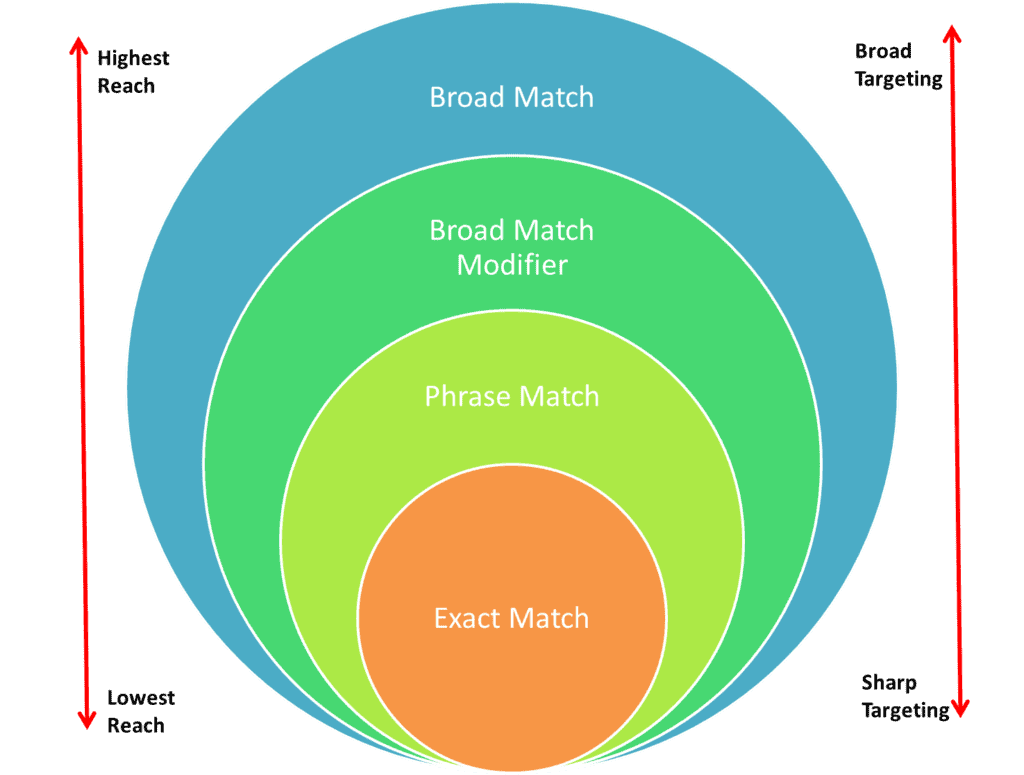
Image source: KlientBoost
Regardless of which approach you take, you should be structuring your campaigns and ad groups in line with your different match types. You might have one campaign for the top-of-funnel that uses Broad Match and BMM, another for the middle-of-funnel using phrase matches, and a final one targeting bottom-of-funnel users with exact match keywords.
6. Have a clear Broad Match Google Ad Keyword Strategy
Most advertisers will use some form of Broad Match keywords in their campaign. These keywords are useful for a number of reasons:
- Customer Match: Broad Match Keywords can be useful to get your ads back in front of customers that have previously engaged with your brand.
- Remarketing Lists: If you’re targeting people who have already been on your website, chances are they’re already interested in your products or services. Broad match keywords can help you get your ad in front of them, even if you don’t know the exact search terms they’re looking for.
- Increase awareness: Broad Match Keywords can increase your brand reach within your market. This is particularly helpful if you’re a big brand with plenty of budget to test, or if your ads are consistently exceeding performance goals.
- Targeting niche or new markets: In some cases, you might not get enough impressions from phrase or exact match lists. In this instance, Broad Match allows you to target a specific niche with many keywords that have low search volume.
To control your spending, we recommend you start with manual bidding and increase as required. You’ll also need to adjust your negative keyword match types so your Broad Match campaigns aren’t restricted. Finally, as always, monitor your performance closely.
A deepr dive into negative keywords
Negative keywords are technically another keyword match type, but these can be used in conjunction with any other keyword match type. These search terms help you achieve profitable campaigns by improving your clickthrough and conversion rate, increasing relevancy, and reducing wasted ad spend.
Negative keywords are critical for a sky-high ROI because you’re eliminating clicks from people who aren’t going to buy anything – that’s a lot of wasted spend you can save!
They also play a crucial role in maximising the ROI of your pay-per-click campaign
Too many advertisers are caught up on what to target that they forget to focus on what not to target.
That’s where negative keywords come in.
Who better to explain negative keywords than Google itself:
“Negative keywords let you exclude search terms from your campaigns and help you focus on only the keywords that matter to your customers.
Better targeting can put your ad in front of interested users and increase your return on investment (ROI).”
Put it this way, the last thing you want to do is pay for dead-end clicks from people looking for something completely different than what you’re offering.
This is where a negative keyword list is worth its weight in gold.
Filtering out irrelevant searchers
It lets you filter out all of the irrelevant searchers, so your ad won’t show when you know the audience isn’t interested.
Let’s say you hire out marquees for weddings and events. Potential customers might search for “marquees” or they might search for “tents”.
What you don’t want is people who are searching for camping tents to trigger your ads.
So, you should exclude camping related keywords from your campaign as negative keywords.
This list instructs Google on the search queries that are not relevant to your products and service. So you don’t have to worry about paying for completely irrelevant clicks for camping tents that will never lead to sales.
Another way to use negative keywords is to weed out the people looking for a free version of your service or product, such as software.
Simply add “free” to one of your campaigns as a negative keyword. However, if you offer a free trial as part of your lead generation strategy, this tactic wouldn’t work.
It’s all about working out the right balance.
Sourcing negative keywords for PPC campaigns
So, now you know what they are and how they work, it’s time to add them to your campaign.
First, you need to choose the right keywords. The tricky part here is that you don’t want to add so many negative keywords that you risk losing potential customers.
It’s a balancing act.
For search campaigns, look for terms that are similar to your keywords, but are probably used by people searching for a different product or service.
Get negative KW using Google’s and search terms report
Start by examining query data based on how people search using Google Ads Keyword Planner and Search Terms Report.
- Go to Google Ads Keyword Planner and type in the keyword you want to target. It will come up with suggested keywords – on this list you’ll see the keywords that you know don’t apply to your business and those you really don’t want to target. These are good candidates for your negative keywords list.
- Go to Search Terms Report to see the search queries that people typed into Google to trigger your PPC ads. Use this to build a list of positive and negative keywords.
- Perform a Google search of your primary keywords and peruse the results on the first few pages. These are all results that Google deems relevant to that search query. If there’s anything in there that’s going to cost you money, add the terms to your negative keyword list.
- Get creative. If you’re selling calendars, does your ad show when people search for the hit movie “Calendar Girls”? Think about movies, songs, books, famous people and other wacky search terms that could trigger your ad.
How to add negative keywords to your PPC campaign
Adding your list to your campaign is one of the first things you should do. You might have chosen the right keywords and written award-winning ad copy, but if your ad can be triggered by completely irrelevant search terms, you’re wasting precious budget.
Once you’ve found your negative keywords, adding them to your Google Ads campaign is easy.
First, work out whether you want to apply them at a campaign level or an adgroup level.
- Campaign level – You’re telling Google to NEVER show any of your ads for these keywords, e.g. you are selling wine glasses and never want your ads to show up for eyeglasses.
- Adgroup level – You’re telling Google not to show your ads for negative keywords in this particular adgroup. This gives you control over which campaigns are serving for given terms.
Now you’re ready to set up your negative keyword list:
- Select the campaign or adgroup
- Click on “Keywords”
- Click the “Negative keywords” button
- Click +KEYWORDS to add negative keywords
- Click Save.
Using negative keywords in Bing Ads
Google isn’t the only on that lets you refine your campaigns with negative keywords. Microsoft’s Bing Ads offers it too, albeit in a slightly different way.
The biggest difference between Bing Ads and Google AdWords is that you can only designate phrase and exact match negative keywords.
But you can still set up campaign and ad-group level negatives, as in Google Ads. Naturally, you should employ your negative keyword strategy in your Microsoft Bing PPC campaign as well.
Negative keywords are one of the most powerful tools in your Google Ads toolbox. Use them properly and you can prevent irrelevant keywords from triggering your ads, which ultimately helps you avoid wasted spend across your campaign.
Building your list should be one of the first thing you do to refine and optimise your PPC campaigns.
What are negative keywords?
Split your keyword groupings by ad campaign
We’ll be frank here: messy and disorganised campaigns are every PPC agency’s biggest nightmare, but they’re something we come across on an almost daily basis. It’s easy to create one campaign and throw all your keywords in there, but this is a surefire way to burn more money than you need to and lose track of what’s happening with your PPC ads.
An effective keyword grouping strategy can help you optimise your campaigns over time, and remove a lot of the headache associated with managing multiple ads and keywords.
Here are four things to do to get better keyword groupings;
- Do your keyword research. If you’re a footwear retailer, you might start out with a keyword like “buy shoes online”.
- Create high-level keyword groups based on clusters. For example, you might have one keyword group for “women’s shoes online Los Angeles”, one for “free shipping women’s shoes Sydney” and one for “best sneakers for women”
- Create subgroups of more specific keyword groupings. In the example above, your Free Shipping group might contain sub-groups for search terms like “Free shipping Nike sneakers Sydney” or “free shipping sandals Sydney”.
- Tweak these sub-groups until you narrow down the keywords that bring in the desired results.
If you’re setting up a new campaign, you can start doing this from the outset. On the other hand, if you already have ads running, it’s time to roll up your sleeves. Revisit your keyword grouping strategy based on your keywords, and see how you can improve your structure.
Don’t rule out one singular keyword ad groups
If you want to get two PPC marketers into an argument, ask them about their opinion on Single Keyword Ad Groups (SKAGs).
Everyone in the PPC world has different opinions on this but, depending on your industry, you might find great success with SKAGs. For instance, we’ve worked with companies in the B2B space where a focused SKAGs approach has worked wonders. While eventually, you may have some challenges when scaling your account, it can work effectively to get you results.
SKAGS are good for a few reasons:
- Improved CTR’s
- Budget control
- Improved average positions
- Better analytics on traffic
- Lower CPCs (which then ultimately leads to more conversions and improved conversion rates)
SKAGs might be right for your business if you’ve got a limited budget, a focused location, and the audience volume is high. If you have more ambitious KPIs, need to scale up your business quickly, or you’re seeing low search volume for a particular keyword, it’s best to adopt a different approach.
A good Google ads keyword strategy should eliminate keyword conflicts
Keyword conflicts simply mean your ads are blocked for a certain keyword you want to rank for due to a negative keyword.
Let’s say you’re running an ad for the keyword “Leather blue sofas”, but your ads aren’t delivering any results at all — despite the fact that the search volume is there. In this case, it might simply be that your ad isn’t showing because you’ve got “-blue” in your negative keyword match list.
If you have an ad that isn’t performing as expected, there are a few things you can do to check if you’ve got a keyword conflict:
- Check your opportunities tab to see if you have any conflicts
- Manually find ad groups that should have a lot more impressions than they are getting and do some diagnosis work
- Use a conflict reporting tool
Once you’ve resolved these, you should find much more success with your ads.
Avoid keyword overlap and duplication in your Google Ads strategy
It’s hard to run accounts that have no duplicate keywords, mainly when you’re talking about larger accounts with lots of keywords, bigger budgets and various managers. In some cases, it’s okay to have duplicates, such as breaking out campaigns / ad groups specific by location. However, having multiple duplicates can take away from the performance of your campaigns.
Thankfully, Google Ads is pretty good at finding and removing these overlaps. You can either diagnose and remove duplicates through the Google Ads editor, or search for potential duplicates through the web interface. As long at you have a carefully planned out Google ads keyword strategy, you should do great!
Next We Take A Look At Dynamic Keyword Insertion
How To Create Dynamic Keyword Insertion
While digital marketing is evolving faster than ever, there’s one core principle driving change: consumers are seeking more personalised experiences.
That’s why it’s so important to understand the humans on the other end of your marketing campaigns and tailor them accordingly.
One key way to tailor your PPC campaigns to your audience is by using Dynamic Keyword Insertion.
Dynamic Keyword Insertion is a popular tool used for Google Ads management (formerly Google AdWords), and other PPC ad platforms.
There are some definite pros and cons to the feature.
Get it right and you can generate massive click-through rates for your campaigns.
Get it wrong and you can wind up with some very dodgy looking ads that turn away customers and damage your brand reputation.
In this article, you’ll learn more about what this PPC feature is, how it works, when to use it (and when NOT to), plus pro tips to drive more clicks for your search marketing campaigns.
What is Dynamic Keyword Insertion?
Dynamic Keyword Insertion (DKI) is a popular practice in pay-per-click advertising which allows you to dynamically insert an AdWords keyword into your ad copy, based on the search’s query.
The goal is to ensure your ad text (such as the title or description) is hyper-catered to what the searcher is looking for. In short, dynamic keyword insertion allows you to show searchers a more relevant ad, since the ad copy is dynamically updated to include the user’s real search query.
Because you are creating an ad that contains text which is super-specific to user searches, they are much more likely to click through.
Using DKI to improve Google Ads Quality Score
Google Quality Score is the rating Google gives advertisers based on the quality and relevance of the ads and landing pages to a searcher’s query.
So, by using dynamic keyword insertion, you are improving the relevancy of your ads, and therefore, raising your quality scores.
That means potentially lower prices and higher ad positions.
How does Dynamic Keyword Insertion work?
DKI allows you to customise your ad to match the user’s search query, thus creating a more specific and highly targeted digital online ad that matches the searcher’s intent.
To achieve this, the advertiser has to create a generic ad that contains the DKI formula. Then, when Google serves this ad, it will substitute the keyword that triggered the auction for the formula in the ad.
Before you implement DKI, you’ll want to make sure that you know exactly which keywords are in your ad group. If you’ve included keywords that aren’t related, your ad copy won’t make sense when you employ the DKI feature.
Why dynamic keyword insertion is important:
If used properly, dynamic keyword insertion has the capacity to increase click-through rate. On the other hand, if used irresponsibly, DKR can also get you in big trouble, or worse, sued.
Dynamic keyword insertion is particularly convenient and important to use in businesses where there’s a large inventory of the same item (e.g. eCommerce stores). Since DKR allows businesses to market that item without having to create numerous ad groups, it can save them time, money, and energy.
Let’s take a closer look at some of the pros and cons associated with using DKI.
| Pros | Cons |
| 1. Higher relevancy | 1. DKI fatigue |
| 2. Higher CTRs | 2. Appearing for irrelevant keywords |
| 3. Higher Quality Score | 3. Generic ads for long-tail keywords |
| 4. Character Limitations | |
| 5. DKI saves you time |
Google’s Dynamic Keyword Insertion: How It Works and Why It Matters
Dynamic Keyword Insertion (DKI) is a powerful feature in Google Ads that customises your ad copy based on the user’s search query. This allows advertisers to create highly relevant ads that match what potential customers are looking for, increasing engagement and click-through rates.
To use Dynamic Keyword Insertion (DKI), you need to type a brace and select Keyword Insertion (“{“) from the available options in Google Ads. This automatically replaces a placeholder in your ad headline or description with the user’s actual search term, making your ad more personalised and compelling.
The benefits of Dynamic Keyword Insertion include improved ad relevance, higher Quality Scores, and potentially lower cost-per-click (CPC) rates. By ensuring your ads reflect what users are actively searching for, you increase the likelihood of attracting the right audience and driving more conversions.
When implemented correctly, DKI can be a valuable tool for creating more effective Google Ads campaigns that adapt to user intent in real time.
2 Steps for using DKI
The good news is it’s pretty easy to use the feature in Google Ads.
Follow these actionable steps for using DKI:
Step 1. Create a new ad
Start by going to the Google Ads dashboard and creating a new ad.
Step 2. Write your default text
Then, when you get to the ad creation view, write your default text (the bit that doesn’t change). Type a squiggly bracket into the field and Google will provide you with a number of options, including DKI:
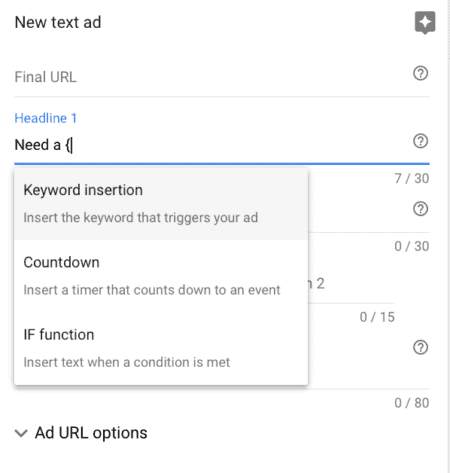
In the example above, the default text is “Need a”.
Then add this piece of code:
{KeyWord:text}
The “text” is a substitute word. So if the keyword is too long for the ad or the code can’t be replaced for any other reason, the default text should represent what you would like to appear in place of the code.
For example:
{KeyWord:Chocolate}
You can put the code in the title of the ad, body or description – wherever it works best for you.
Here’s an example from Google Ads featuring chocolate candy products:
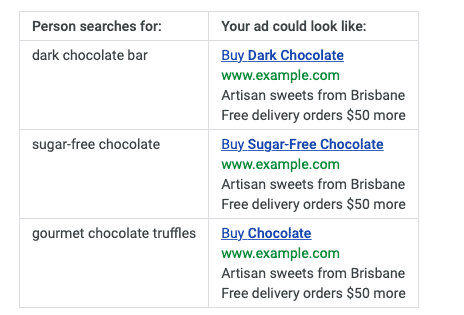
Because “gourmet chocolate truffles” is too long to fit, the substitute keyword “chocolate” is used.
Here’s another great thing about Dynamic Keyword Insertion: Google bolds dynamically inserted terms. So, your ad stands out more which will help with click-through rate.
2 main reasons you SHOULD use Dynamic Keyword Insertion:
Dynamic Keyword Insertion isn’t for everybody but there are some compelling reasons to try it.
DKI is a brilliant option if you:
1. Are short on time or resources for keyword research
Not everybody has the time or expertise to commit to creating really specific ad groups and ad copy. It’s a highly intensive process and takes time to get right.
With DKI, you can use a small group of keywords and still ensure your ad caters to searchers.
It might not always be the best way, but it’s definitely the easiest.
2. Have tons of product SKUs
Dynamic Keyword Insertion is especially handy for businesses that have lots of inventory on the same product, like eCommerce stores.
Why?
Because you can get that item in front of searchers without having to create heaps of ad groups. Think of the time, money and energy you’ll save!
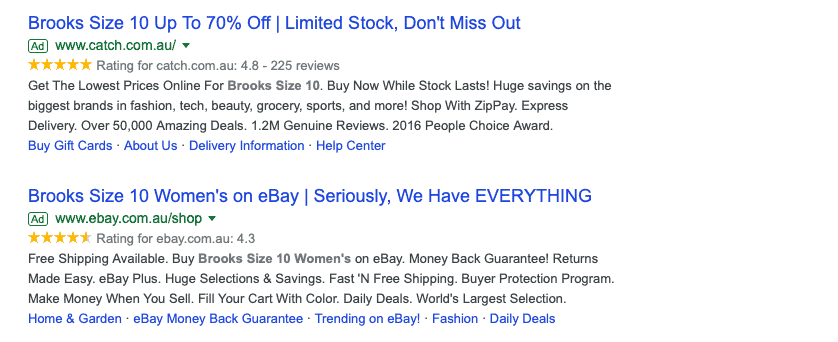
Let’s say you’re advertising for Brooks shoes.
The searcher needs size 10, so that’s what they search for.
If they see an ad that specifies size 10, they’re more likely to click on that than one that doesn’t show the size.
So, rather than creating ads with every shoe size, you can use Dynamic Keyword Insertion.
Like this:
4 tips on when to AVOID Dynamic Keyword Insertion:
DKI isn’t for everybody. Here are few scenarios where you should skip DKI:
1. You’re bidding on competitor terms
You don’t really want competitor terms showing up in your ads, as you can get into trouble. There are actually some sectors where it’s illegal to put a competitor’s name in your ad.
Yes, you can bid on their keywords. But adding their name to your ad is a sure-fire way to get into trouble with Google’s trademark policy.
Bottom line: if you have ad groups with competitor names as keywords, DO NOT use Dynamic Keyword Insertion.
For example, here’s what we see when we search for “myob accounting”:
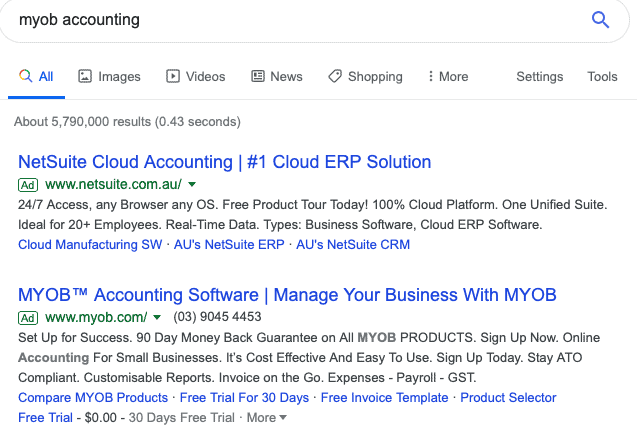
We know that NetSuite bids on “myob accounting” as a keyword. But they haven’t used DKI to put it in their headline.
Instead, they use other PPC tactics to ensure they are positioned above MYOB in the search results.
2. You’re bidding on misspellings
Misspelled keywords in your ads? This doesn’t look professional.
3. You’re bidding on lots of long-tail keywords
Chances are the long-tail keywords will be too long to fit within the character limits of your ads. So this is where the substitute text is put in. This is fine, but not ideal if you’re bidding on lots of long-tail keywords or your keywords just happen to be longer words.
4. You’re using broad match keywords
The whole point of using DKI is to show an ad that’s hyper-relevant to the searcher and match their search query as closely as possible.
Broad match lets search engines to display your ads for variations of the keywords in your account, such as misspellings, synonyms, singular/plural, related searches, and more.
So, if you’re using this for ads together with DKI, your ad can end up looking confusing and irrelevant.
When Dynamic Keyword Insertion goes VERY wrong
DKI doesn’t always run like clockwork. Sometimes you can wind up with an ad that just doesn’t work. In fact, it can even turn potential customers away.
For example, you might get an ad where the words don’t read well grammatically.
Here’s an example where a company set up a broad matching option for “couches” and had the ad matched to “couch”:

(Image credit: Wordstream)
“Great Prices on Couch” doesn’t sound right, and that usually means the chances for conversion are pretty low.
The result?
Wasted ad spend.
In fact, if you want to know what NOT to do with DKI, there’s one company you can look to – ebay.
Here are a few examples of their #AdFails:
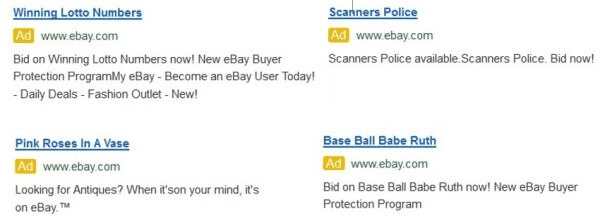
(Image Source: SearchEngineLand)
The problem eBay had is they were using a blanket one-size-fits-all approach to their DKI strategy.
7 Pro Tips to Drive MORE Clicks with Dynamic Keyword Insertion
Follow these essential tips:
1. Research like your Ad budget depends on it
Oh wait, it does.
The only way to use DKI effectively is to research your keywords first.
Let’s assume you already have the keywords you want to bid on. You’ve probably used Google’s Keyword Planner to create this list.
Next, it’s time to sort your keyword list into smaller, highly targeted groups of keywords that are related.
This will help you set up your ad groups for DKI.
One tactic is to look for two-word phrases. For example, blue dress.
Every keyword includes this two-word phrase with words added to the start or end:
- Cheap blue dress
- Buy blue dress
- Blue dress online
- Blue dress sale
By grouping your keywords closely like this, the ad will make more sense when they are dynamically inserted.
2. Use Dynamic Keyword Insertion sparingly
The more liberally you apply DKI to your account, the more problems you’re going to have.
You’ve seen what happened with eBay.
Know exactly which words are in your ad group before you turn on DKI. The best tip we can give you here is this: keep your ad group tight
DKI is all about making your ads relevant to searchers. By keeping your ad groups tight, you can make doubly sure this is the case.
For example, if you’re a tyre fitter, you might have “Audi tyres”, “Honda tyres”, and “Volkswagen tyres” in an ad group.
DKI works best when all keywords in the ad group can be switched out and the message is still crystal clear.
3. Imagine your ad texts
Try to imagine different keywords as the text for your ad. Then, ask yourself:
- Does the ad make sense? Is it grammatically correct?
- Is it saying something you shouldn’t?
- Are you committing trademark violations or creating problems for the brand?
If you don’t take time to check these things, you could end up with this:
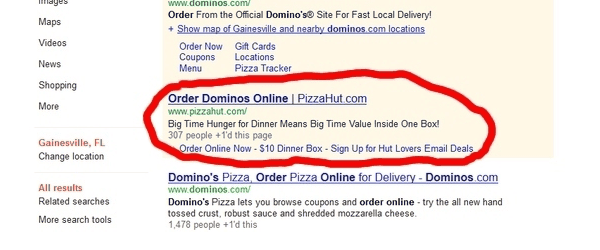
(Image Source: Conversion Theory)
4. Run A/B tests
To see if inserting keywords dynamically is right for you, start by running some A/B tests.
Just as you might experiment with different calls to action and headlines, make DKI one of your Adwords marketing experiments.
To be clear, what you’re testing here is Dynamic Keyword Insertion vs Manual Keywords.
Look at CTR and conversion rates for both versions.
If conversions plummet with DKIs, you know they don’t work with that particular campaign.
On the other hand, if they soar, you are onto a winner.
5. Think beyond the headline
Yes, the headline is the most common and obvious place to use DKIs, but why stop there?
If it makes sense, include DKI in the description text of the ad too. Just be sure to check it makes sense first. With more characters here, you have a higher chance of an eBay style, grammatical fail.
6. Watch your capitalisation
There are different ways you can capitalise your keyword to get different effects in the ad. All you do is change the way “keyword” appears in the code.
Take a look at the options:
- keyword – No capitalisation“buy honda tyres”
- Keyword – First word is capitalised“Buy honda tyres”
- KeyWord – Every word is capitalised“Buy Honda Tyres”
- KEYword – The whole first word is capitalised“BUY honda tyres”
- KEYWord – The whole first word is capitalised, and every following word is capitalised“BUY Honda Tyres”
- KEYWORD – Everything is capitalised“BUY HONDA TYRES”
But it’s not a simple case of saying you want everything capitalised.
Google won’t always accept that. It depends on the context. For example, you can usually have FYI in capitals, but not FREE.
So which should you choose?
Our tip is to stick with the KeyWord example, where each first letter is capitalised. This covers most scenarios without looking awkward.
7. Keep your default text super short
Some of the search terms coming through your ad group may be longer than others. By keeping your default text short, you can make sure your ad will still cater for these.
A word about character limits…
Ever heard the one about the Google Ad with 31 characters in the headline, not 30?
With DKI, it’s possible.
DKI gives you a bit of a wiggle room with character limits.
Okay, it’s not guaranteed for every DKI, but if Google allows it, your headline may be longer than the character limit. This is especially beneficial for ads targeting long-tail keywords.
Next We move to Google’s Responsive Search Ads
If you haven’t started using Google’s responsive search ads (RSA) for your business, it’s time to make the switch — stat.
In 2021, Google announced that it will be sunsetting expanded text ads (ETA) from 30 June 2022.
This means advertisers will no longer be able to create new ETAs or edit existing ETAs. Responsive search ads will replace ETAs as the default ad type.
It’s a big change, but as soon as you see the numbers, it makes complete sense:
According to Google, 15% of search queries have never been searched for before. Responsive search ads have 7% more conversions than ETAs with a similar cost per conversion.
Responsive search ads are POWERFUL. Because they use automation, these ads are able to serve up the most relevant message to different searchers. And more relevance = more conversions.
But it does mean that if you want to move the needle using Google Ads, you have to get familiar with building and optimising responsive search ads.
In this post, we’ll take you through everything you need to know to create game-changing RSA campaigns. You’ll learn:
- What are responsive search ads?
- How to create responsive search ads
- Optimising your responsive search ad campaign’s performance
- Tips and best practices for Google responsive search ads
Let’s jump in.
What are responsive search ads?
Responsive search ads are an innovative ad format that uses machine learning to serve up the most relevant ad for each searcher.
Responsive search ads look almost identical to ETAs in search, but with one key difference.
Unlike ETAs where you input three headlines and two descriptions, you can add up to 15 headlines and 4 descriptions. Google then tests over 43,680 combinations to find the exact right ad to show to that searcher based on different factors like their search query, browsing behaviour, or device.
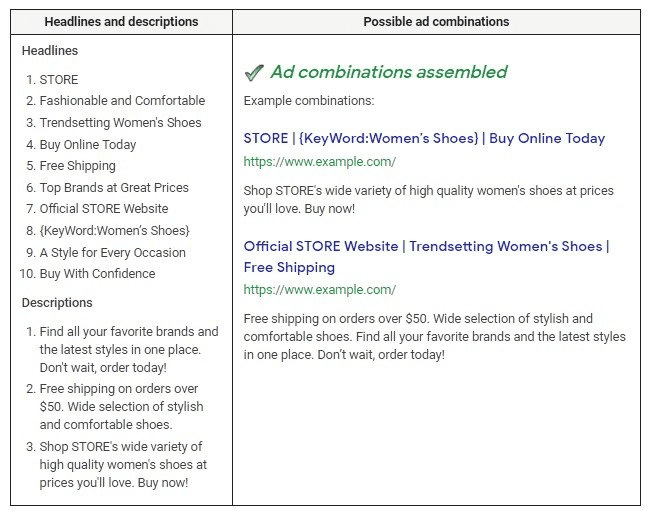
Image source: Supermetrics
Next We move to Dynamic Search Ads
But What are Dynamic Search Ads (DSAs)?
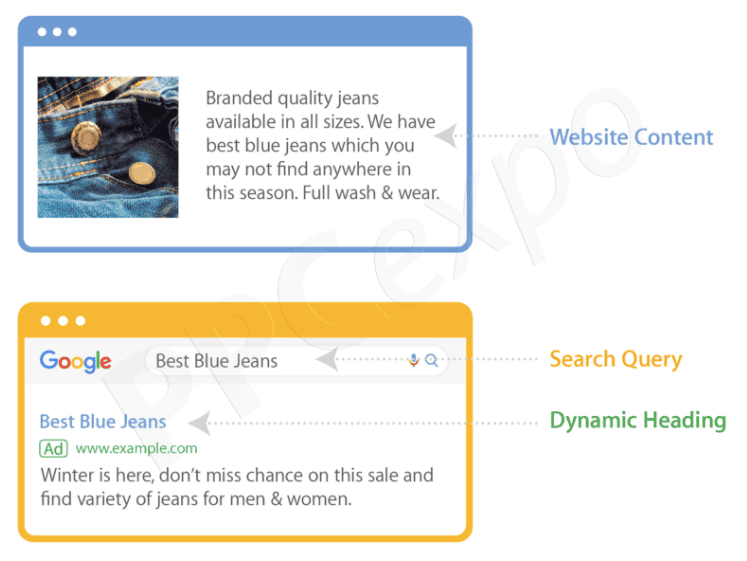
Dynamic Search Ads (DSAs) are search ads that show based on the content of your site, not keywords. Google essentially crawls your site, matching to search terms that are closely related to the content provided. The headline and the landing page are dynamically generated to match the search term.
Dynamic search ads capture unique searches, which can then lead to expansion opportunities. They help you get in front of people who are searching for your products and services, with the right information, without you needing to actively manage keywords or ads.
That’s the key difference between dynamic search ads and traditional text campaigns – you forego keywords and use your website or product feed instead.
Google matches users’ search queries to the type of product on your site or feed, and shows a dynamically generated ad which is tailored to their search. DSAs help to fill in the gaps where your other search campaigns may be slacking.
DSAs are hard to distinguish from traditional text ads, as they still show in the relevant search engine results pages on Google.
(Image Source: PPC Expo)
How have dynamic search ads evolved?
Dynamic Search Ads (DSAs) have evolved as a key component of paid search advertising, offering businesses a way to automatically generate ads based on website content rather than relying solely on pre-defined keywords. Google introduced DSAs in 2011 as a way to help advertisers capture relevant searches that might be missed with traditional keyword-based campaigns. Initially, DSAs used Google’s web crawling technology to match users’ search queries with relevant landing pages, dynamically generating ad headlines and targeting queries based on website content.
As search engine algorithms advanced, DSAs became more sophisticated, incorporating machine learning and improved automation. By the late 2010s, Google enhanced DSAs with better audience targeting, refined matching mechanisms, and integration with responsive search ads. This allowed advertisers to reach broader audiences while maintaining ad relevance. The introduction of artificial intelligence further improved the accuracy of DSAs, enabling them to predict user intent and deliver more personalised ad experiences.
Today, DSAs are widely used by Australian businesses to scale their paid search efforts efficiently. They are particularly beneficial for large websites, e-commerce stores, and businesses with frequently changing inventory, as they reduce the manual effort of managing extensive keyword lists. With continuous improvements in AI and automation, DSAs are expected to play an even greater role in the future of search advertising, helping businesses maximise visibility and conversions with minimal manual input.
2 major differences between DSA ads different from traditional PPC campaigns:
There are t text ad campaigns and DSA campaigns.
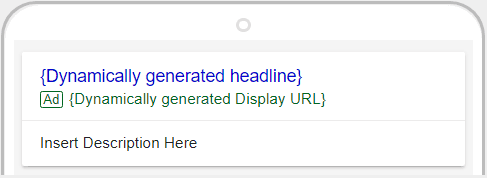
1. Dynamic ad copy headlines
The ad headline for a Dynamic Search Ad is dynamically created by Google.
The search engine pulls information directly from your site or page feeds to populate the DSA headline and create the relevant landing page.
You just need to write the description lines for the ad. As you can imagine, having a tailored ad that is about the actual product searched is a search best practice that dynamic search ads can help you achieve.
2. Bidding
Like a text campaign, DSA campaigns use a cost-per-click CPC budget. This means what you pay is determined by the number of times your ad is clicked multiplied by the maximum CPC.
However, unlike regular text campaigns, you do not apply bids to individual keywords – DSA doesn’t use keywords.
Instead, you apply bids to the auto-target level – AKA the list of different pages on your site that you can target. Once you set bids for each auto target, you will then show in the results based on your ad rank.
How do Dynamic Search Ads work?
Google introduced Dynamic Search Ads in October 2011 to allow advertisers to create targeted ads with ease.
DSA uses Google’s organic web crawling technology to index the website and determine which searches to show ads for.
Google keeps a fresh index of your inventory and, when a relevant search occurs, it dynamically generates an ad with a headline based on the query, and the text based on your most relevant landing page.
The ad enters the auction and competes as normal. But Google won’t enter it for any search where you also have an eligible keyword targeted ad.
So, you don’t need to worry about your ad campaigns competing against each other. Instead, you get better results from broader exposure for more inventory – all without making any changes to your keyword campaigns.
How to set up DSA campaigns
Setting up your DSAs in Google Ads is simpler than you might think.
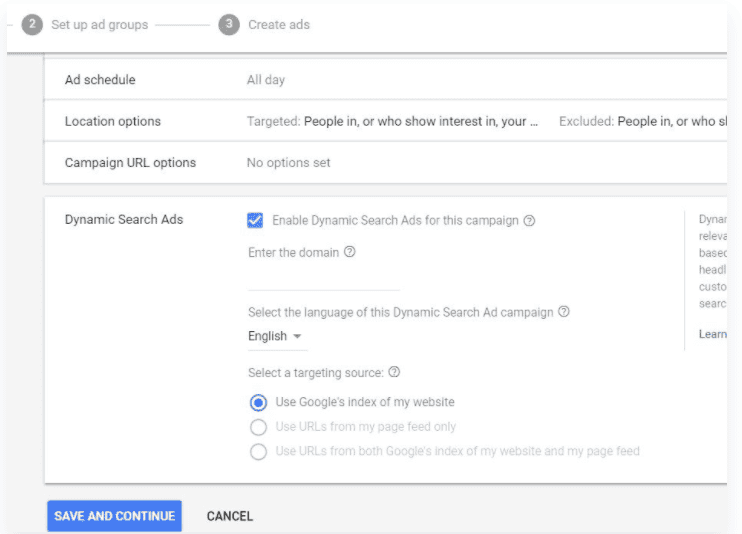
Go through the process of creating a text campaign as you would with any other Google Ads campaign.
In the campaign settings, you’ll see a box to tick: “Enable Dynamic Search Ads for this campaign.”
(Image Source: Instapage)
Once you get to this stage, use the following actionable steps for setting up your first dynamic search ad campaign.
3 steps to create your dynamic campaign:
Step 1. Select the goal for your new search campaign
From the campaign tab in Google Ads, select the blue “+” to start a new campaign. Then, select the goal you have for your new campaign, or select “Create a campaign without a goal’s guidance.”
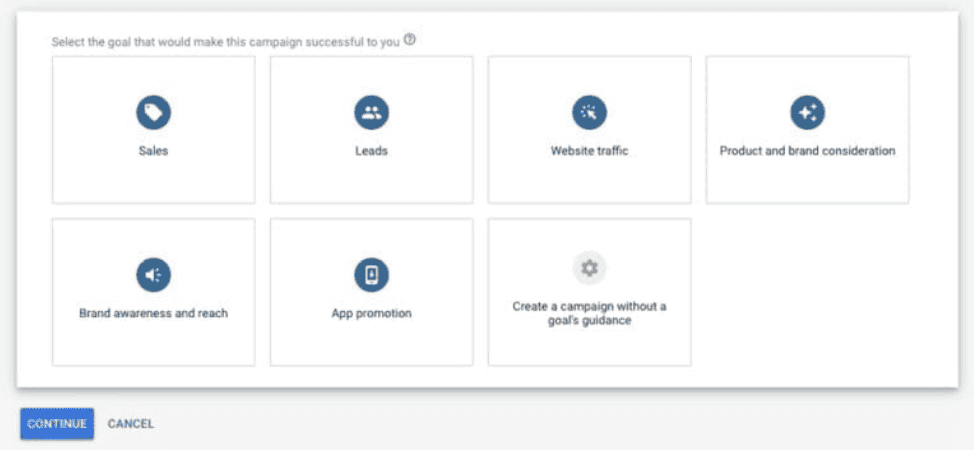
(Image Source: PPC Hero)
Hit continue and select “Search” as your campaign type.
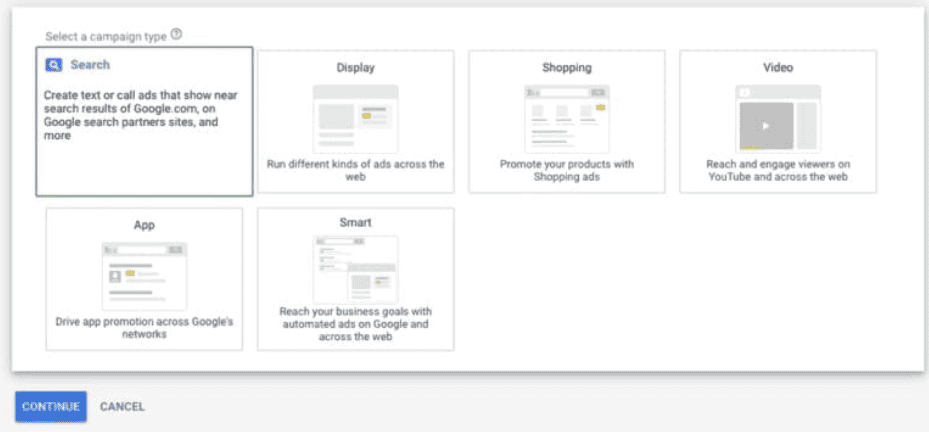
(Image Source: PPC Hero)
Step 2. Name your campaign
On the next page, you will name your campaign and configure your target locations and budget as normal. Since DSAs are only for Search, make sure to only select “Search Network” under the “Network” section.
Hit continue to proceed to the Ad Group creation stage.
Step 3. Change “Ad Group Type” to “Dynamic.”
At the top of the page, change your “Ad Group Type” to “Dynamic.”
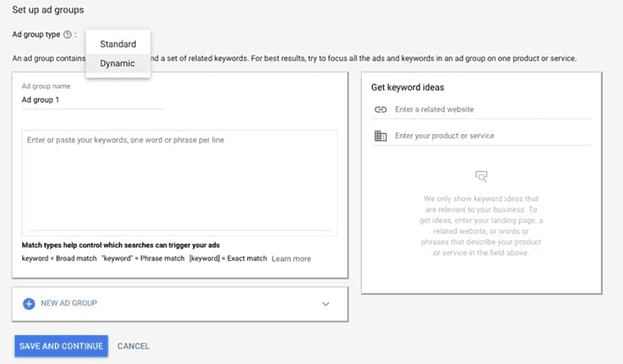
(Image Source: PPC Hero)
Create a Dynamic Ad Group in 4 Steps
Step 1. Add your website domain.
On the new screen prompted, enter your website address.
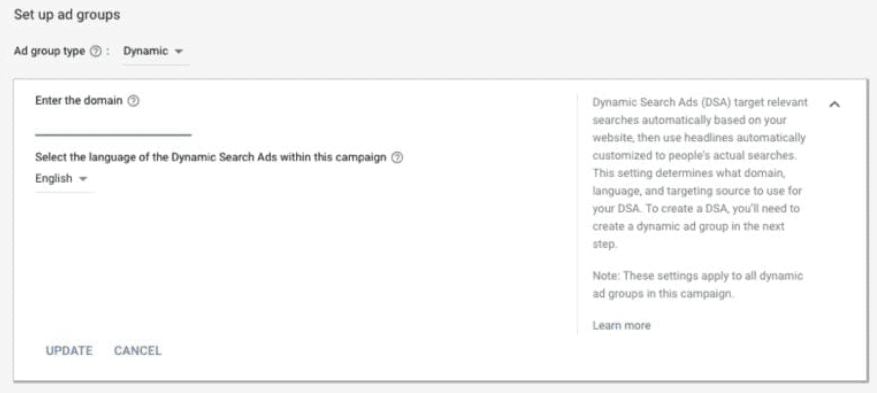
(Image Source: PPC Hero)
Step 2. Choose your Dynamic Ad targets.
This is where DSAs become unique from the set up of a regular search campaign. Before choosing your dynamic ad targets, you must determine if you want to target your entire site or specific pages and/or categories on your site. Since you will be in charge of your ads’ description lines, you want to ensure that what you are targeting is in line with the description lines you use.
To do so, you will need to choose your dynamic ad targets. Within each ad group, go to the “dynamic ad targets” sub-tab. There are three options:
A. Landing pages from your standard ad groups category.
All web pages you’re currently running search ads against, across all of your accounts. Great option if you want to increase traffic on the web pages that you’re already using as landing pages in existing ad groups and campaigns.
B. Other categories
Landing pages organised by theme. Here, you decide which sets of pages to target, how to group similar pages and the level of granularity. Just note that it can take up to 24 hours for categories to show if your site is completely new to Dynamic Search Ads.
C. URL_Equals
You can target specific URLs. However, it can limit your reach if you want to get incremental traffic.
Step 3. Create your ad.
Once you’ve set your targeting, you will create your ad. Because the headline and final URL will be dynamically generated based on the search term and content of your site, all you need to do is add a description line (maximum 80 characters).
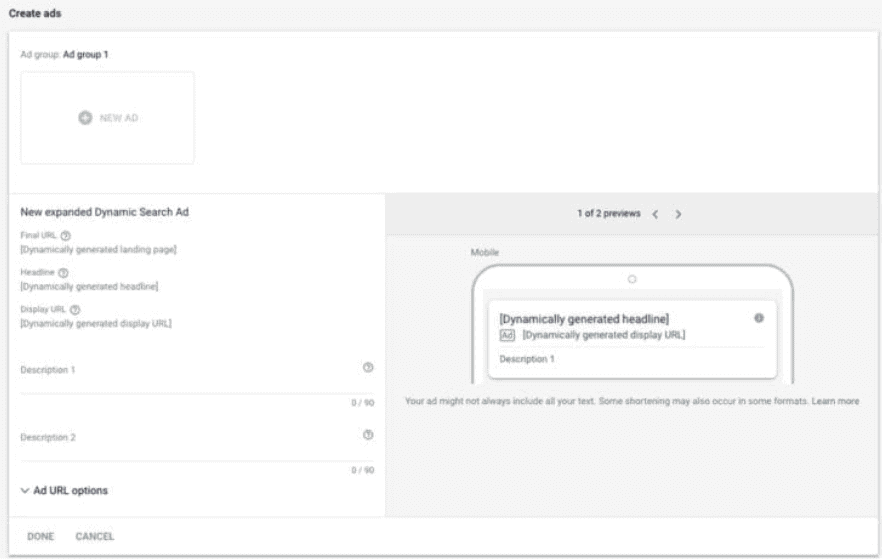
(Image Source: PPC Hero)
Step 4. Finalise ad group settings and save.
Once your ad is completed, finalise ad group settings as normal and hit “Done.” Congrats – you’ve just created a DSA campaign!
How to optimise DSA campaigns
Like most Google ad campaigns, there are a number of ways to optimise DSA campaigns.
After your campaign has gone live, you will have the ability to implement and adjust different features and settings, including the following:
- Device bid adjustments
- Ad schedule and bid adjustments
- Ad extensions
- Audience targeting
- Negative keywords
5 easy steps to optimise DSA campaigns
1. Create a solid campaign structure
Ironically, the most important optimisation measure you can take comes before you even create a DSA campaign — structure.
Evaluate your current text campaigns and how they align with your business. Then, ask yourself “Where do I need to improve the experience?”
DSA campaigns use auto-targets, and auto-targets live in ad groups. So, you need to structure your auto-targets so they are in the most specific ad groups possible. Then, consider what product categories you have and how granular they are to further determine how your DSA campaigns can be structured.
One way to do this is to create each ad group so it represents a product or product line for a larger category.
Say you are an eCommerce business selling shoes. You create a DSA campaign for the different sports shoes you sell. You need individual ad groups for auto targets for running shoes, tennis shoes, cycling shoes, climbing shoes, and so on.
Then, create a tailored description line for each individual ad group.
2. Map keywords appropriately
DSA campaigns exist to expand query coverage and improve the overall ad experience. Therefore, it is especially important to add negative keywords into different DSA ad groups and campaigns to improve where certain user queries are mapped in terms of campaigns and ad groups.
Thoroughly mapping your queries can help ensure your DSAs show based on the most relevant query, with the most relevant ad.
3. Use negative keywords
Make sure you’re not competing with yourself on the search keywords you might be bidding on. The last thing you want is to cannibalise your search campaigns to the point where none of them win!
Another great thing about using negative keywords is that you can ensure the lower converting products aren’t using up all the budget before the high-converting products get a look in!
Simply check your search term reports to find and exclude any irrelevant keywords.
As you continue to add in negative keywords to improve ad experience, you should also look for keywords to add into your text campaigns.
As with all keyword research, look for terms with good volume and that are actually converting well. You can use these queries as actual keywords in text campaigns to track performance and competition, without actually relying on the DSA campaign.
4. Highlight your promos and offers
DSAs save you heaps of time by dynamically generating headlines. Where should you spend this extra time?
Focus on highlighting more promos and offers. You can do this by highlighting any promos and offers in your description line, and letting the system create the custom headlines for you.
So, as the user is drawn to the dynamically generated headline, you should focus on testing offers and value props in the description line.
We’re talking about free shipping, super fast delivery, seasonal exclusives, and so on.
While your headline highlights the product, your description draws the users even closer with added extras that could win you the sale.
5. Bid manually and / or utilise smart bidding
Let’s talk online ads and bidding strategies.
Okay, we know Google tells you to do automatic bidding for DSA but if you really want more control, manual bidding is the answer.
Simply go to advanced options under the additional settings of your DSA campaign and get higher control over your campaign spend.
Google’s Smart Bidding can also help you improve back-end performance, including cost per acquisition and return on advertising spend (ROAS).
Should YOU use Dynamic Search Ads?
Dynamic Search Ads can add huge value to your AdWords campaigns.
According to Think With Google, most advertisers saw 5-10% more clicks and conversions with less effort.
But that doesn’t mean DSAs are right for every brand.
Start by weighing up the pros and cons.
5 Pros of DSA campaigns
There are a lot of pros to using DSAs.
1. You can catch additional keywords you hadn’t thought of targeting.
DSAs allow advertisers to quickly close the gap in keyword coverage and product inventory.
The tool can crawl your website or crawl a page feed that lists ALL products. Not only will it help you close the gap in coverage, but DSAs can also show on keywords that would typically be flagged in Google Ads as having “Low Search Volume” which cannot show.
2. DSAs are perfect for sites with hundreds or thousands of products.
Got too many products to build out individual campaigns or ad groups to target all possibly variations? DSAs are the ideal solution.
That’s what North American e-tailer Grainger did. With more than one million products, the company implemented Dynamic Search Ads to generate relevant ads based on the company’s vast and dynamic product catalogue, alongside remarketing lists for search ads to re-engage customers.
Because the brand’s website was crawled regularly, ads always reflected their current products and inventory levels.
The results were astounding:
- Return on Ad Spend (ROAS) increased nearly 1,000% compared with non-brand search ads
- Conversions up nearly 1,000% compared with non-brand search ads
- Click-through rate (CTR) up nearly 1,000% compared with non-brand search ads
3. DSAs are great for covering more abstract search queries.
Sometimes there are search queries that are more abstract, or you might not have considered them. This is where DSAs are really effective.
Google crawls your site and will dynamically create ads based on how the search query matches the site’s website content.
In other words, the advertiser creates a generic ad and Google dynamically generates a headline and appropriate landing page to match.
4. Ad creation is much easier.
The headline and landing page is dynamically generated based on the actual product that is matched to the query in the system.
The hard part is done – all you need to do is create a description line.
5. Fast and easy to set up campaigns.
Dynamic Search Ads make it quick and easy to set up campaigns as there’s no need to worry about keywords.
You can be running ads on a tone of product categories within a day.
Pro Tip: A nother Google Ads tool which is great for saving time is Dynamic Keyword Insertion (DKI), which allows you to plug in a bit of code into your ads to automatically insert whichever keyword matches the user’s search query.
3 Cons of DSA campaigns
1. You don’t have full control.
Unlike normal text ads, you don’t have full control over which type of queries (and keywords) your ads are served to.
This means the responsibility is on you to make sure your structure is sound and you have accounted for appropriate negatives wherever possible.
Look at the search term reports from your text ad campaigns, and closely monitor your search reports closely over the duration of your DSA campaigns.
2. Headlines might not match the ad.
Dynamic headlines are a boon for some advertisers, but others prefer to have 100% control over their ad copy and messages.
If that’s you, DSA may not be right for you. But you can look at search reports to see which headline is being shown and which landing page it drives to.
3. Low-performing search queries waste budget.
Another risk of DSAs is which products receive the majority of your traffic.
Just like normal search ads, a few queries can take up the majority of traffic and eat into your budget before the best, high-converting products are searched.
There are ways around this, which we’ll cover in the advanced tactics next…
3 Advanced strategies for Dynamic Search Ads
Want to get the best from your DSA campaigns? Try these proven advanced strategies.
1. Use DSA strictly for remarketing
Only show ads to users who have been to your site before or taken another action on your site (such as reading a blog or putting items in their cart).
Yes, this will limit your overall reach, but it means Google can target users who are familiar with your brand and are actively searching for similar products.
The results?
Higher conversion rates and a stellar ROAS.
2. Use DSA to win more customers
Use the DSA campaign as a normal campaign, then layer your remarketing audiences within the campaign.
Why would you do this?
Because it allows you to bring in new customers while letting Google increase bids for those users who have been to the site and are more likely to convert.
3. Expand your Dynamic Search Ads
Just like other Search and Display ads, you can now use expanded text ads for your DSA campaign.
This means longer headlines and description lines.
Of course, for DSA, you only get control over the description. All you need to do is use the expanded description field to provide compelling and relevant messaging.
How to get rid of Dynamic Search Ads
If you’ve tried Dynamic Search Ads, checked your ad performance and found it’s not for you – don’t panic. You can attempt to fix your DSA low traffic issues by troubleshooting and optimising your ads.
You can delete or disable the DSA ads you created, and the system will simply revert back to the normal way.
Responsive Search Ads are replacing Expanded Text Ads in Google Ads
As we touched on earlier, responsive search ads are now the default format in Google Ads — and from 30 June 2022, advertisers will no longer be able to create expanded text ads or edit expanded text ads campaigns.
Here’s Google’s announcement:
Responsive search ads…combine your creativity with the power of machine learning to help you show more relevant ads to more people. Starting 30 June 2022, responsive search ads will be the only Search ad type that can be created or edited in standard Search campaigns. This change will help simplify the way that you create Search ads and make it easier for you to drive performance with our automated tools.
The good news is that any existing expanded text ads you have will still serve in search results. You’ll also be able to pause or resume these Google Ads campaigns, remove them, and access your ad’s performance reports.
Advantages of Responsive Search Ads
Responsive search ads have a few advantages compared to other formats, such as expanded text ads or dynamic search ads.
4 benefits of using responsive ads in your PPC campaign:
1. Higher clickthrough and conversion rates
At the heart of it, the goal of every Google Ads campaign is to drive qualified traffic to your website.
According to Google, a responsive search ad is the most effective way to do it.
Google itself has said that advertisers who add responsive ads to their ad groups achieve up to 10% more clicks and conversions. In some cases, this figure has been as high as a 71% increase in revenue and 61% more conversions compared to ETAs.
2. Better personalisation
Personalisation is one of the best ways to increase relevance with potential customers and encourage them to click on your ad.
Consider this stat:
88% of marketers have seen measurable improvements thanks to personalisation. Of these, more than half reported a lift greater than 10%.
With responsive search ads, Google will personalise your ad campaign for the searcher based on their individual behaviour, search intent, device, search history, and more. Plus, you can tailor your ads to a user’s location for an added level of personalisation.
Put this all together, and you have a powerful recipe for clicks and conversions.
3. Built-in A/B testing
If you want to optimise your Google Ads campaigns, you need to A/B test. This is one of the biggest benefits of responsive search ads because the testing feature is built right into every campaign.
Google automatically tests different messaging combinations and adapts your ads based on objectives such as impressions, clicks, and click-through rate. Not only does it mean you’ll save a ton of time on analysing the numbers, but it also means better performance because Google is constantly optimising in the background (as opposed to humans reviewing ads once a day or once a week).
4. Reach more audiences
With traditional ETAs, advertisers typically have to develop multiple ads to display for searchers based on their search queries, locations, or other factors. Unfortunately, each of these individual ads might only show up for a handful of queries because they’re targeting low-volume keywords.
Responsive search ads have more headlines and descriptions, which means your ad will compete in more auctions and match more search queries. Over time, this means more eyeballs on your ads, as well as more clicks to your site.
How Responsive Search Ads Work to Boost Engagement and Conversions
Responsive Search Ads work by allowing advertisers to enter multiple headline and description options, which Google then tests and optimises to find the best-performing combinations of headlines and descriptions. This flexibility helps businesses reach a wider audience with more relevant messaging.
To maintain control over your ad messaging, you can pin headlines and descriptions to specific positions, ensuring that essential information always appears in your ad. This feature is particularly useful for branding, compliance, or highlighting key selling points.
One of the biggest advantages of Responsive Search Ads is that they save time by providing multiple headline and description options while letting Google’s machine learning determine the best pairings. This leads to more effective ads, attracting more clicks and conversions by dynamically delivering the most relevant message to users.
How to create responsive search ads
Now that we’ve covered the benefits of RSAs, let’s jump into the next part: how to create a new responsive search ad campaign in Google.
Thankfully, this process is fairly straightforward.
First, sign into your Google Ads account and navigate to the main page of your ad campaign. Navigate to the “Ads & extensions” section, select the plus icon, and select “Responsive search ad”:
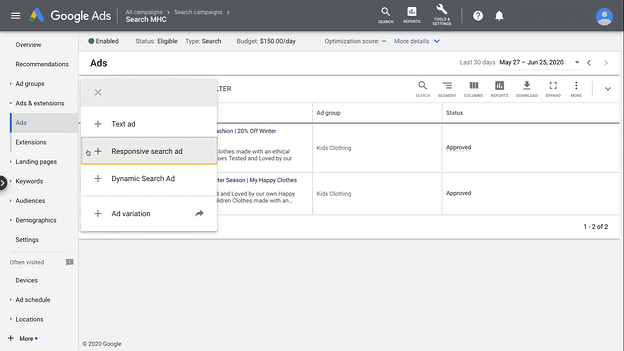
Image source: Knorex
From here, choose the ad group you want to add responsive search ads to. You’ll then be presented with a page where you can input the following responsive search ads specs:
- The final URL, which is the landing page you want people to land on after clicking on the ad
- Your display URL, which is the link that appears to searchers in Google search results
- Up to 15 headlines for your ad
- Up to four descriptions for your ad
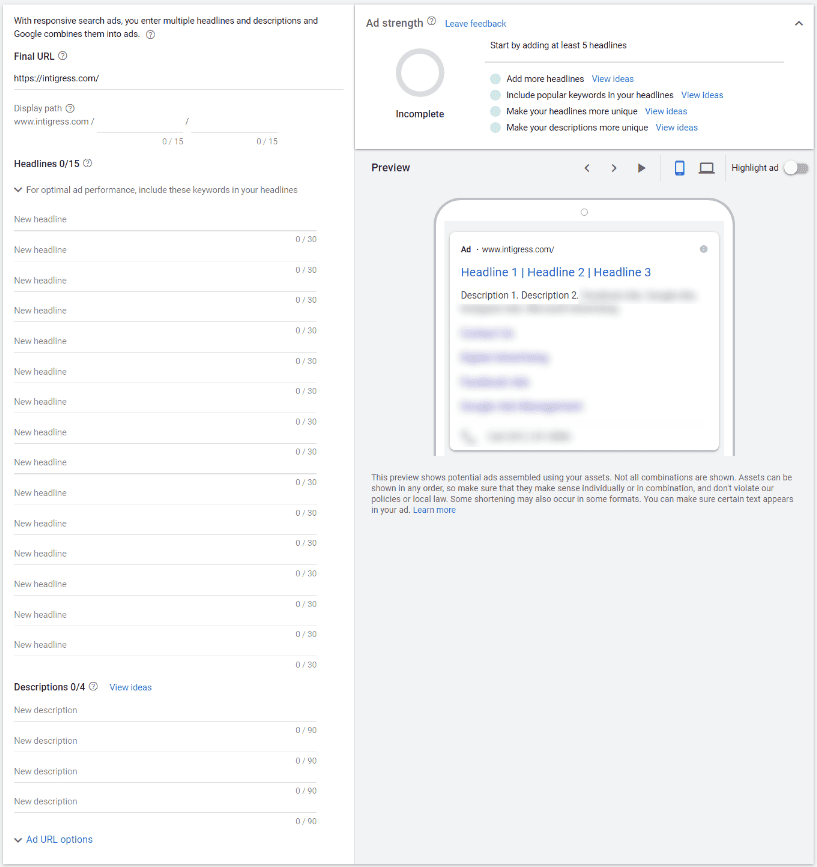
Image source: Intigress
After you’ve filled in all the required sections, Google will provide you with a preview of your ad and your ad strength score. You’ll also get recommendations with tips to improve and optimise your ads:
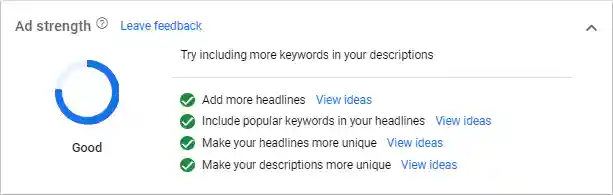
3 ways to improve your responsive search ads performance:
Responsive search ads are constantly testing and self-optimising by design. But that doesn’t mean you can’t put your ads in the best position possible to achieve maximum results, or tweak your existing ads to improve campaign performance.
3 actions to increase ready-to-buy clicks on responsive ads
1. Utilise all the headlines and descriptions
You have the option to add up to 15 headlines and 4 descriptions. And if you want to optimise your RSA campaigns, you should be creating as many unique headlines as possible.
Here’s Google’s advice:
The more headlines and descriptions you enter, the more opportunities Google Ads has to serve ads that more closely match your potential customers’ search queries, which can improve your ad performance.
This is an opportunity to experiment with messaging to see what resonates with your customers, so make sure to craft multiple headlines and descriptions for your campaigns. This includes:
- Switching up the description to see which selling points resonate with your customers, such as free shipping or fast delivery
- Using different header lengths to see if users prefer short or long headlines
- Avoiding redundant words or filler words in your ad text
- Highlight any unique points that differentiate your business from competing advertisers, such as your product rating, quality, or any value-add services
Another tip? Try to avoid doubling up the same word in different headline variations as well. For example, if you’re writing an ad about activewear, you might choose to write “gym wear” in one headline and “activewear” in another.
2. Craft a compelling call-to-action (CTA)
Regardless of whether you’re building ETAs or RSAs, you need to have a powerful CTA.
Acronyms aside, your CTA tells your customers what you want them to do and invites them to take action. These should feature in your headline and your description, like this one from Uber Eats inviting people to “order delivery now”:

3. Adapt your ads to different screens
Google allows you to specify the width of your ads for different screens — and if you’re serious about performance, you should absolutely be doing this for all of your responsive ads.
More than 50% of PPC ad clicks come from mobile. If you’re not adapting your ad copy for mobile, your ads aren’t optimised for half of your audience.
Create different ads that can adapt to varying device widths, including desktop and mobile. This gives Google more flexibility to display shorter headlines on mobile and share a longer message with desktop audiences.
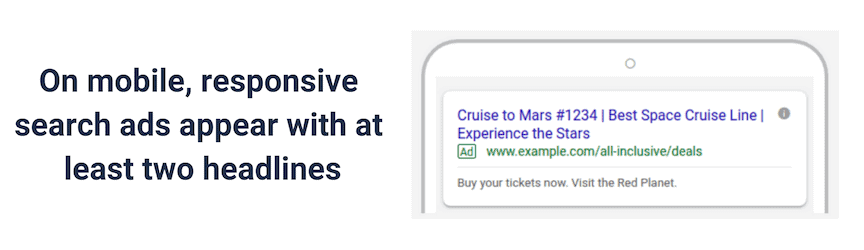
Image source: WebFX
5 Tips and best practices for Google Responsive Search Ads:
1. Make the most out of pins
Pins are a great way to guarantee that certain messages appear in specific positions on the ad. This gives you more control over the types of combinations Google can make, in order to ensure your ad always makes sense.
Let’s say you create an online advertising headline with a CTA. You want this to appear in search results, but it wouldn’t make sense if it showed up next to another headline that’s also a CTA. In this instance, you can ‘pin’ both of these to the second headline position so they appear in the right place and don’t show up next to one-another.
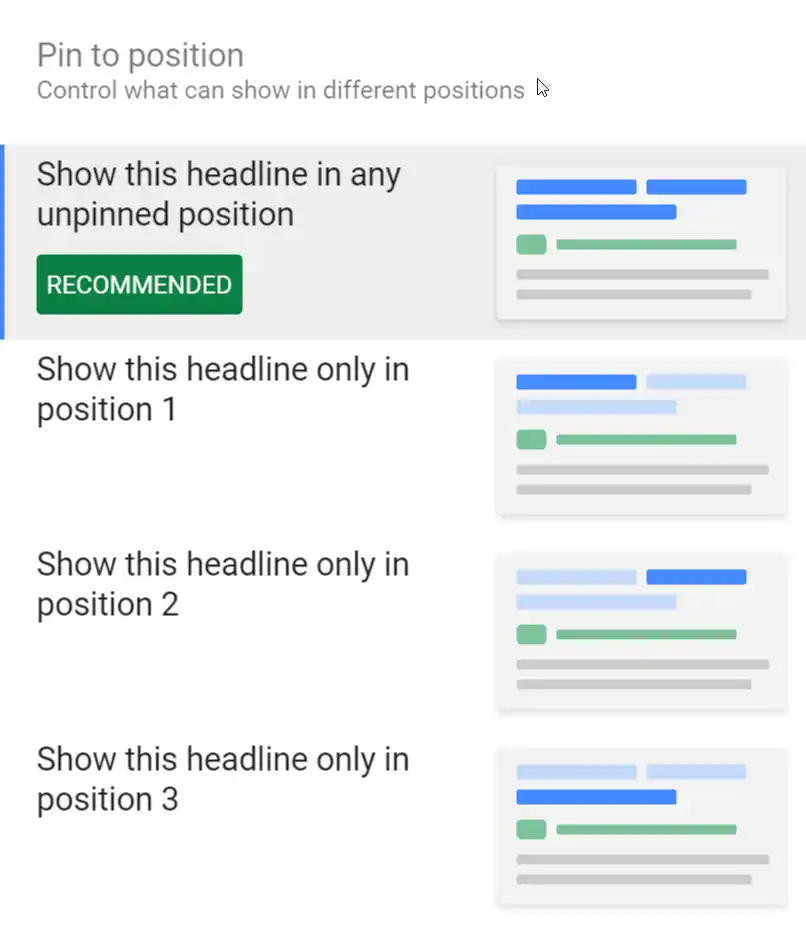
Image source: StoreYa
Keep in mind though that you should only pin headlines and descriptions strategically. Every pin you use restricts Google’s opportunity to test copy combinations to find out which ones are the most effective for your audience.
2. Create effective ads using existing high-performing ads
Google uses machine learning to automate the testing and optimisation process, but that doesn’t mean you can’t start off with an advantage.
Look at your existing text ads in the same ad group to see which ads are your top performers. Use these as the foundation of your ad headlines and descriptions for your new responsive search ads.
3. Include top-performing keywords in your headline
Improve the relevance of your responsive search ads by incorporating popular keywords directly into your headline. Google bolds any keywords that are featured in both the search query and your headline or description, which signals to your audience that the ad matches what they’re looking for:
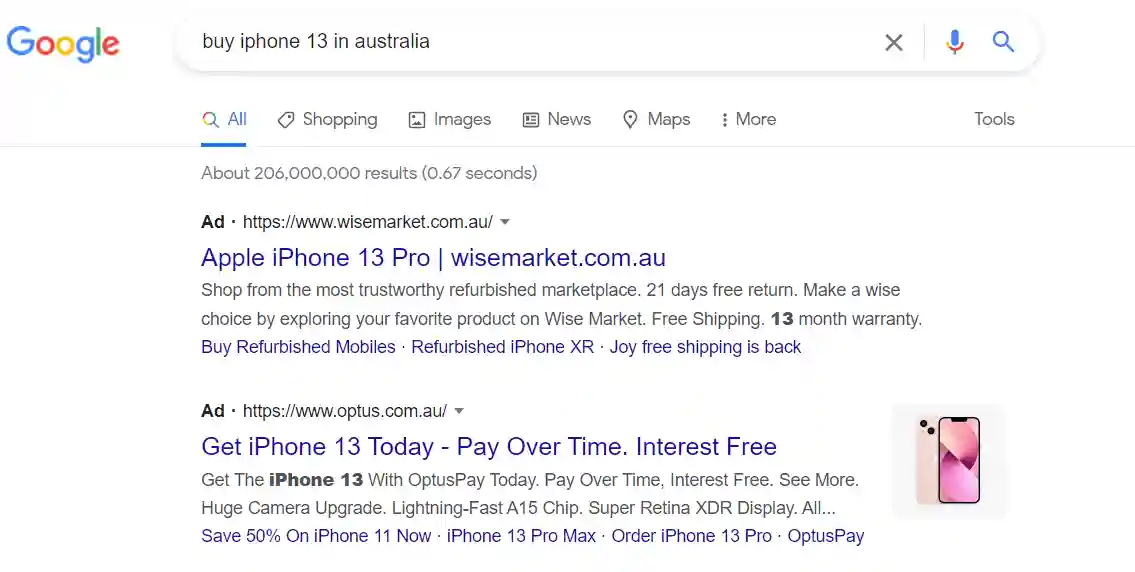
For best results, limit your keyword choice to roughly two or three phrases with the highest search volume. This will also help you improve your overall campaign ad strength.
4. Ensure your copy variations make sense when put together
Headlines and descriptions can be shown in any order (unless you pin them).
This gives Google a ton of flexibility when displaying different combinations, but it also means you need to pay extra attention to your copy variations.
Imagine if someone types in a search phrase for “hire a carpenter in Sydney” only to see a Google ad that says:
Hire a carpenter Sydney | Carpenter for hire – book now | Book a Sydney carpenter now! Sure, the ad technically makes sense. But it’s definitely not the best combination because all of the headlines are similar. That’s why you need to write headlines and descriptions that are versatile enough to stand alone, and also make sense when put together. Start out by highlighting different benefits in your headlines to add variety. For example, if you’re a carpenter, you might choose to have the following headlines:
- Hire a carpenter in Sydney
- 5-star carpenters from $65 p/h
- Top-reviewed Sydney carpenters
This type of approach gives Google’s AI more freedom to experiment with responsive search ads to see which messaging works best for different audiences.
5. Pay attention to ad strength
When you’re crafting your headline and description variations, make sure to keep an eye on your ad strength and try to achieve a score of Good or Excellent. According to Google, improving your ad strength from Poor to Excellent can increase clicks and conversions by an average of 9%.
If you have a “Poor” ad, follow Google’s ad recommendations to boost up your score before setting your campaign live. Once it’s running, check the asset report to see which headlines and descriptions are underperforming, and replace them with new variations.
Last points regarding DKI
The DKI feature can be just what your pay-per-click ad campaigns need – or not. As we’ve shown above, it totally depends on your business goals.
The one lesson you should take from this article is to take care with DKI. If you’re going to use it, follow the essential tips so you don’t waste valuable ad spend:
- Only use DKI in ad groups where keywords are at least 2-3 words
- Don’t use DKI for broad match types
- Don’t use DKI to target competitor’s keywords – create a separate campaign
- Don’t use DKI to target misspellings
- TEST, TEST and TEST again!
Of course, this is just one thing you can test out as part of your PPC campaigns. To delve into more detail about search ads and best practice tips, download your free Digital Marketing Game Plan.
Written by world-leading marketing experts, this eBook provides reams of proven insights, templates, tactics and examples you need to accelerate revenue-shifting results with digital marketing.
Don’t embark on search advertising without it! Download your eBook now.
You may want to review:
The Ultimate Guide to Google Ads | 27 Of The Best Google Ads Examples | How to Run Google Shopping Ads: Step-By-Step Guide | The Ultimate Guide To Google Ads Ad Extensions | Google Ads Dashboards: Reporting, Metrics and Target KPIs | Guide to Google Ads Bidding Types, Strategies and Bid Adjustments | How to Properly Set Up Your Google Analytics Tracking for Google Ads | How Long To See Results With Google Ads?
Need help?
OMG is the Top Australian SEO Agency and Australia’s Leading Digital Marketing Agency we have years of experience under our belts. So if you need help, why not reach out. We are also the #1 Google Ads Management Agency in Australia and the Best PPC Agency in Australia and we are committed to providing results that make a true difference!

About the author
Read More Blogs
-


Last updated on:
-
Last updated on:
-
Last updated on:


Stop Guessing What Your Marketing Should Do Next.
Your free $4,000 strategy session shows where your digital marketing is leaking performance across search, paid media, content and conversion. You leave knowing what to fix first and what a stronger strategy could produce.