









 1300 433 071


- Home
-

- Blog
-
- AI Marketing Blogs
-
- Guide To AI Website Builders: What They Are & How They Work

Guide To AI Website Builders: What They Are & How They Work
The rise of AI website builders is reshaping how websites are designed, written, and deployed. These tools promise faster builds, automated design choices and even content generation, all with minimal input from the user. But how do they actually work? What powers them under the hood? Are they really as efficient as they claim?
This guide explores how AI website builders function, which platforms are leading the charge and how to choose the right one based on your goals, skills and budget.
Key Takeaways
-
AI website builders use machine learning, NLP and predefined design logic to generate full websites from a small set of inputs. They streamline layouts, content and visual styling without requiring design or coding skills.
-
Most AI website builders rely on hybrid automation – part generative AI, part template logic – rather than building sites from scratch. This explains why output quality varies between platforms and industries.
-
Tools like Wix ADI, Bookmark AIDA, GoDaddy Airo, 10Web and Hostinger lead the market by balancing speed, design automation and user control. Each offers different strengths depending on your goals and technical comfort.
-
AI web design accelerates the build process but still requires human refinement. Auto-generated layouts and copy are useful starting points, not finished assets, especially for SEO, branding and conversion.
-
Built-in SEO features cover the basics but rarely deliver depth. AI can generate metadata, structure and mobile-ready layouts, but intentional keyword targeting, technical SEO and content quality still depend on expert input.
-
The right AI website builder depends on your business model, content needs, budget and long-term plans. Consider flexibility, export options and SEO control before committing to a platform.
-
AI website builders are ideal for launching quickly — not for scaling without strategy. To turn an AI-generated website into a growth asset, you’ll still need ongoing optimisation, richer content and a clear performance roadmap.
What is an AI website builder?
An AI website builder is a tool that uses machine learning, natural language processing and pre-trained design logic to automatically generate a functional website. These platforms collect a few key inputs, such as your business name, industry, content preferences and branding, then create layouts, design styles and even text content based on that information.

They’re designed to replace the traditional drag-and-drop experience with a guided and hands-off flow. Instead of manually building every element, the AI generates most of the site for you, including pages, structure, visual hierarchy and sometimes full-length copy. While some tools market themselves as fully AI-driven, most operate using a hybrid model that combines automation with template-based frameworks and user prompts.
The top 5 AI website builder platforms
Here’s a breakdown of some of the most notable website builders with AI in 2025:
1. Wix ADI (Artificial Design Intelligence)

Wix ADI was one of the first mainstream website builders with AI capabilities. It uses a structured onboarding questionnaire to gather business info, then generates a full site based on predefined logic and design rules. The AI creates layouts, colour palettes, page sections and basic copy. Users can refine the design afterward using the standard Wix editor.
2. Bookmark (AIDA)

Bookmark’s AI Design Assistant (AIDA) can build a site in under two minutes based on user input. It focuses on speed and simplicity. The platform also includes heatmaps and behavioural analytics to help refine the site post-launch.
3. GoDaddy Airo

Airo is GoDaddy’s recently rebranded AI web design assistant. It generates websites, content, logos and even marketing plans. Airo is ideal for small businesses that want a centralised solution for branding and online presence without needing separate tools.
4. 10Web
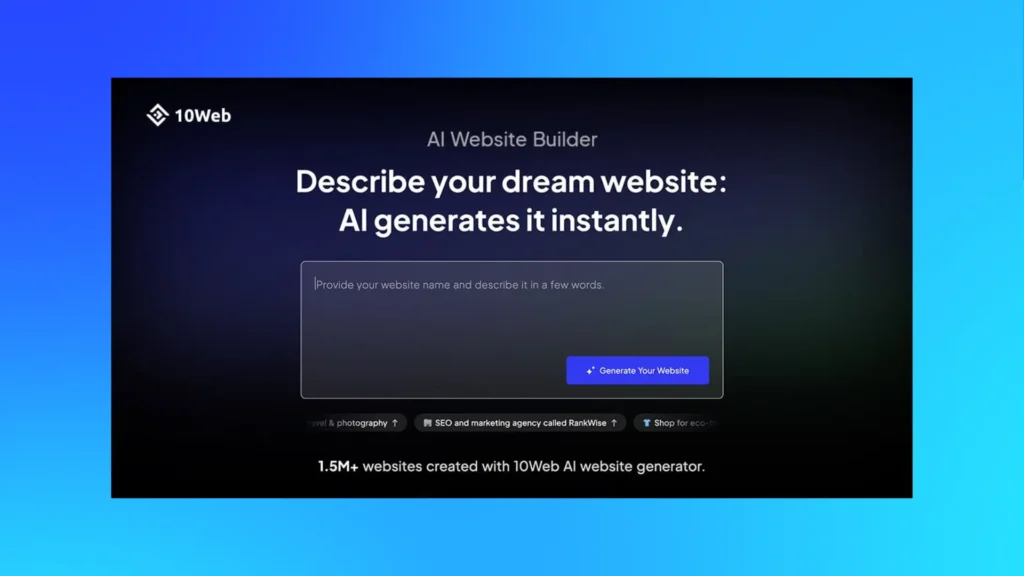
10Web integrates with WordPress and uses AI to recreate existing sites or generate new ones. It leverages the power of large language models (LLMs) for content creation and layout planning, and supports Elementor as its design engine.
5. Hostinger Website Builder
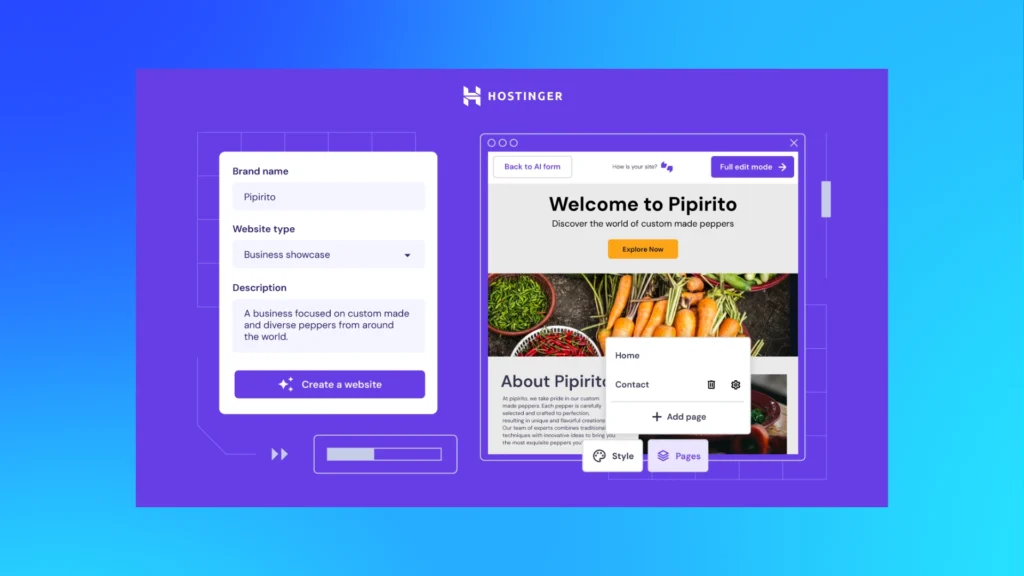
Hostinger’s tool focuses on beginners and uses AI to build pages, write content and even suggest SEO improvements. It’s one of the most affordable options, making it ideal for simple portfolios and small business sites.
Each platform varies in the balance between AI automation and user control, which can significantly affect the outcome and flexibility.
How AI website builders work: The tech behind the tools
While the front-end experience feels seamless, multiple technologies work behind the scenes to generate these AI-powered websites.
1. Machine Learning (ML) models
Most AI website builders use rule-based machine learning, not true generative AI, in the design process. These models take input (e.g. “I run a café in Melbourne”) and map it to existing layout and content structures trained on similar data.
2. Natural Language Processing (NLP)
NLP powers the text generation part of the process. Tools like GoDaddy Airo and 10Web incorporate GPT-style large language models to create headlines, service descriptions, product blurbs and even blog intros.
3. Template-based automation
AI web design doesn’t start from scratch. It selects from a pool of pre-built templates and applies logic to choose fonts, colours, page hierarchy and spacing based on the user’s industry or goals. For example, a law firm and a fashion brand might both use a hero layout, but with entirely different design outcomes.
4. Predictive design patterns
Some platforms incorporate heatmap data, behavioural analytics and UX best practices to make design suggestions that align with how users typically engage with similar websites.
Step-by-step: How AI website builders build your site
AI website builders streamline the creation process by replacing manual design choices with guided automation. Here’s a deeper look at how most platforms take you from blank slate to live site in a few steps:
Step 1: Initial input
You’ll start by answering a short set of questions. These typically include your business name, industry, service type, preferred style (e.g. modern, playful, professional), and key goals — such as collecting leads, selling products or showcasing a portfolio.
Some platforms also ask about tone of voice and brand personality. This input gives the AI enough context to generate relevant layouts and written content. The more specific you are here, the better the output.
Step 2: Structure and layout generation
Based on your answers, the platform generates a basic site architecture. This includes the homepage layout, suggested pages, such as About, Contact and Services, and navigation structure.
Most AI website builders use template logic to match your industry to common UX patterns. For example, a site for a café might feature an image-forward homepage with a menu preview, while a legal services site will lean toward text-heavy sections and credibility blocks.
Behind the scenes, the AI applies layout rules tied to conversion goals, scroll behaviour and mobile responsiveness.
Step 3: Content suggestions
Here, natural language processing (NLP) kicks in. The AI writes placeholder content for headings, blurbs, calls-to-action and product or service descriptions. While some platforms rely on basic text snippets, others (like 10Web or Wix ADI) use GPT-style generation to produce longer and more natural-sounding copy. You can usually regenerate sections, adjust the length or provide prompts for tone or keywords.
It’s worth reviewing this content closely. While grammatically correct, AI-generated copy often lacks specificity, brand nuance or SEO targeting — so you may need to rewrite parts before going live.
Step 4: Branding and visual styling
Once the structure is in place, the AI website builder applies colour palettes, fonts, button styles and section formatting to match your initial preferences. Some platforms also auto-generate a logo, favicon or hero images using AI tools or stock assets.
This step is guided by brand logic — for example, if you choose a minimalist theme, the platform might use monochrome tones and thin sans-serif fonts. If you indicate a bold and energetic brand, it may apply brighter colours and dynamic layouts. While this step is mostly automated, you can typically tweak the visual theme later using manual settings.
Step 5: Preview and customisation
The platform then compiles a live preview of your site. You can navigate through it like a real visitor, review how content and design work across devices, and make any edits before publishing.
Most AI website builders offer drag-and-drop customisation at this stage. You can:
- Rearrange or delete sections
- Rewrite generated content
- Replace imagery
- Add contact forms, maps, booking widgets, or social links
- Adjust font sizes or spacing for mobile layouts
While the heavy lifting is done for you, this step lets you personalise and fine-tune the experience.
Step 6: Publish
Once everything looks right, you can hit publish. Many platforms offer built-in hosting, so your site can go live instantly using a default or custom domain. You’ll also have options to set SEO metadata, connect analytics, configure contact forms and set up email notifications. Some platforms include built-in domain registration and SSL setup, so there’s no need to juggle third-party tools.
After publishing, you can continue updating your site at any time. Some AI website builders even offer automated maintenance suggestions based on visitor data, page performance or seasonal trends.
AI website builders vs traditional website builders and dev teams

Here’s how AI website builders compare to traditional builders or working with a development team:
- Speed: AI builders can generate a working site in minutes. Traditional builders and custom-builds take days or weeks depending on complexity.
- Flexibility: Traditional platforms (e.g. WordPress, Webflow) allow full creative control and integration. AI tools are faster but can be restrictive if you want specific design features or custom development.
- Quality: AI-generated sites are visually appealing but often lack nuance in brand storytelling, microcopy, and UX flows. A manual build tends to outperform in polish and long-term scalability.
- Cost: AI platforms are cost-effective, usually bundled into low monthly subscriptions. Custom development requires upfront investment, but yields higher long-term flexibility and performance.
- Control: AI builders make assumptions to speed up the process. That’s great for speed, but frustrating for users who want granular control over every element.
Pricing models and value for money
AI website builders are positioned as affordable, low-effort solutions, but what does “affordable” actually mean in practice? Pricing can vary significantly depending on the platform, level of automation and the type of business the builder is targeting. Most AI builders fall into one of three categories:
- Free tier with limited features: Great for experimenting, but usually lacks custom domains, SEO tools and full branding options.
- Subscription-based plans: Ranges from $10–$25/month for most small business packages. Includes hosting, support and additional marketing tools.
- Add-On AI Tools Within Existing Platforms: For example, Wix ADI is included in the standard Wix pricing. 10Web charges extra for AI-based features on top of WordPress hosting.
Website builders with AI capabilities offer strong value for users who need speed, ease of use, and basic performance. However, the value decreases for businesses that need advanced functionality, custom integrations, or heavy ecommerce.
How AI website builders handle SEO: Built-in tools and limitations
One of the big promises of AI website builders is that they’ll take care of SEO for you, generating metadata, optimising layouts and handling technical setup in the background. Here’s what these platforms typically do well, and where you’ll need to step in manually.
What AI builders typically get right
Most AI website builders prioritise basic SEO hygiene. You’ll often get:
- Clean site structure: Pages are logically structured with simple navigation and mobile-friendly design. This gives search engines a clear path to crawl your site.
- Automated metadata: Titles, meta descriptions, image alt text and Open Graph tags are often generated based on page content or your original input. Some platforms let you edit these fields before publishing.
- Fast load times: Because the sites are built on lightweight templates with minimal custom code, load speeds are generally good — a plus for Core Web Vitals and mobile ranking.
- Schema markup (on select platforms): Some AI website builders, like 10Web or Hostinger, include structured data for common page types like FAQs, products or services. This can improve how your content appears in search results.
- HTTPS and XML sitemaps by default: Secure sites and basic sitemap generation are usually baked in, helping with crawling and indexing.
Where the SEO falls short
Despite those strengths, AI website builders aren’t full SEO platforms. Here’s where most of them hit limitations:
- Weak keyword targeting: Auto-generated content rarely aligns with intentional keyword strategy. It reads fine, but it’s not written with search queries or ranking difficulty in mind.
- Limited control over URL structure: You may not be able to create custom slug paths or folder structures. This is especially frustrating for content-heavy sites or teams focused on topical authority.
- Lack of redirect management: Many builders don’t include built-in support for 301 redirects, which becomes a problem during site updates or migrations.
- Duplicate headings or overuse of H1s: Because the copy is AI-generated and templates are reused, multiple H1 tags or misused headings are common — something search engines penalise when it becomes systemic.
- No control over canonical tags: Some platforms don’t allow canonical tag customisation, which affects how duplicate or similar pages are indexed.
- Limited integration with analytics and tracking: While basic performance data is available, custom event tracking, search console integrations or goal tracking may require workarounds — or be completely unavailable.
AI website builders make a good first attempt at SEO, particularly for users who wouldn’t optimise anything manually. But they rarely go beyond surface-level optimisation. If search performance matters to your business, treat the built-in SEO features as a starting point. Once the site is live, invest in a full audit and ongoing optimisation to fill in the gaps.
How to choose the right AI website builder
Not every AI builder is designed for the same purpose — some prioritise speed and simplicity, while others aim for deeper flexibility or ecommerce functionality. Choosing the right platform depends on your goals, the complexity of your site, and how hands-on you want to be after launch.
Here’s what to evaluate before committing:
- Business type: Some builders are tailored for local service providers, portfolios, or blogs, while others support ecommerce, content-heavy sites, or multipage business websites.
- Content expectations: Look for platforms that allow full editing of AI-generated copy, especially if brand tone, clarity or SEO accuracy is important.
- Design flexibility: Choose a builder that lets you customise layouts, colours, fonts, and elements after the initial site is generated — not all tools allow post-build adjustments.
- Budget and value: Entry-level plans suit simple sites, but growing businesses may need higher-tier features like integrations, form customisation, or marketing automation.
- SEO needs: Prioritise platforms that let you modify meta tags, URL structures, and indexing preferences. Built-in optimisation only goes so far.
- Export options: If future migration matters, check whether the platform allows you to export your site’s content or code.
Turn your website into a growth engine with Online Marketing Gurus
Using AI website builders can fast-track the launch process, but performance doesn’t come from automation alone. Driving organic traffic, improving conversions and scaling your business takes a clear strategy and technical expertise.
At Online Marketing Gurus, we help businesses optimise AI-generated websites with data-led SEO, detailed technical audits and content that earns visibility. From launch to long-term growth, we help you make smarter decisions and extract more value from every click.
Let’s make your AI-built site work smarter and check out our generative ai seo service to help your AI-built site appear in LLMs. Get in touch to speak with our experts and map out your next steps.

About the Author
Andrew Raso
Share